-
-
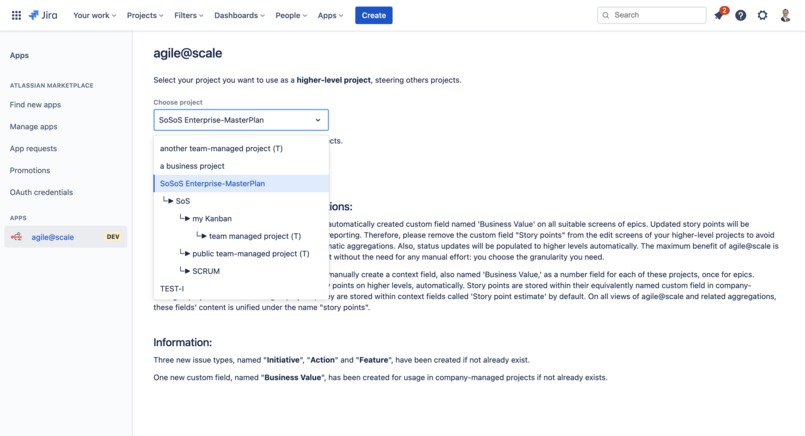
Configure your enterprise hierarchy levels
-
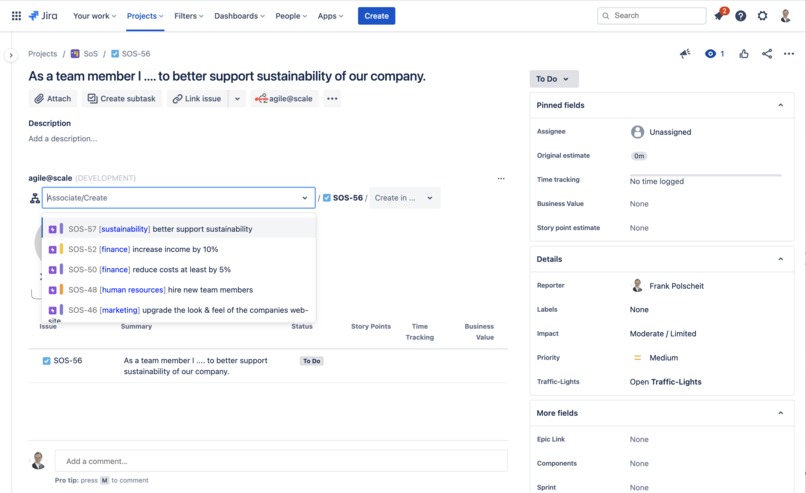
Multi-project breadcrumb for top-down or bottom-up approaches: add a parent within higher-level project or children in lower-level projects
-
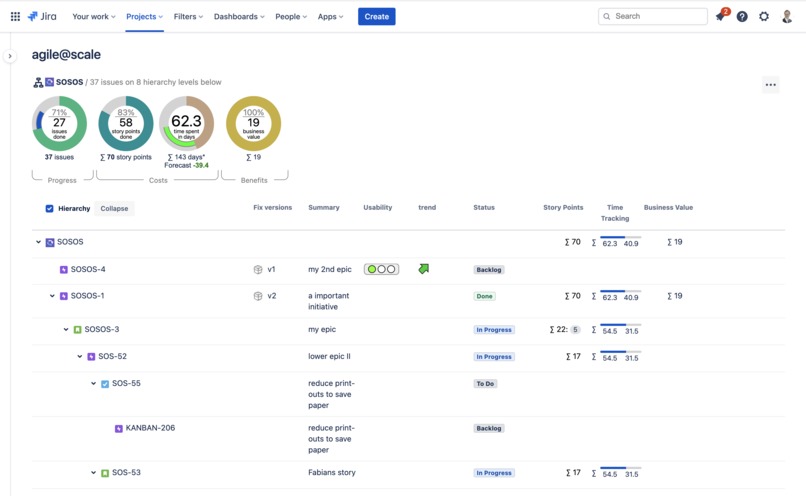
Multi-project overview cockpit and drill-down over all levels
-
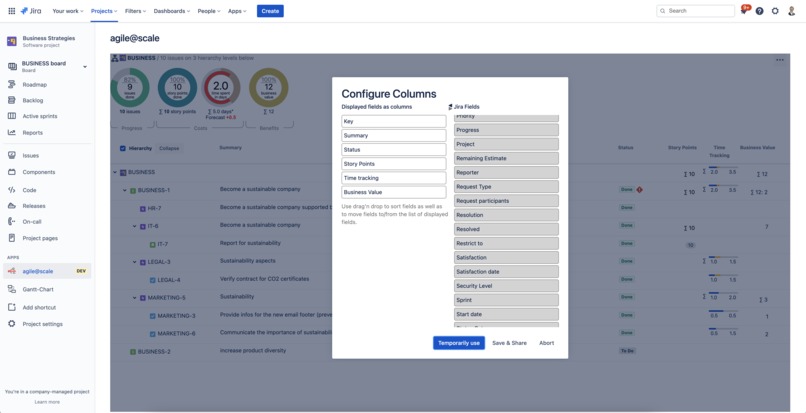
Configure the columns and their sequence on the cockpit using drag'n drop
-
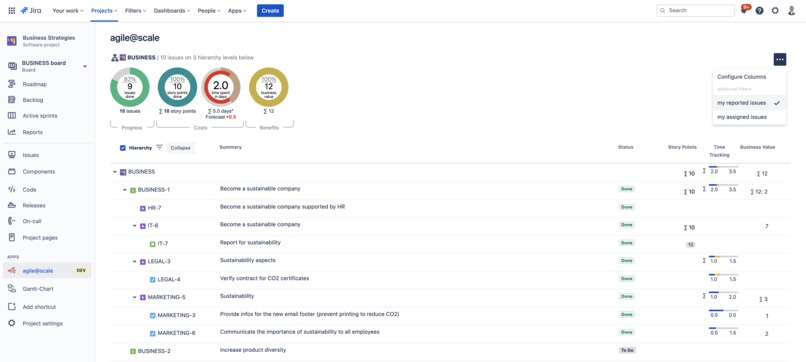
Predefined quick filters allow focussing on your issues
-
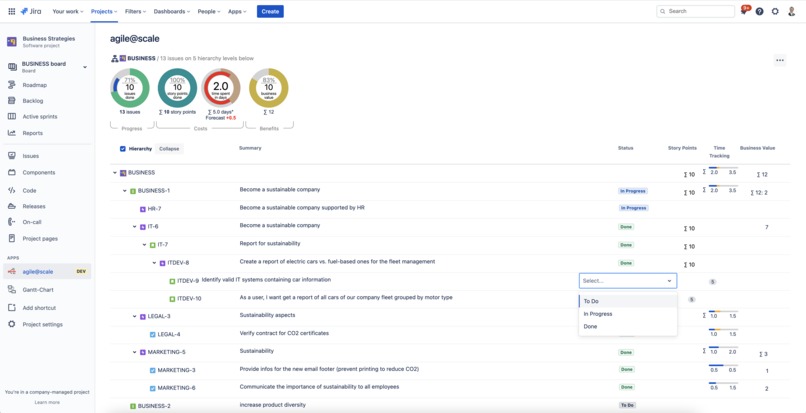
Inline-edit capabilities on the cockpit for issues' summary, status, story points, and business values


Inspiration
Is the current pandemic of COVID-19 a game-changer? Well, take a look into various industries and branches: home offices are widely established, remote teams are working successfully together, even in most business departments and very traditional companies like banking and finance. But without IT, all that would be impossible. Stepwise, IT becomes part of the business and even drives business rather than just a cost factor: business-IT-alignment has already started!
Due to current situations, your business has to (re-)act faster than ever as, for example, resources are limited, and future deliveries are uncertain depending on container ships. Plans might become obsolete. The classic approach of "plan - do - run" is often not flexible enough. Agile methods succeed in most of the departments using Kanban or Scrum derivatives. So, many agile projects exist in your daily business, and most of them use Atlassian Jira for processing.
- But how do all the projects in different departments of your business fit together?
- Do you have a suitable overview of all projects you are responsible for reacting fast to changing circumstances?
- How do you delegate new aspects and trends into the teams like overall sustainability requirements, which might become critical for your business tomorrow?
To achieve more synergy effects and increase communications between all involved parties of your business and IT horizontally and especially vertically within your organization, you have to scale your projects from the team level over optional, intermediate levels on the enterprise level. Some companies try to scale their projects using, for example, SAFe but additionally also establish many new roles like "release train engineers" (RTE) and meetings and processes. Other more or less extensive agile processes like LeSS exist as well. However, as all of these approaches do not fit all your business purposes, their underlying process models must be adapted to the company's needs and culture.
A pragmatic approach can be to use your current company-internal experiences and build hierarchy levels of interest based on your business. On each level, representing a particular abstraction grade of your business: you have projects you all control the same way based on epics and initiatives, actions, tasks, stories, or however you call those none-epic activities. For that, you are using the well-known standard features and reporting of Atlassian Jira. Unfortunately, such multi-project dependencies are not supported out-of-the-box nor automatic aggregations from lower levels to higher ones. These missing features are available right now using "agile@scale".
Main idea
You are already familiar with agile concepts and collected practical experiences. Business analysts or product owners define user stories and describe them in more detail to be ready for implementation. In some cases, user stories are too complex. So, you have to break them down into smaller ones: such a big story becomes an epic with multiple user stories associated within the same project. That's daily business.
Being successful, you can scale this approach horizontally into other teams working in the same way in parallel. But what about vertical scaling to higher enterprise levels beyond your working teams?
Wouldn't it be great to reuse all your experiences and just put that on the next level?
From a team's perspective, epics are big stories. Still, they are just smaller stories from a management viewpoint because they focus on much more business topics in parallel on a higher level. If our epics become just stories on a higher level, I call them "initiatives", "activities," or "features" to understand better. Within such a higher-level project, other epics can also group them for better tracking. I call these epics "enterprise epics," but within Jira, they are still just epics. Management can prioritize initiatives, activities, and features within such a higher-level project as you do on lower levels. Using Scrum at the higher level, they can plan a sprint per month, per quarter, or whatever cadence better suits your business.
The last missing point: wouldn't it be nice to use the same agile reporting on these higher-level projects, too? Who is going to maintain the status of the initiatives as well as provide aggregated estimations? Without that, you cannot create any burn-down chart or other agile reporting on a higher-level project.
Well, my app "agile@scale" automize all that: so, for example, user story updates on the lowest level will trigger an automation to aggregate estimations and statuses on all associated higher levels. Additionally, anybody can easily create a new parent to a story or other children as new associations to all levels. Finally, for a faster overview, my app also provides a management cockpit focussing on progress, costs, and benefits in terms of aggregated business values and a drill-down over the multi-projects hierarchy.
That way, you can create new higher-level projects per business level to scale vertically up to the top management.
What it does in detail
Within the global app configuration, you can select a project and config it as a higher-level project controlling all the other projects you specify as lower-level ones. Also, you can easily select a new default issue type like initiative, action, or feature, representing higher-level none-epic activities for this (business) project. The app automatically creates these issue types in addition to Jira's standard-issue types. Depending on your preferred approach (top-down or bottom-up), you will get guided next steps. A higher-level project can also be controlled by another project one abstraction level above to build a multi-level project hierarchy representing your business needs.
Interactively, you can associate epics and none-epics (initiatives, activities, features, stories, tasks, etc.) to parents and/or break them down into one or multiple children within the related, controlled projects as configured. In all cases, a flexible search mechanism supports you to find fast what you are looking for. Also, you can create a related issue within a higher-level project and assign a suitable epic in a single step. Additionally, you can create an epic within a controlled project as a new child. You can do all this without leaving the current issue view: an extended multi-project breadcrumb list makes that possible on the issue view.
Having linked all your lower-level issues or broke down all your high-level initiatives, you will see a cockpit for aggregated figures of progress, costs, and benefits per issue view or per project via the menu item "agile@scale".
Suppose you enter or update estimations (story points or time tracking figures) or change the status of a lowest-level issue (leaf node of your work break-down tree). In that case, the app automatically aggregates the delta value to all higher levels in the background. So, you can use Jira's standard features for reporting like burn-down charts, etc., on all abstraction levels without manually maintaining estimations or statuses. Especially the status information is essential to indicate which issues have been done.
As soon as a leaf issue changed its status into, e.g., "in progress", the app also updates all related parent issues accordingly to overall hierarchy levels. The app will also switch the related parent issue into "done" if all children are "done". So if you add another new issue for such an epic later, this will put the epic's status back into the previous status category if it is "done". You just have to update all leaf nodes, respective lowest-level issues.
Below the cockpit, you can display all associated issues as a tree or as a flat list of leaves/lowest-level issues only. Also, the displayed columns can be flexible configured to show what you would like to see. Mixing team-managed projects and company-managed projects, all fields with the same name are displayed within a single column to make life easier. Jira-internally, context fields with the same name are stored within different custom fields per team-managed project. All that is unified by the app for better user convenience. In addition to all native Jira fields (system fields, custom fields, context fields), the app also supports traffic-light fields, which are often used to illustrate a certain aspect like criticality, severity, business impacts, or trends. This feature needs the separate app "Traffic-Lights for Jira Cloud" (see Atlassian Marketplace: https://marketplace.atlassian.com/apps/29738/traffic-lights-for-jira?tab=overview&hosting=cloud).
Some fields already support inline-editing like summary, status, story points, and business value to avoid clicking on the related issue key to open another browser tab and to chance values there. The different Jira-internal representations of business values (a context field per each team-managed project and one custom field for all company-managed projects) are handled by my app. Aggregations are updated automatically on the screen. Changing the status will trigger the related automation in the background: to see updated, other parent issues you have to reload all issues; respectively the page (hit F5).
How I built it
After having the first idea of the main features, I started learning about Atlassian Forge using the tutorials and examples. Initially, I tried out the backend service handling for (create/update) events to focus on technical risks and build a prototype. Then, I developed the configuration page based on the Forge UIkit and the storage API. Becoming more familiar with Forge and its current weaknesses, I switched to use the Forge CustomUI, which suits the needs of all the graphical representations. In parallel to developing in Forge, I have learned how to use React-like frameworks and integrated AtlasKit components, too. Previously, I used AUI components in Atlassian Connect.
Challenges I ran into
Atlassian Forge is a relatively new framework and has got a lot of weaknesses and limitations in opposition to Atlassian Connect. Finding workarounds for that was challenging but it also helps to focus on the main business needs from a user perspective rather than taking a more technical view of a developer. Additionally, coming from the velocity framework for on-premise apps, I also had to learn to use and develop React-like components.
Accomplishments that I am proud of
Bridging the gap between business and IT is more than business analysis and process knowledge combined with appropriate development skills. Focussing on the users' needs in all departments like human resources, finance, purchasing, and last but not least, IT development, as well as IT operations, is essential to build attractive apps.
What I learned
Up to now, I have build apps to extend Jira and Confluence on server environments and Data Centers using Java, HTML5, CSS, Velocity framework, and for the cloud on the basis of Atlassian Connect using JavaScript. Yet, I have got the knowledge to easily build cloud apps using Atlassian Forge and run them serverless on AWS lamda services focussing even more on business solutions than the necessary technology stack below.
What's next for agile@scale
Publishing on the Atlassian Marketplace is on its way. Based on customer feedback, I will implement further extensions and features.
Built With
- atlaskit
- css
- forge
- html5
- javascript
- jirarest
- svg


Log in or sign up for Devpost to join the conversation.