


Inspiration
As maintainers of Pyroscope, an open source continuous profiling library, we are very familiar with Slack and the various ways that it has empowered us to move faster. We are members of more than 20 different slack groups and we use slack as our main hub for managing our open source community.
Not only that, but we also use Slack as our hub for the observability stack that we use for our dogfooding servers that we have deployed in production. Logs, metrics, traces, and alerts all flow through Slack so when there is some sort of critical issue Slack will be the first place that we receive that alert.
With that in mind, for this hackathon we decided to create a bot, Pyroscope bot, that allows for a workflow where we can also analyze and debug the same issues using the functionalities existing via the Slack/Slack Bot API
What it does
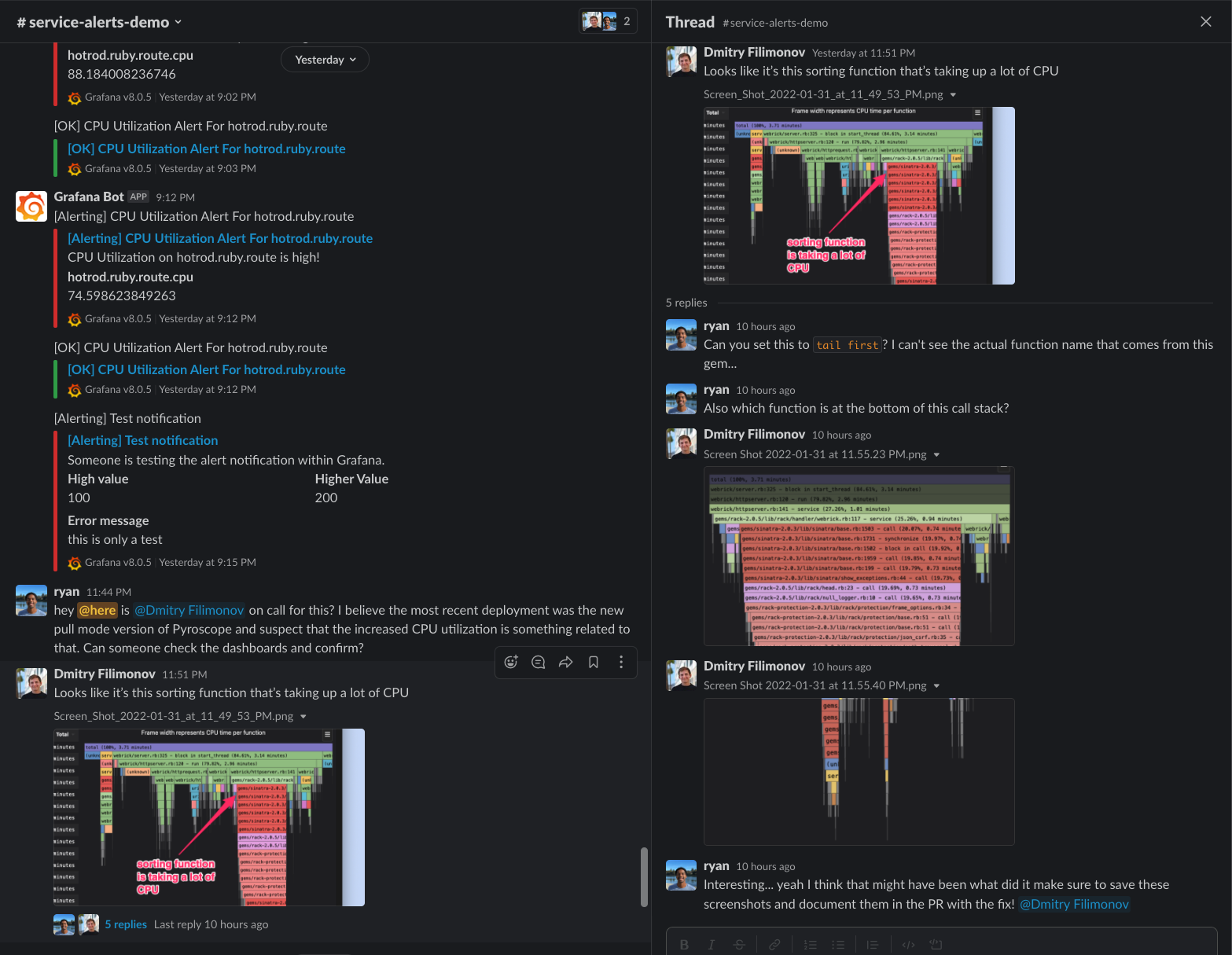
Workflow before Pyroscope bot
- Get an alert about CPU utilization
- Leave slack to open pyroscope dashboard
- Find the problematic appname from the dropdown and select it
- Do some analysis and determine which function is consuming the most resources
- Take a screenshot
- Add annotation to the screenshot to point out the most important piece of the flamegraph
- Paste it into Slack, hope that whatever you're trying to show is visible in the screenshot
- Discuss and resolve the issue
Workflow after Pyroscope Bot
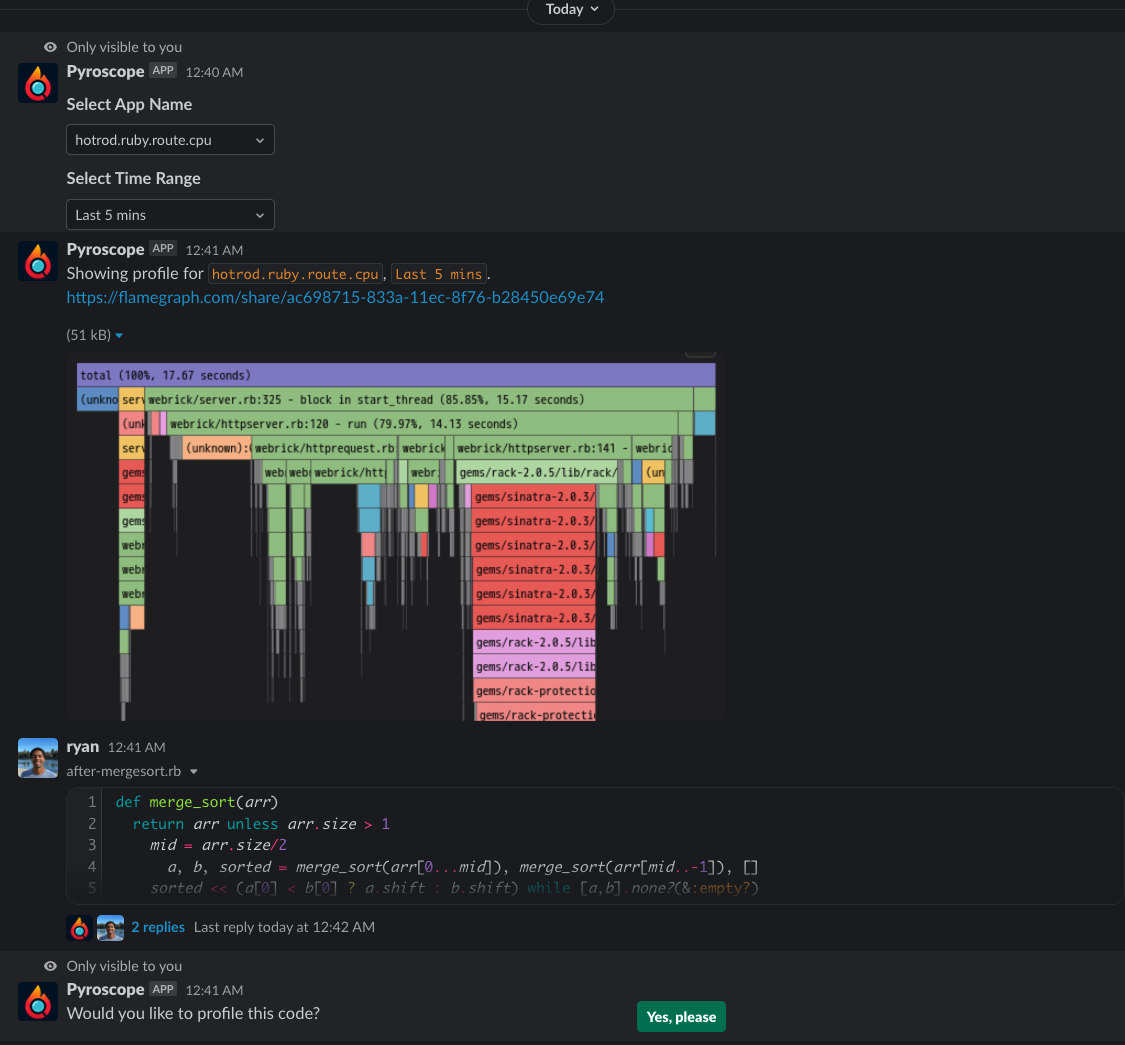
- Get an alert about CPU utilization
Leave slack to open pyroscope dashboardFind the problematicapp_namefrom the dropdown and select itDo some analysis and determine which function is consuming the most resourcesTake a screenshotAdd annotation to the screenshot to point out the most important piece of the flamegraphPaste it into Slack, hope that whatever you're trying to show is visible in the screenshot- Use the slackbot to directly reference problematic appname from alert and select profiling period
- Get shareable link with interactive flamegraph (which significantly more useful than a screenshot)
- Discuss and resolve the issue
How Pyroscope bot was built
To build the bot we used Slack API integration in Go. We used Socket Mode to listen to events that are important for us (e.g file_shared events or /profile slash command).
We have 2 primary features:
- getting existing profiles from Pyroscope (which is continuously profiling your application's server)
- profiling arbitrary code (which comes in the form of a script
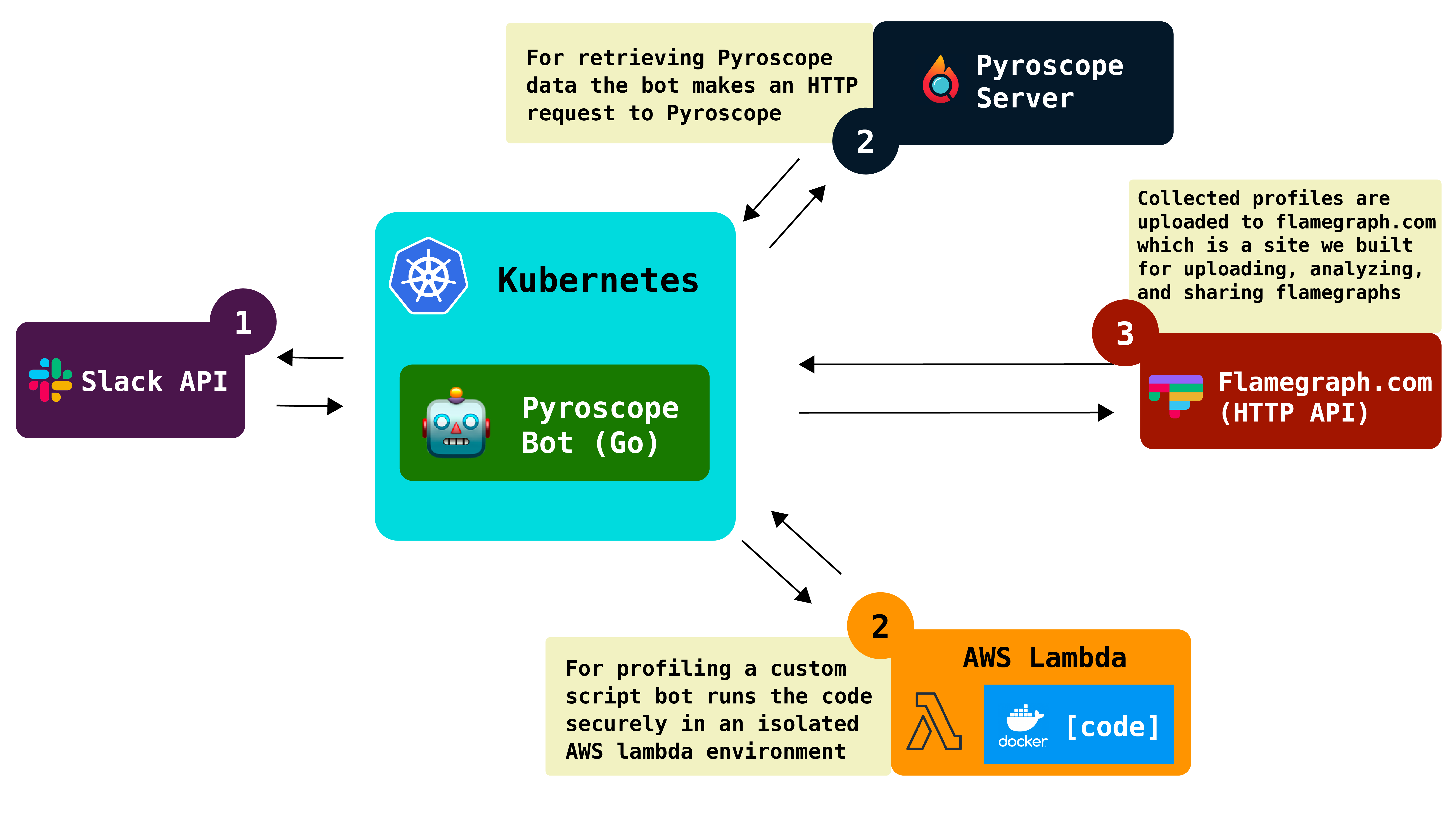
With the first one, when a user issues a /profile command, we render a UI for them so that they can specify which app they want to get profiles for and then we make an HTTP request to a pyroscope server which returns a profile that a user requests.
With the second integration we listen to file_shared events, ask users if they want their snippets to be profiled and if they say yes we run this user-provided code in a docker container on AWS lambda which then also returns a profile. We then upload this profile to flamegraph.com and it returns a permanent URL that we post in a Slack message from the bot.
Challenges we ran into
Security
Running arbitrary code exposes us to a risk of people running malicious code on our servers and we solved that issue by running the code on AWS lambda where we’re able to sandbox the code. In addition to that we added throttling so that no user can submit too many files at the same time.
Costs
Running a server to handle the uneven load that would come from users is something that would likely become both:
- unreliable: In times of high traffic the server would likely crash
- costly: If we want to ensure that service is uninterrupted we would need to provision a server large enough where high spikes in traffic don't make the slackbot crash
Our most proud moment!
Functionality
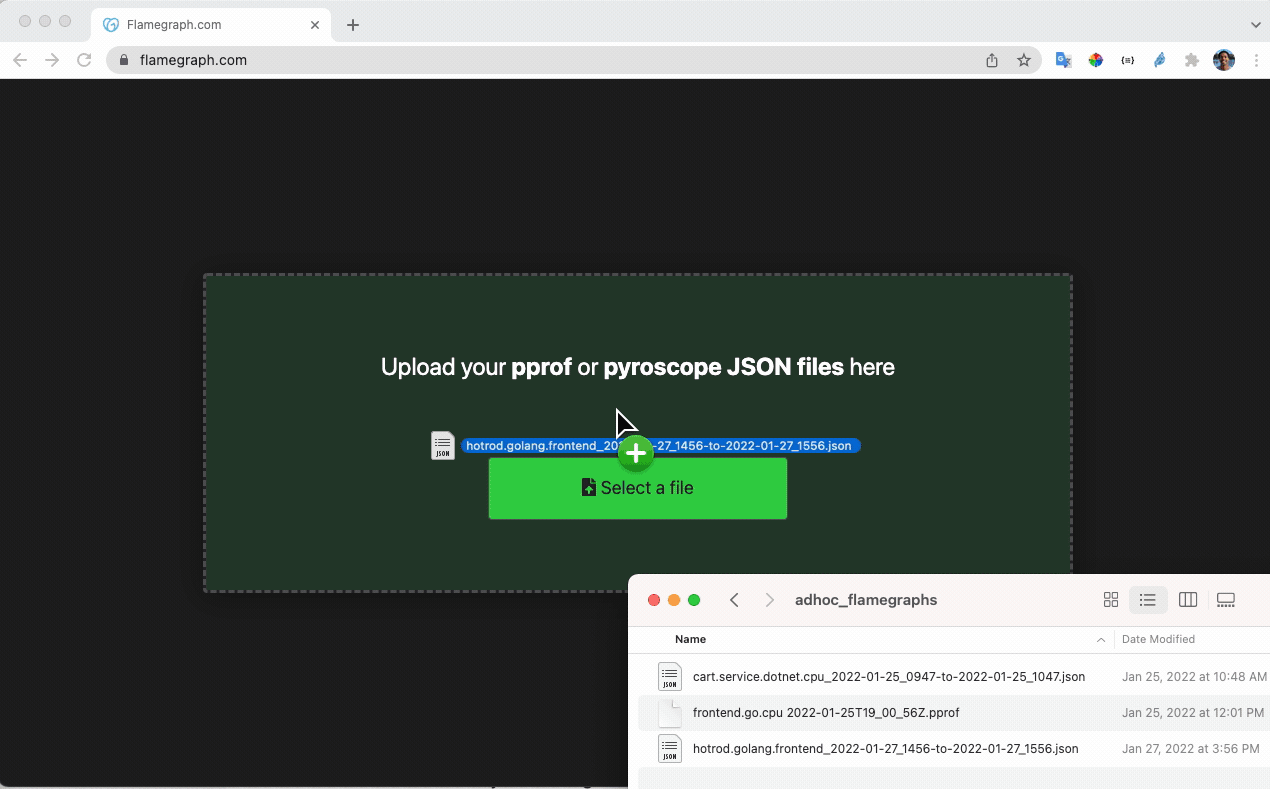
While we've built several useful apis into the Pyroscope server, it became clear that sometimes it's better to have these functions as arbitrary functionality as opposed to tying it to a particular server. This is why we created https://flamegraph.com which we hope to continue to build out to be a pastebin like service for uploading, sharing, and analyzing flamegraphs.
Not only is this useful for the Pyroscope bot, but we plan to really promote it as a new hub for the expanding interest in Flamegraphs as a data visualization type.
What's next for Pyroscope Bot?
There are several different areas where we believe that we could improve Pyroscope bot:
- Adding UI/UX improvements to the Slack UI: We'd love to use more of the UI components available to make a more streamlined experience
- Adding a slackbot homepage that contains similar surface level information about Pyroscope / the program being profiled
- Adding some Pyroscope features into the Slackbot workflow: We also have the ability to calculate a "diff" between two Flamegraphs and you could imagine this is useful in showing specifically what's wrong
- Adding more rich features for the flamegraph.com api where data between flamegraph.com and slack are shared (i.e. comments made on slack could also persist in flamegraph.com view)
- Integrating with other types of observability data: Pyroscope bot is just the start. There can definitely be similar bots that can be created with similar products and the next step is getting them to talk more to each other
Feedback for Slack API Team
As we were working on the integration we found a few issues:
- There's no way to attach a file to a /slash command
- file_shared callback does not include a timestamp to the original message where the file was shared. The workaround we came up with is calling
conversations.historyto get to that timestamp, but it would be nice if it was available somewhere in the callback body. - Ephemeral messages that a bot posts in response to a slash command can't be updated / deleted later. We tried a lot of different things, but could not accomplish this. These stack overflow answers didn't work for us: https://stackoverflow.com/questions/47496747/how-to-remove-ephemeral-messages/51218544
- We had similar issues with regular messages as well. We're happy to provide some code that reproduces these issue after the hackathon.
- When sending responses in socket mode, it's hard to debug issues because the messages are sent into darkness, there's no feedback or logs that we could look at.
- For Workflows it would be cool to have a way to trigger a workflow when a file of certain type is uploaded. It would be useful for bots similar to ours.


Log in or sign up for Devpost to join the conversation.