-
-

Ares Logo
-
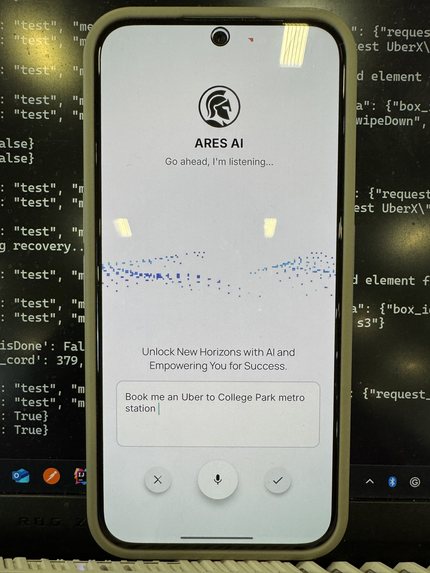
Ares Landing Page
-
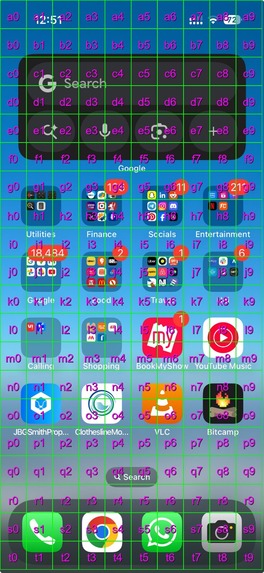
What Gemini Sees


Inspiration
What if you could control your phone with just one instruction—no tapping, no scrolling, no searching? A task like "Set an alarm for 7:30 a.m." can be done by Siri or Bixby, but what about booking Uber or ordering your cart on Amazon? Shouldn't require a dozen manual steps? We wanted to build something that could understand your intent, see your screen, and act like a human assistant—but with the precision of AI. That’s where Ares.AI began: turning natural language into real-time mobile automation.
What it does
Ares.AI takes high-level instructions (like "Open WhatsApp and message John") and automates the steps to make it happen. It sees your screen, breaks your request into atomic actions, finds the right UI elements, takes action, and sends back the next move. It keeps track of context, retries when needed, and adapts when stuck, just like a real assistant would.
Core Working
Goal Planning with Gemini 2.5 Pro
We start with a natural language instruction and use function-calling for Gemini 2.5 Pro to break it into a structured sequence of atomic UI actions—like tapping buttons, typing text, or navigating menus. Each goal is clear, ordered, and aligned with how a human would complete the task.
Stateful Goal Execution
The agent maintains a session-level memory of which step it’s on, how many attempts have failed, and whether the current goal is stuck. If something goes wrong—like a button not appearing—it tries alternative actions before giving up.
Visual Grounding with Gemini Vision
At each step, we pass uniquely processed screenshots with bounding boxes to get coordinates for Gemini to identify the correct bounding box for the next action. If the element isn’t visible, the agent adapts: scrolls, waits, or tries again. It avoids looping on duplicate screenshots and uses hashing to manage screen state effectively.
Challenges we ran into
- UI inconsistency: Not every screen looks the same—element labels, layouts, and icons vary wildly across apps.
- Image matching in real time: Finding the right element without lag meant balancing model power with latency.
- State recovery: Knowing when a goal was truly stuck and how to recover (scrolling, retrying, skipping) required careful heuristics.
Built to feel like a human, but backed by the precision of AI
Built With
- android-studio
- figma
- gemini
- kotlin
- python


Log in or sign up for Devpost to join the conversation.