-
-
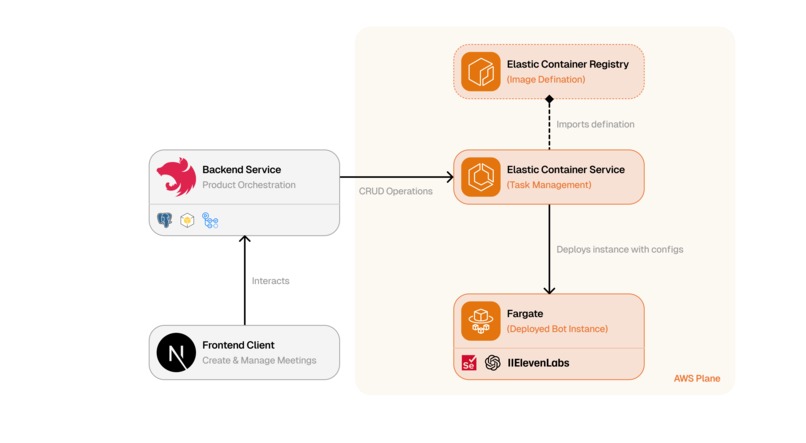
Flow diagram
-
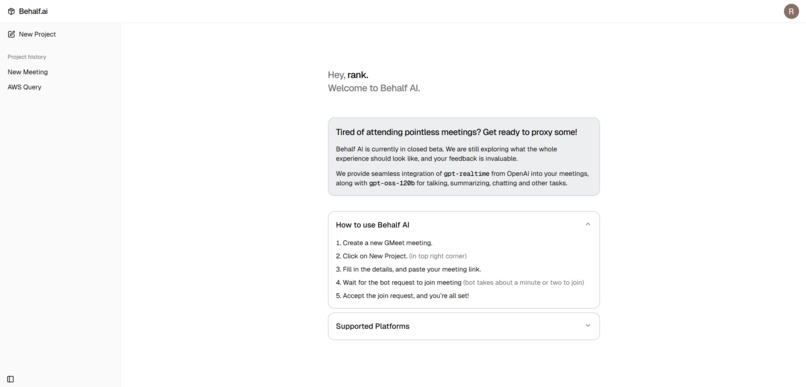
Dashboard Page
-
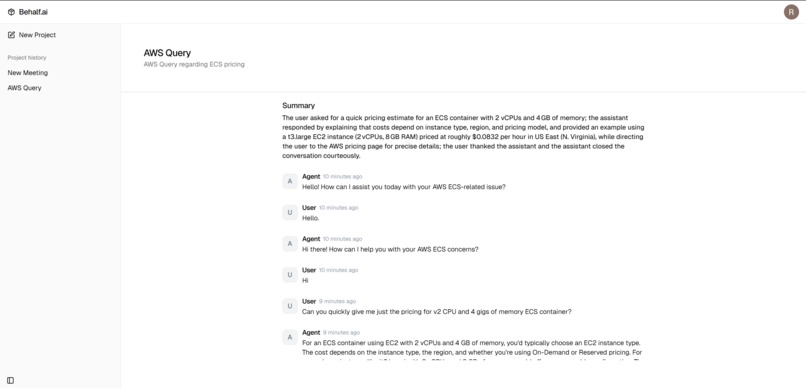
Meeting Page
-
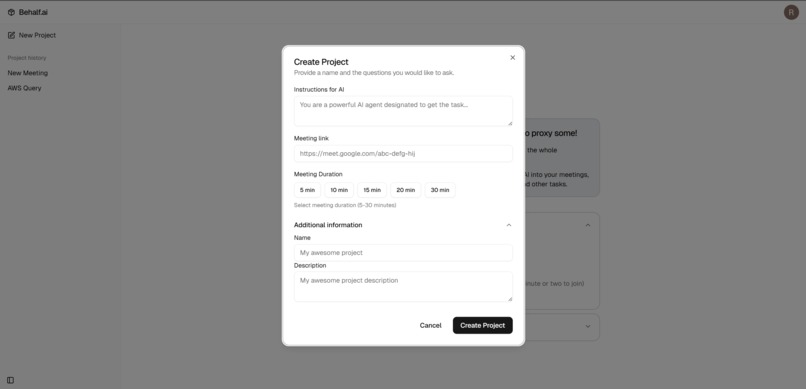
Create Meeting Agent Dialog
-
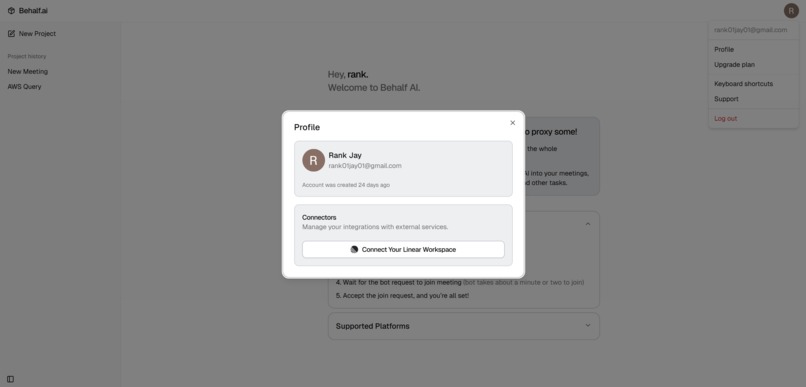
Profile Dialog


Inspiration
We’ve all been there—double‑booked for important meetings, juggling time zones, and trying to be present while our calendar says otherwise. After missing yet another crucial discussion because a standup overlapped with a customer call, we asked a simple question: what if you could truly be in two places at once? Not a passive recorder or a transcript bot, but an agent that represents you, listens, understands context, and speaks up—politely and on‑topic.
The “aha” moment came when we realized real-time AI has quietly crossed a threshold. With low‑latency speech recognition, streaming TTS, and robust function calling, an assistant could join a Google Meet as you, follow instructions, and help your team move work forward. The gap wasn’t model capability—it was practical, production‑grade plumbing: joining admission flows, routing audio devices reliably, deciding when to talk, and recovering from network hiccups.
Behalf.ai is our answer: a real-time meeting presence that feels natural, useful, and respectful of the room. It doesn’t replace you; it amplifies you—capturing decisions, filing issues, and nudging the conversation toward outcomes. We built it because we needed it, and we’re excited about what it unlocks for distributed teams everywhere.
What it does
Behalf.ai is a real-time AI agent that joins Google Meet on your behalf, listens to the conversation, speaks when appropriate, and takes action—so you never lose momentum.
In plain language: Behalf.ai clicks into your Meet link, waits through admission if needed, introduces itself with your chosen identity, and participates like a helpful colleague. It hears the room, synthesizes responses, and can take tasks off your plate via tool integrations.
Key features:
- Realtime presence in Google Meet: joins reliably, handles waiting rooms, and monitors meeting state (removal, end) to behave politely.
- Natural conversation: low‑latency speech‑to‑text and streaming TTS; barge‑in/turn detection to avoid talking over people.
- Actionable follow‑through: function calling to tools like Linear to create/list issues; transcripts streamed to your backend for notes and search.
- Context and control: configurable instructions, meeting IDs for correlation, and careful mic/camera control to avoid surprises.
Example use cases:
- Engineering standups: when you’re double‑booked, Behalf.ai attends, answers common questions, and files a “linear_create_issue” when a bug is discussed.
- Customer calls: it captures decisions, clarifies next steps, and sends lightweight summaries via your API.
- Support triage: it listens, creates tickets with relevant context, and keeps the team’s backlog current in real time.
Under the hood, Behalf.ai joins Meet via resilient browser automation, routes audio through system devices (e.g., PulseAudio/BlackHole), streams bidirectional audio to the OpenAI Realtime API or ElevenLabs, and uses a tool router with robust error handling to carry out tasks.
How we built it
We built Behalf.ai in Python with three collaborating subsystems: Google Meet automation, real-time audio+assistant streaming, and a tool execution layer.
Meeting automation: A
GoogleMeetJoinerdrives Chrome via Selenium. We implemented a layered strategy to resist UI changes: a cached “FastFinder” for rapid element detection, fallbacks toWebDriverWait, JavaScript execution for tricky clicks, and—even as a last resort—keyboard shortcuts (e.g., Cmd/Ctrl+D) to manage the mic. It handles admission (“Ask to join”), dismisses modals, toggles camera/mic, monitors removal/end states, and saves transcripts by readinglocalStoragekeys for transcript/chat alongside meeting metadata.Realtime assistant: A provider‑agnostic
BaseRealtimeAssistantorchestrates lifecycle and resilience—signal‑aware shutdown, exponential backoff reconnects, and concurrent loops for reading WebSocket frames, watchdog checks, and audio capture. We support:- OpenAI Realtime (WebSocket) with
gpt-4o-mini-realtime-preview, semantic VAD turn detection, Whisper‑1 input transcription, and streaming TTS (“alloy”). Incoming frames include audio deltas, transcripts, and function‑call events. - ElevenLabs ConvAI as an alternative provider with symmetric streaming and transcript events. Both implementations share a common pipeline, so the rest of the system doesn’t care which provider is active.
- OpenAI Realtime (WebSocket) with
Audio I/O: Our
PyAudioRouterprovides low‑latency PCM streaming (24kHz mono, 16‑bit, 20ms chunks by default). It selects devices via environment hints (e.g., PulseAudio’smeet_out.monitoras input;bot_micas output) and uses bounded queues with drop‑oldest to keep latency tight during bursty conditions. Capture/playback threads integrate with asyncio through thread‑safe queues for smooth backpressure.Tools and decisioning: We translate provider function calls into a canonical format and route them through a
ToolRouterwith middlewares for timeouts, rate limits, structured error returns (so the conversation continues gracefully), and logging. We ship Linear tools for creating and listing issues via your backend, authenticated through environment variables.Config/ops: Pydantic Settings load
.env/env vars, establish platform‑specific audio defaults, and set up robust logging (human‑readable with optional JSON tee and ECS metadata). The mainapp.pywires it all: argument parsing, meeting config, and signal handlers for clean shutdown.
The breakthrough came from treating the assistant as a sidecar with strong contracts: once audio and tools were standardized, everything else snapped into place.
Challenges we ran into
Taming latency without sacrificing stability: Initially, we assumed a straightforward audio stream would “just work.” It didn’t—bursts and buffer growth caused noticeable lag. We built
PyAudioRouterwith 20ms PCM chunks, bounded queues, and a drop‑oldest policy to keep the tail short under load. We also tuned WebSocket pings and chunk sizes. The result feels conversational rather than “IVR‑ish.”Surviving Google Meet’s shifting UI and flows: We started with a single set of selectors and quickly discovered they’re brittle across updates and locales. Our layered strategy—FastFinder caching, multiple XPath/CSS variants, JS clicks, and keyboard shortcuts—made joining resilient. We even added micro‑mouse movements to appear more human and avoid odd edge cases. The admission logic handles “No one responded” timeouts vs. explicit denials differently, either retrying or ending gracefully.
Deciding when to speak (and when not to): The most frustrating issue was the assistant talking over people or missing a beat after long pauses. We integrated provider‑side semantic VAD with our own lightweight state machine (
assistant_speakingtracking) to respect turns. We also addedensure_mic_on()to verify the mic state post‑admission and fall back to toggling via Cmd/Ctrl+D. Now it interjects naturally and yields when the room takes over.Keeping sessions robust: Dropped sockets and intermittent networks happen. We implemented exponential backoff with jitter, watchdog timers, and cooperative cancellation across tasks. On “error” events from providers, we shut down cleanly, persist what we can (timeline, transcript), and reconnect if appropriate.
What we learned: if you design for failure from the start—multiple selector strategies, backpressure, structured tool errors—the system feels reliable even when the internet isn’t. And sometimes the most pragmatic “AI” trick is a keyboard shortcut.
Accomplishments that we're proud of
Natural, low‑friction conversation: The combination of 20ms audio chunks, bounded queues, and streaming TTS yields a responsive feel. With semantic VAD and turn‑taking, the agent sounds polite—able to barge in when it should, and quiet down when people speak.
Rock‑solid meeting join reliability: FastFinder plus layered fallbacks made Google Meet automation resilient. From dismissing modals to handling “Ask to join,” to correctly responding when the meeting ends or we’re removed, the flow recovers gracefully.
Tool calling with graceful failure: Our tool router’s middleware (timeouts, rate limits, structured error returns) means a broken integration doesn’t derail the conversation. If creating a Linear issue fails, the assistant explains the error and keeps going, rather than crashing the session.
Clean ops story: Strong logging, ECS‑aware settings, and signal‑driven shutdowns make it deployable. Transcripts stream to your backend, while local captures and metadata are saved for post‑processing. It feels like a product, not just a demo.
A moment of triumph was hearing the agent politely introduce itself, file a Linear ticket on cue, and then wait its turn—no awkward overlaps, just helpful presence.
What we learned
Coming into this project, we underestimated how much real‑time systems are about guardrails, not just speed. We gained a deep appreciation for backpressure: once we bounded queues and embraced drop‑oldest, user‑perceived latency improved dramatically. The project also taught us that browser automation in production is an art—resilience isn’t one trick; it’s a stack of fallbacks, from smart selectors to keyboard shortcuts.
Architecturally, we learned to value clean contracts. By standardizing audio with PyAudioRouter and abstracting provider differences behind BaseRealtimeAssistant, we could swap OpenAI Realtime for ElevenLabs without touching the rest of the system. Building a canonical tool‑call format (plus error‑first middleware) made external actions dependable—and debuggable.
On the human‑AI interaction side, we learned that timing beats raw accuracy. An on‑time, slightly imperfect answer is more helpful than a perfect answer that arrives after the topic has moved on. Semantic VAD and explicit “assistant_speaking” state gave us the control we needed to feel natural in a live room.
Most importantly, we left with renewed conviction: practical AI isn’t just model quality; it’s orchestration—devices, sockets, timing, and thoughtful failure modes that make the experience trustworthy.
What's next for Behalf.ai
Immediate improvements:
- Smoother intros and hand‑offs: richer prompts per meeting type and speaker‑aware etiquette.
- Even tighter latency: adaptive chunking and dynamic playback buffers for jittery networks.
- UX polish: clearer controls for when/how the agent speaks, plus in‑call signals for transparency.
Near‑term features:
- More platforms: Zoom and Teams adapters using the same layered automation approach.
- Deeper context: calendar, docs, and past meeting memory to reduce “cold starts.”
- Expanded tools: Jira, Notion, Slack follow‑ups—still behind the same safe tool router.
- Better summaries: streaming highlights during the call and post‑call action items.
Longer‑term vision:
- Multimodal collaboration: watch shared screens, reference docs live, and co‑edit action items in real time.
- Enterprise readiness: SSO, scoped credentials, fine‑grained policies, audit logs, and data locality options.
- Accessibility: live caption improvements, speaker‑aware summaries, and adaptive voices.
We started by solving double‑booking and meeting fatigue; we’re aiming for something bigger: an ambient, trustworthy AI presence that accelerates collaboration without crowding the room. If Behalf.ai quietly helps teams make decisions faster—and makes your calendar feel humane again—that’s a future we want to build.
Built With
- amazon-web-services
- elevenlabs
- gpt-oss
- openai
- python
- selenium


Log in or sign up for Devpost to join the conversation.