-
-
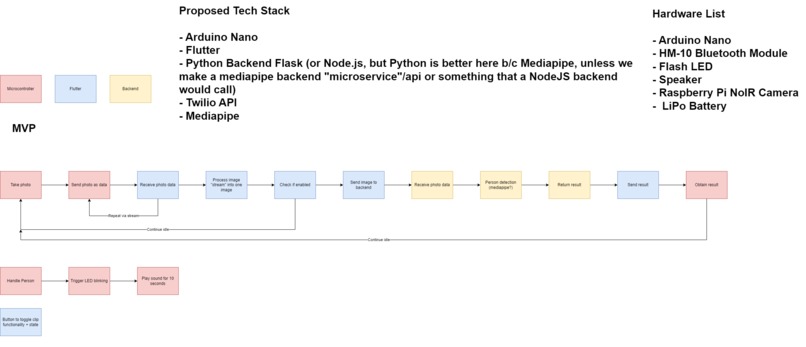
List of Functions / Proposed Architecture
-
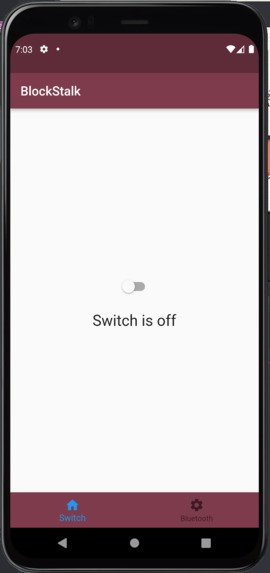
Phone Switch Screen
-
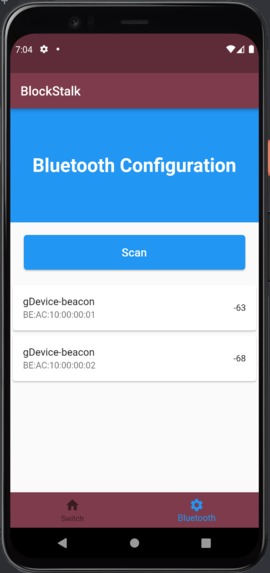
Phone Bluetooth List Devices Screen
-
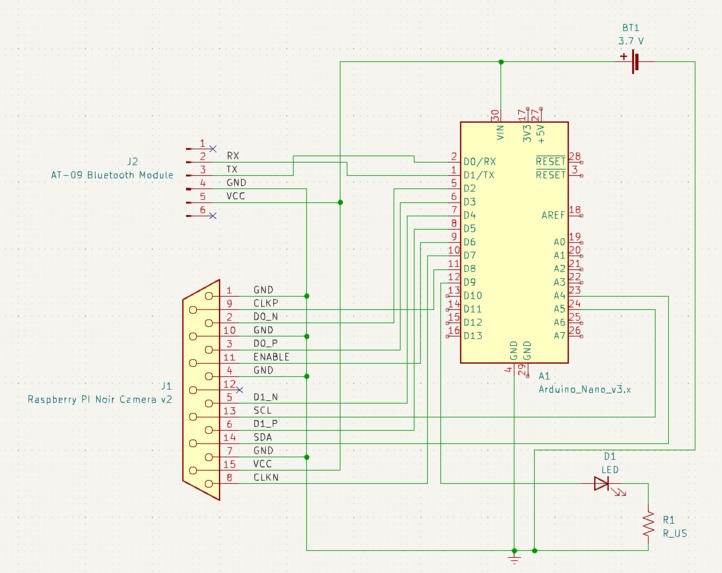
First iteration of the electrical schematic with Arduino nano
-
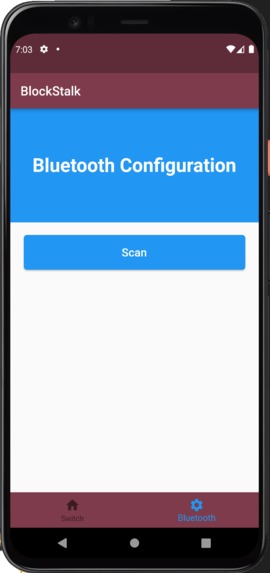
Bluetooth Connection Screen
-
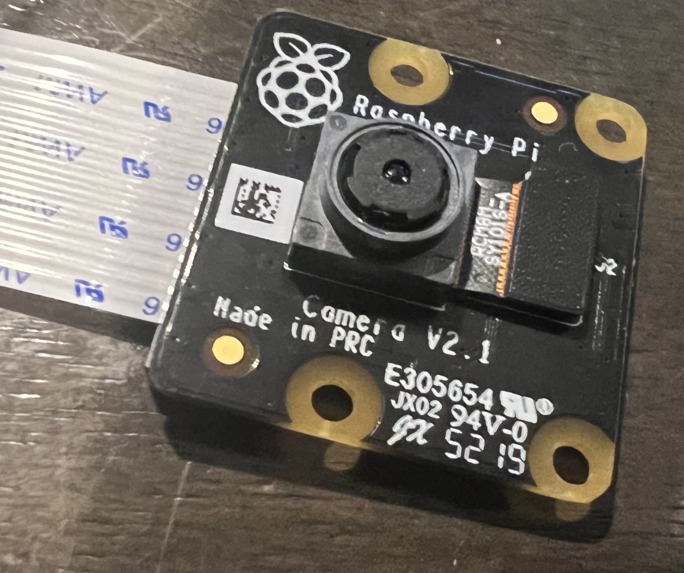
Camera (Works in the dark)
-
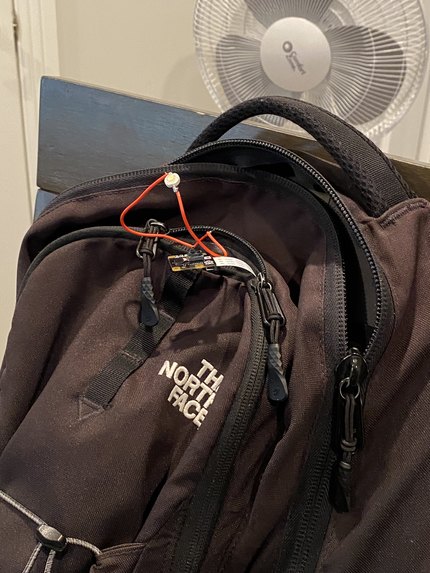
nice and compact!
-
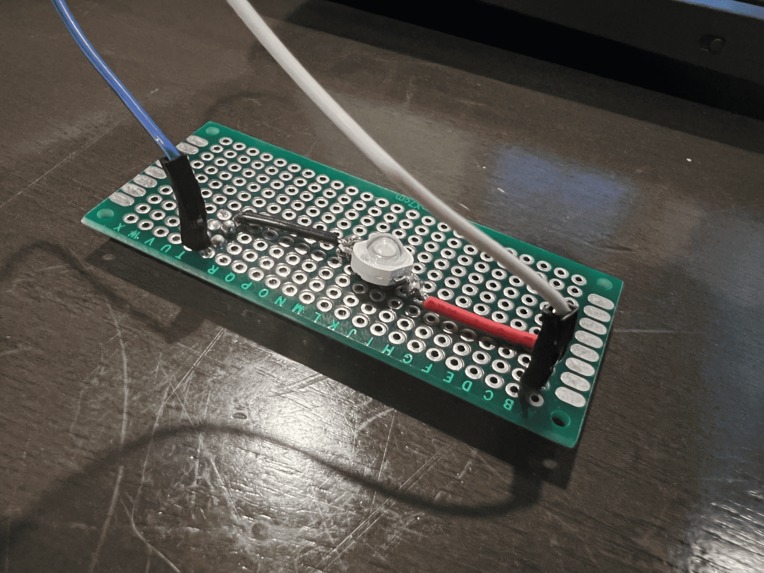
LED on Perfboard


Inspiration
Walking alone at night is a general fear for many people. As a team, we decided to try to create something that could help make people feel safer walking by themselves. This concept was inspired by the fact that people usually feel scared that someone will approach them unexpectedly from behind or to help people quell their fears of being stalked. BlockStalk helps amend this problem as it alerts users when someone is suddenly right behind them! BlockStalk defends its users by flashing a bright light at the person, giving them time to escape from a scary situation.
What it does
BlockStalk is a hardware device that works in tandem with software, as it relies on the use of a mobile app to alert the user if someone is close behind them. Users will have a choice to keep the device on or off, using the phone app to switch the detection functionality on and off.
How we built it
Hardware: We originally wanted to use an Arduino Nano with a raspberry pi camera, but the part to attach the camera to attach the Arduino Nano was too small. We opted to use a raspberry pi instead which led us to cut down on our code complexity at the expense of device size. We breadboarded the components and tested them. Afterward, we tried to solder a final version on a perf board but were a bit limited on time and manpower.
Software: The mobile app is developed with Flutter, which utilizes Bluetooth and socket io libraries in order to have mobile devices to be able to communicate with the raspberry pi. However, because we could not get an Android phone to test out the Bluetooth, we pivoted to using Socket.io to communicate between the app and the Raspberry Pi. The Raspberry Pi uses Google's Mediapipe API to detect people. The server backend is created using Typescript, which talks to the raspberry pi client written in Python alongside the Flutter client written using Dart. This backend is deployed through the use of Replit. Essentially, the library socket.io acts as a key feature for this project as it allows communication between the front end and the back end alongside the mobile and hardware devices.
Challenges we ran into
Hardware: Dylan: Working with what we had because when we were preparing for this we had to keep in mind what parts we needed. We knew a lot could go wrong and a lot did go wrong, so the most challenging part was trying to work with what we had on hand. For example, some of our parts arrived a day before the hackathon and we discovered that the size of the part we ordered just would not work. In our previous hackathon, a critical component did not work as well as we expected so this time we thought of a lot of contingency plans so the same mistake wouldn’t happen again, it was a bit harder to plan due to all the different amounts of hardware we used. Another example was that we forgot to buy resistors, which majorly hurt us because we could not power the raspberry pi using a dedicated batter nor could we optimize the brightness of the LEDs without burning them out. We also forgot to buy transistors, which made it harder for us to control the LEDs while keeping the same brightness we wanted.
Software: Casey: It was a challenge to work with Flutter as it was the first time I had ever used this framework. I found it to be a little difficult to maintain the states and make sure their functionality would be working properly. For example, when creating different pages the main page would be the one that had the switch functionality; however, when switching pages the switch would be turned off. Therefore, I had to look through many libraries to see the fix, which would be with the Provider library. Additionally, another challenge I experienced was creating all the client and server files as they were all written in different languages so it was interesting to see how one can write the same concept in different languages and try to get them to talk to each other. Dylan: I also spent half the entire hackathon trying to install stuff on the Raspberry Pi. Sucks.
Accomplishments that we're proud of
Casey: I’m proud we were close to finishing what we envisioned. Though it wasn’t what we exactly had in mind, it was pretty close! Dylan: Learning how to use Raspberry Pi for the first time. Getting some time to do a little bit of soldering during a hackathon. Also, using parts we honestly didn’t think would work.
What we learned
Casey: I learned a lot about Flutter, about the children, and the states. Additionally, I learned a lot more about clients and servers and how they talk to each other alongside setting them up as well. Dylan: I never used a Raspberry Pi before, so learning how to set that up, ssh into it, and overall just use it. I also learned how to plan ahead with hardware better, so we have multiple fallback options in case things don’t work as planned.
What's next for BlockStalk
Software: For BlockStalk, our next iteration would be to have the mobile app able to have a reliable Bluetooth connection, alongside a feature to allow people to send texts to specified receivers to call for help. This will allow users to feel safer as they are able to know that help will be on the way if they ever are in danger. The next level would allow the project to send the user’s location through text, to make sure people know exactly where they are in certain situations. Afterward, we plan to have BlockStalk allow users to be able to text multiple people at the same time during an emergency.
Hardware: BlockStalk will be scaled downwards in order to have it become more discrete and more manageable to carry around on one’s back. The project will also be more distracting to the assailant with the addition of brighter and more numerous powered LED lights to temporarily blind them, so the user may get away safely with a lot of time to spare. With more material and time, BlockStalk may also have additional cameras and speakers to provide evidence and attention to the scenario to dissuade the assailant from coming closer to the user.
Built With
- dart
- express.js
- flutter
- kicad
- mediapipe
- ml
- opencv
- python
- raspberry-pi
- socket.io
- soldering
- typescript


Log in or sign up for Devpost to join the conversation.