-
-
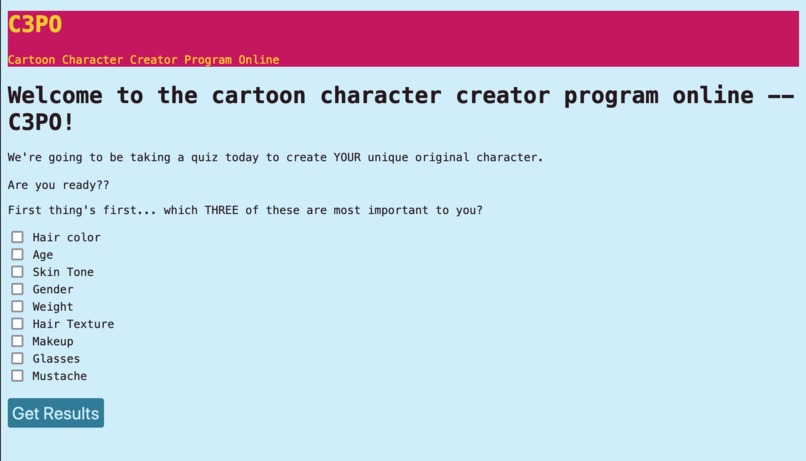
Interface
-
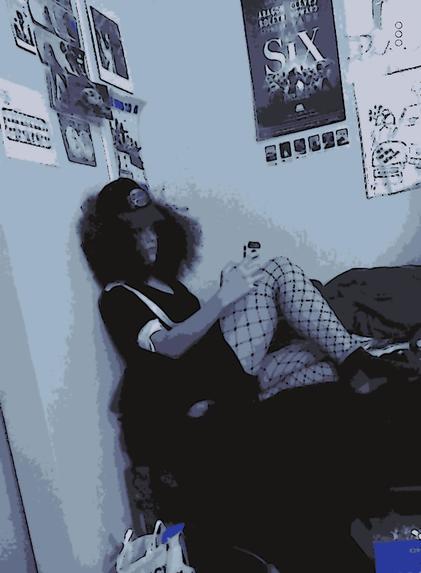
test cartoonify


Inspiration
Inspired by an idea our friend Eleni had for a quiz that could generate characters -- used with permission, of course! We wanted to be able to generate completely custom characters each time a user runs the program.
What it does
The program generates both an image and personality for a unique character.
How we built it
Server
We're using a linode server that links to vs code on our local computers via SSH. This was especially useful because of the large dataset we were hoping to work with, but presented a lot of challenges in setting it up and downloading packages (since we had to be sure the packages were installed to the server, not to our local computers).
Personality
After the users input a word describing their character's personalities, the web crawler will do a google search with several depth on that word. The 10 most frequently appearing words (ideally its synonyms) associated with this search will then be stored into a dictionary. We want to search for human pictures representing these adjectives and include them in the dataset. We built it by making use of open source libraries, such as beautifulsoup, requests, and numpy. Please note that this code was adapted from an earlier project one of us had worked on (for a class assignment) -- the code for that project was complete, but modified for this use.
Images
When a user runs the program, they can choose various physical characteristics of their desired character. Using a dataset containing photos and descriptions of people (e.g. hair color), we select a photo that matches those given characteristics, then cartoonify it. We used opencv for the 'cartoonizing' process, and the CelebA dataset for the source images.
Interface
The user can interact with the code on a web interface built with html, css, and javascript. None of us had previously coded for a website, but it was a fun challenge, especially to work with bringing the data from one html page to another (which we eventually accomplished with localstorage).
Challenges we ran into
Images & CelebA Data
One major challenge was that, even with a server, it took hours for the computer to divide up 202,599 images into 5 files. However, the Big Mean Folder Machine only allowed 106 files to be distributed into those 5 files for some reason. We assumed that it was because of the software’s free edition limitation, but this meant that only a (relatively) small number of files could be uploaded to the server.
It's also important to note that we recognize the limitations of this dataset. Given the time constraints, it was what worked best for this project, given that there was already a dataset of descriptions for each image. However, this is not a representative sample of the world, and in future we would like a dataset that better represents the people we (hope) might use this program.
Personality
How to generate a baseurl from a single word that the user input to start the first search depth, and making imported libraries to work in our code
Accomplishments that we're proud of
At least some of the photos were able to be inputted into vs code, so that we have a image library that could help generate the cartoon characters. Generating a customized new figure is like a miracle!!
It was interesting to code a website for the first time! None of us had ever done it before, so that was challenging but so fascinating that we got carried away. Specifically, we're most proud of learning to use javascript to collect and store information (specifically, bringing information between webpages).
This was also our first hack (for all of us!) and we're incredibly proud to have taken part, worked together so well, and made something! It's not perfect but it's great
What we learned
Collaborating through Linode really broadened our horizon! Normally what we learned in school was to use Github to collaborate. After doing the Hacktoon, we learned that Linode is such a powerful tool that could synchronize our codes and make virtual collaborations become more efficient and easier.
What's next for Character Creations!
We want to continue the work we've already done, because this project isn't finished! There's still a lot to be done to connect the various pieces that we've been working on -- right now, they still don't connect into a unified project, but are scattered. We'd also like to be able to combine images. The (lofty) goal was to create entirely new 'people' by combining images with facemorpher or a similar package, and then cartoonify them.
It'd be great if characters could be in 3D format and show some selected personalities through their motions such as dancing around, waving to others, or just showing a shy face!
Sources
Server
To set up server: https://www.linode.com/docs/guides/deploy-vscode-with-marketplace-apps/
To connect to server https://www.linode.com/docs/guides/deploy-vscode-with-marketplace-apps/ https://www.linode.com/docs/guides/use-public-key-authentication-with-ssh/ Most helpful: https://code.visualstudio.com/docs/remote/ssh-tutorial
Installing git on debian server https://gist.github.com/derhuerst/1b15ff4652a867391f03 Pip: https://www.geeksforgeeks.org/how-to-install-pip-in-linux/ Other help with pip https://linuxconfig.org/install-pip-on-linux#h2-basic-usage-commands-for-pip Downloading open cv with https://pypi.org/project/opencv-python/ This made me realize we were dealing with an outdated python: https://www.godaddy.com/garage/how-to-install-and-configure-python-on-a-hosted-server/
Images
Cartoonify There were many tutorials for this -- it looks like opencv is fairly widely used to 'cartoonify' images -- but this one was quick enough to follow https://towardsdatascience.com/turn-photos-into-cartoons-using-python-bb1a9f578a7e
Uncompleted Face merge We started looking into the software we'd use for merging faces -- it likely would've been one of these packages. https://github.com/huuuuusy/face_merge facemorpher
Building the 'Website' (localhost)
Basic web tutorial https://docs.microsoft.com/en-us/learn/modules/build-simple-website/1-introduction
Quiz https://www.w3schools.com/html/html_form_input_types.asp and https://www.javatpoint.com/how-to-get-all-checked-checkbox-value-in-javascript
Passing from one page to another https://www.csestack.org/javascript-localstorage-pass-data-web-page/ https://blog.logrocket.com/localstorage-javascript-complete-guide/#getitem
The plan was to use flask to transfer the inputs from the website to the python code


Log in or sign up for Devpost to join the conversation.