-
-
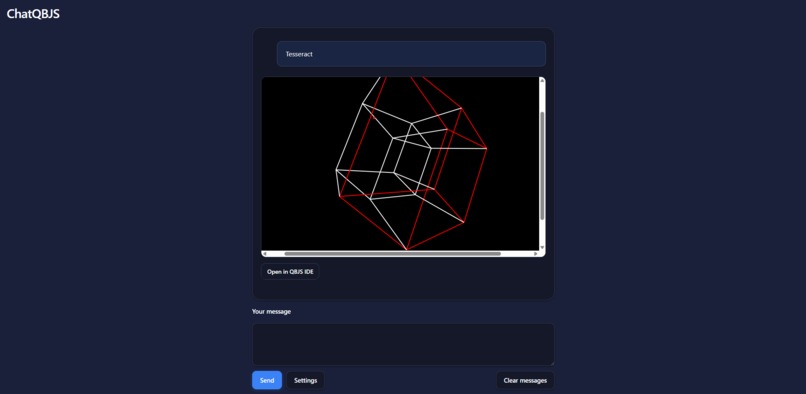
Tesseract example in ChatQBJS

Inspiration
Hello! I'm Ethan, a software engineer who was introduced to programming years ago by a family member via the QB64 project. Since writing my first programs in QB64, I've been completely hooked on programming!
I had the idea of building a chat UI that enables developers to generate BASIC programs using purely natural language, as though speaking directly to the 80s.
I built this project with native JavaScript APIs documented by MDN. I used Deno to bundle my TypeScript code into JavaScript so I could ensure my JavaScript code is type-safe. The entire application is distributed as a single, bundled HTML file where users can access full functionality completely offline.
Some noteworthy APIs used:
- https://developer.mozilla.org/en-US/docs/Web/HTML/Reference/Elements/dialog
- https://developer.mozilla.org/en-US/docs/Web/API/Web_Storage_API/Using_the_Web_Storage_API
- https://developer.chrome.com/docs/ai/prompt-api
- https://docs.orama.com/docs/orama-js/search
What it does
ChatQBJS is an AI-powered chat assistant that generates and previews QB64/QBJS code. Users can describe what they want (e.g., "draw a bouncing ball" or "create a text adventure"), and the assistant writes the QB64 code and shows a live preview inline. It supports both Chrome's built-in Gemini Nano and the remote Gemini 2.5 Flash API, so users can start coding immediately without installing anything.
How we built it
The application uses few-shot learning with examples sourced from the official QBJS samples to improve code generation quality. The conversation interface leverages Chrome's Language Model API for local inference, with an option to use the remote Gemini API for enhanced capabilities.
To supplement retrieval augmented generation (RAG), I used Orama to index the QBJS samples and pulls them into the conversation context when the user asks for related examples.
Challenges we ran into
My development cycle was slowed when I started testing the local model on my device. To increase iteration speed, I implemented mock responses in development, avoiding minute-long generation cycles.
Accomplishments that we're proud of
I'm proud of the ability to dynamically generate and edit QBJS programs using natural language. It feels surreal to program in a language designed decades ago using such modern AI techniques as "vibe coding", bridging the gap between classic BASIC programming and contemporary AI assistance.
What we learned
We learned how to use iframes to embed and display generative message replies, creating a seamless preview experience within the chat interface.
What's next for ChatQBJS
As the Built-In Chrome AI Language Model API matures, I hope to integrate an AI assistant feature directly into the QBJS IDE, making AI-powered programming assistance more accessible to the QB64 community.
Learn more about QB64
Built With
- deno
- gemini
- typescript




Log in or sign up for Devpost to join the conversation.