-
-
Thumbnail!
-
Homepage!
-
Plot of Classified Data!
-
Wine dataset!


Inspiration
I have been involving myself in the field of Data Science, Machine learning and Web Development, thus this project adhered to my personal interest in both fields by involving myself more deeply through a project.
What it does
ClassifyGenius, is an interactive machine learning web application built using Streamlit. The main goal of this app is to allow users to explore and compare different machine learning classifiers and datasets, and to fine-tune the parameters of each classifier in order to achieve the highest accuracy possible.
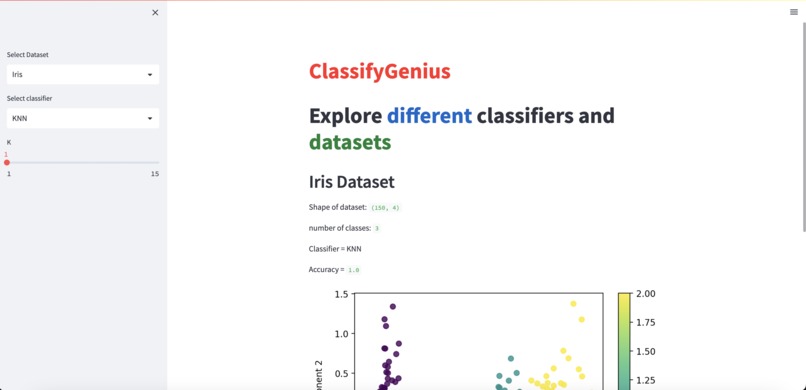
The app has a user-friendly interface with dropdown menus to select the dataset and classifier, and scrollbars to adjust the parameters of the classifier. Once a dataset and classifier have been selected, the app automatically fits the model, predicts the classes, and displays the accuracy score and a plot of the data. Users can switch between different datasets(Breast Cancer, Iris, and Wine) and classifiers(3 machine learning decision classsifier algorithms: KNN, SVM, and Random Forest), and see how the accuracy score and plot changes with different parameters.
In summary, ClassifyGenius is an excellent tool for exploring and learning about different machine learning algorithms, as well as experimenting with various parameters to optimize their performance.
Full project desc:
ClassifyGenius is an interactive machine learning application built using the open-source Streamlit framework. It is a simple web application that enables users to explore different datasets and classifiers. The application allows the user to select from three popular machine learning algorithms: K-nearest neighbors algorithm (KNN), support vector machines (SVM), and random forest. It also allows the user to adjust the parameters of the selected classifier with a scrollbar. As the user changes the parameter, the accuracy changes, and the application updates the overview of the dataset, classifier, and accuracy, along with a plot of the dataset.
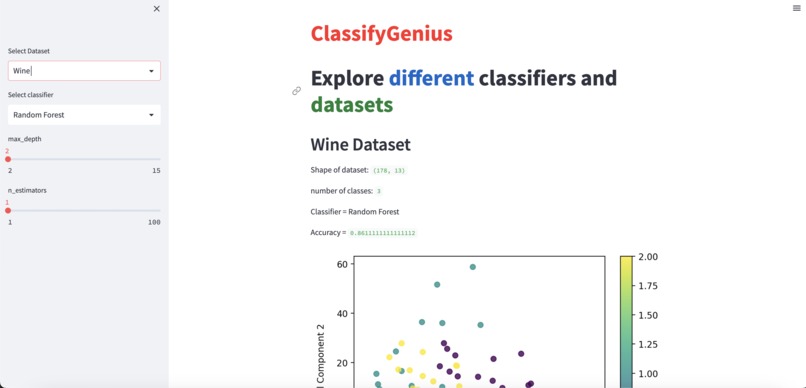
The application offers three datasets to choose from: Iris, Breast Cancer, and Wine. Users can choose the dataset they want to explore and visualize by selecting it from the dropdown menu. ClassifyGenius displays a summary of the dataset, such as its shape and the number of classes in the dataset. The user can also choose a classifier from the dropdown menu, and the application displays a scrollbar to adjust the classifier's parameters.
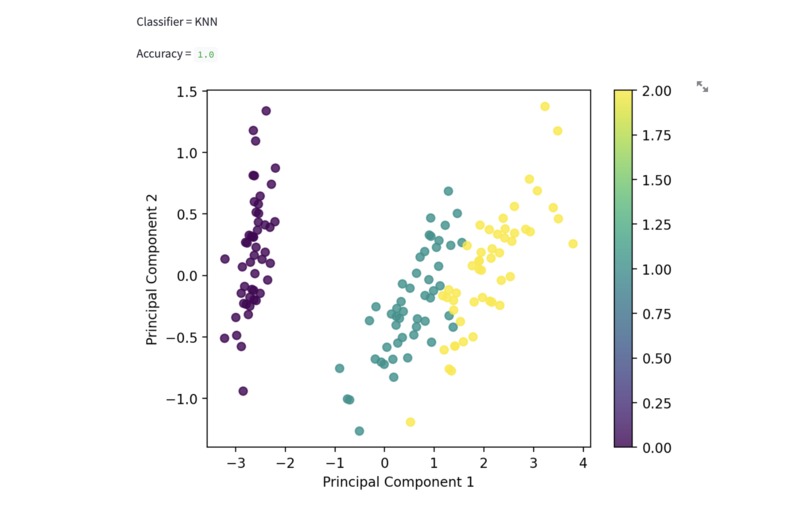
The app also offers a plot of the dataset, which the user can use to explore the data visually. The plot updates as the user selects a different dataset or classifier. For example, the user can select the Iris dataset, and the application transforms the data into two dimensions and plots it. If the user selects a different dataset, such as Breast Cancer, the plot updates accordingly.
ClassifyGenius offers an intuitive and straightforward interface that enables users to explore the different machine learning classifiers and datasets. Users can play around with different parameters to see which combination offers the best accuracy for the selected dataset. The application is an excellent tool for anyone interested in learning about machine learning algorithms or for anyone who wants to experiment with machine learning classifiers.
How we built it
I built this web app using Streamlit, which is an open-source framework for building web apps for machine learning and data science. The app lets you explore different datasets such as Iris, Breast Cancer, and Wine, and also select different classifiers such as K-nearest neighbors (KNN), SVM, and Random Forest. You can update the parameters for the classifier and see the accuracy and plot of the dataset.
I used various libraries such as NumPy for numerical computing, Matplotlib for data visualization, and scikit-learn for machine learning tasks. Overall, I have built a simple but powerful machine learning app that allows users to explore and compare different classifiers and datasets.
Challenges we ran into
Certain challenges I ran into were learning and implementing the methods from the Scikit-learn to run the classifiers task of differentiating the accuracy between each dataset and their parameters.
Accomplishments that we're proud of
A few accomplsihments I am proud of is that this is my first machine learning project, and my first web app built in Streamlit specifically! Building a machine learning project and a web app using Streamlit are both significant accomplishments on their own. Combining the two was very accomplishing for me!
What we learned
What I learned while building this project was how to implement machine learning algorithms, such as decision trees and random forests, to implement data. Through online youtube videos and lessons, I gained a deeper understanding of how these algorithms work and how to choose the right one for a given task.Additionally, I learned how to use the Streamlit framework to create interactive web apps that allow users to easily interact with my machine learning models. Overall, this project was a great learning experience for me, and I'm proud of the skills and knowledge I gained through the process.
What's next for ClassifyGenius
Improving the accuracy of the model: While the model performs well, there's always room for improvement. One potential next step could be to experiment with different machine learning algorithms or hyperparameters to improve the accuracy of the model.
Built With
- matplotlib
- numpy
- python
- scikit-learn
- streamlit


Log in or sign up for Devpost to join the conversation.