-
-
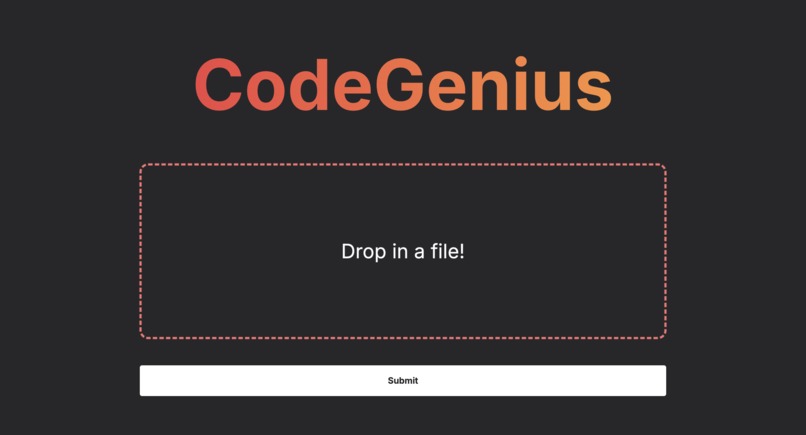
The landing page where you upload a file or a zip file.
-
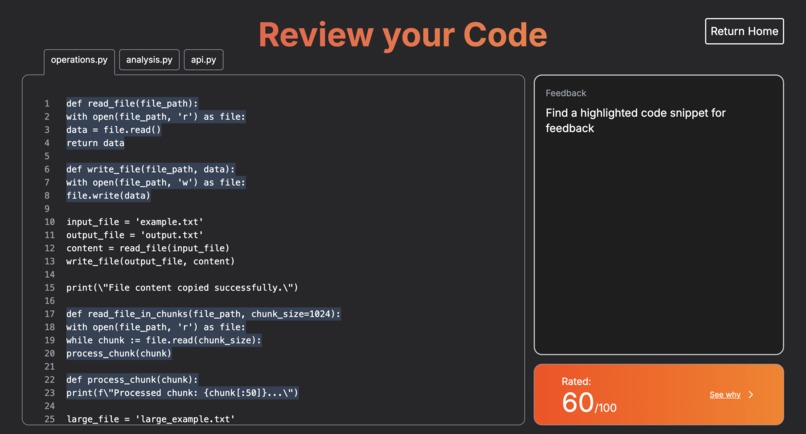
The annotations page where you can preview your code in multiple tabs.
-
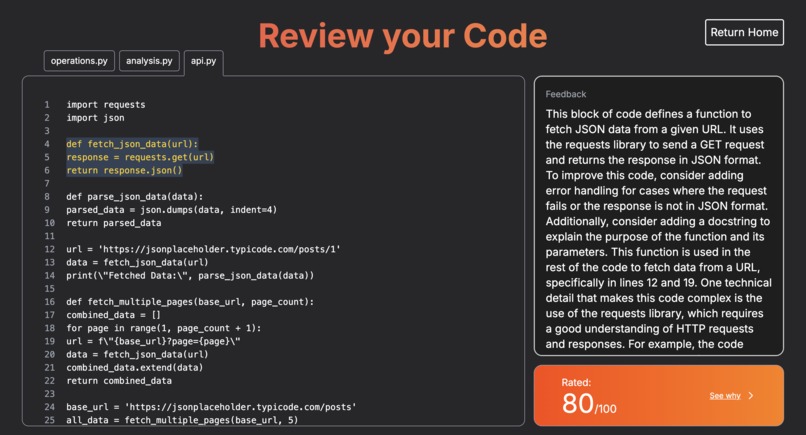
The feedback section where you can learn how to better structure your code.
-
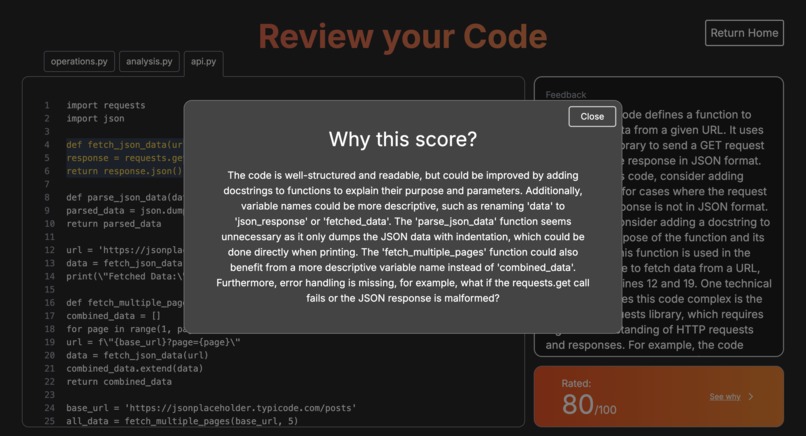
The scoring page where you can see why the code got the score it did.


Inspiration 💡
Growing up we all used Genius to understand exactly what our favourite musicians were saying. Similarly, we noticed that when building software, there has been times where we're given a piece of code where we have absolutely no idea what's happening. Whether at work, school or using open source code, seemingly ambiguously-written software is prevalent everywhere. We wanted to created an application that can take the guessing out of reading code and the documentation around said piece of code. Similar to Genius, documentation would be made in the form of annotations pertaining to certain areas of the program that could be harder to understand then others. Modern LLM technology can help us determine what constitutes as a "difficult to understand" piece of code.
What It Does 🤔
CodeGenius starts with the user input. Users can drag-and-drop either a singular code file or a larger .zip file with many different code files in it. It can parse most modern programming languages, but our models have been tested and prompted with mostly Python3 code. Then, in seconds all files provided by the user are annotated! Certain sections of the program are highlighted as areas of potential confusion for someone else reading it. Then, upon either hovering over (or clicking on) the section of code, a more detailed annotation is provided.
This annotation consists of three main parts: 1) What does this piece of code actually do? 2) How does it intertwine with the rest of the program/project as a whole? 3) Where do possible sources of confusion come from from this piece of code?
The annotation aims to answer all three questions, leaving the reader more knowledgeable about that piece of software, the programming language, and how to read code as a whole.
All these annotations are packaged and are easily sendable through a unique URL, making it perfect to send over a Slack message or on Notion.
Each code file also gets a "readability" score, graded out of 100 (with 100 being the most readable code possible). If a user clicks on this score, they get an explanation on why the LLM thought that piece of code is deserving of that specific score.
How We Built It 👥
We instantly knew we wanted to make something to help developers (like ourselves!), so we set out on a very long ideation phase until we settled on an idea that helps all programmers, from teenagers to seasoned veterans. Then, we drew wireframes on how our application could potentially look like at the end, and how it could flow into a developer's normal workflow. We then took those wireframes and started creating a working frontend using Next.js, Tailwind CSS and TypeScript. We left creating the animations and designs for the website till the last part. First, we just wanted to build our MVP. So, we spent most of Friday and Saturday building out the system that can take in code files and store that data in an accessible JSON format. Then, we connected our frontend to a Flask backend, where we called Groq via API call and used Llama's powerful 3.1-70b-versatile model. We added more stylistic features and design elements to make it easier to use, such as tabs for respective files in a .zip file.
Challenges We Ran Into 😅
A massive problem that we ran into was connecting Groq's responses to our websites frontend. It didn't work for a very long time due to its incompatibility in outputting data that TypeScript's JSON functions are compatible with. So, it took hours of data manipulation and being creative with existing JSON parsing functions to get our data to properly show on the frontend.
A second problem we ran into was ensuring the output from Llama was accurate. The LLM often hallucinated and gave us false info. For instance, the LLM often gave us the wrong line numbers when referring to parts of a program it thought were too "complex". Learning prompting techniques (like few-shot learning or prompt chaining) and other data manipulation techniques allowed us to mitigate these problems and get accurate answers. Now after implementing these techniques, most of the LLMs responses are accurate!
A third challenge we ran into was figuring out how to design a user friendly website. We knew we wanted to make an application that's easy to use, but still has that URL-sharing feature to easily integrate in a modern workflow. It took a lot of ideation and experimenting with different frontend libraries, but we're happy with our end product with TypeScript and Next.js.
Accomplishments That We're Proud Of 🥳
We're very proud of the fact that we managed to build a complete application that is run through a LLM that solves a real-world purpose, helping code become more readable and usable. For a lot of us this was our first time working with LLMs in such a capacity, and our first time building a full-stack Next.js application with a Flask backend.
What We Learned 📚
- The importance of user feedback in refining AI-generated content.
- Techniques for optimizing performance and responsiveness in web applications.
- Best practices for designing intuitive and user-friendly interfaces.
- How to effectively integrate AI and machine learning models into a real-world application.
What's Next for CodeGenius 🔮
First of all, we want to do is host the application on Vercel so that everyone can benefit from CodeGenius. Then we would like the LLM to gain context between each file that is input into CodeGenius so that the LLM can Identify how the separate files work together and make suggestions to the whole project as a whole if applicable. Lastly, we would like to incorporate GitHub compatibility such that Git repos can be imported directly.
Try It Out🧪
https://github.com/MatthewFrieri/code-genius
Built With🛠️
- Next.js
- Tailwind CSS
- TypeScript
- Flask (Python)
- Groq (for Llama)
Team Members
David Crimi Matthew Frieri Rishabh Sharma Shervin Darmanki Farahani
Built With
- css3
- flask
- html5
- javascript
- llama
- next.js
- python
- tailwind


Log in or sign up for Devpost to join the conversation.