


Inspiration
In our careers, we've often found ourselves effortlessly developing entire features, only to hit a roadblock when it came to writing a PR description. There were also instances when we dove into code reviews, only to wonder, 'What does this code even do?'
That's where Ada AI (Inspired by Ada Lovelace - the first person to ever write an algorithm) comes into play. She's our solution to ease these common pain points in the development cycle. While she won't replace human reviewers, we believe she can significantly reduce the time spent in the review process.
What it does
Ada is a developer companion that helps you with the following tasks:
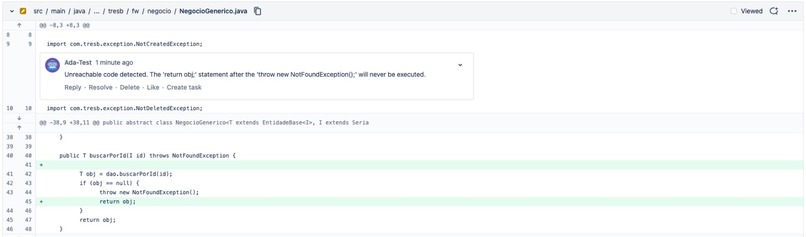
🤖🔍 Code review
Ada does the initial code review, she can point out improvements and general comments about the code.
This will be a great help to the developers giving them impartial feedback.
🤖🔧 Suggestion for your PR description integrated with JIRA
Have you ever got stuck on writing a description for a PR? Ada can help you generate a description in no time! Even using the description from the Jira Task that your PR relates to, and the best thing is that you have to do absolutely nothing!!!
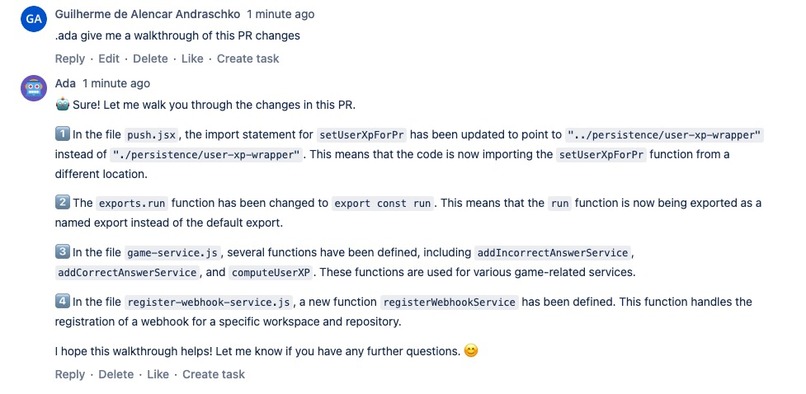
🤖💬 Interact with Ada during the review cycle
You can talk to Ada while you are reviewing a PR, ask her to walk you through the code, make a summary of the changes
or any doubts you might have about the PR.
How we built it
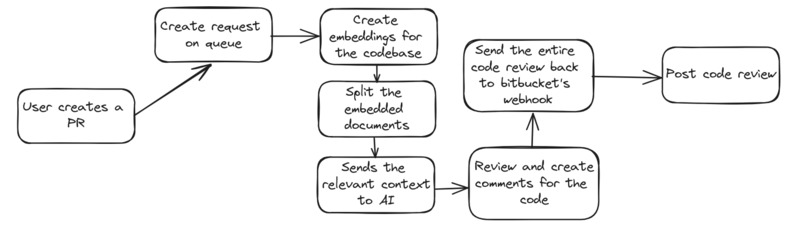
Ada AI aims to integrate Bitbucket + Jira + AI to improve developer productivity. This is the flow:
- Any Bitbucket Pull Request creation and Pull Request comment will hit the forge webhook.
- Then, it will request our AI interact layer, which will call OPEN AI.
- Some complex operations were designed to be asynchronous. That means, when the AI generates the response, it will call back a forge webhook
- Bit Bucket API is called to update PR comments/description
- Jira API is called to help to build PR descriptions. This is possible only when setting up the JIRA Token, and if the branch has the same ID as the JIRA Card.
So, we used:
- Forge modules: web-trigger (to be called by BitBucket and our AI API), jira: Global Page and custom UI (for setup)
- Langchain API (layer to interact with Open AI API) deployed on Vercel
- Open AI (LLM model)
Privacy
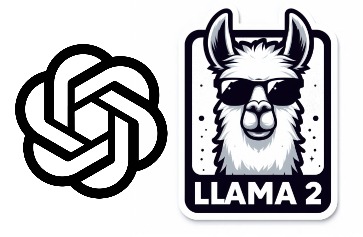
We offer both options for the users to use Ada, through OpenAI GPT-4, or use their custom and private LLM using Ollama, if users prefer they can change the settings at any time, and point to their Ollama Server.
Improvements and limitations
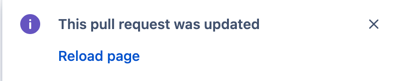
We are currently using a comment session on Bit Bucket in order to talk to Ada, but it's not quite designed for that, so maybe in the future when the Bitbucket forge module is not on the Early Access Program we can try to deliver a better user experience. Another alternative would be to work with Atlassian to improve comment session responsiveness. Currently, this PR page requires a click on the notification to reload the page, or in the last case refresh the browser.
Supported language formats:
cpp, go, java, js, php, proto, python, rst, ruby, rust, scala, swift, markdown, latex, html, sol.
Challenges we ran into
Using the Bitbucket comment session to work as a Chat was very challenging. Also, Forge limitations on timeout made us decide to push for an async solution. But still sometimes webtrigger runs 3 times, probably due to some timeout, if there was a possibility to not retry would be better.
Accomplishments that we're proud of
We have managed to deliver a code reviewer and assistant for developer, that helps improve our day to day life, that in out of itself is incredible, we are also very confident we are delivering a very competitive project.
What we learned
We got deeper into Atlassian integration and also integrating with AI APIs, also a deeper understanding of embeddings and LLMs.
What's next for Ada AI
We expect to test this solution in a real company, plus we hope to present it to the Audience in Amsterdam :D
Setup
- Install the App via the installation link then navigate to the JIRA project you have installed, then see the top bar, there will be "Apps" > "Ada AI". You will see it:
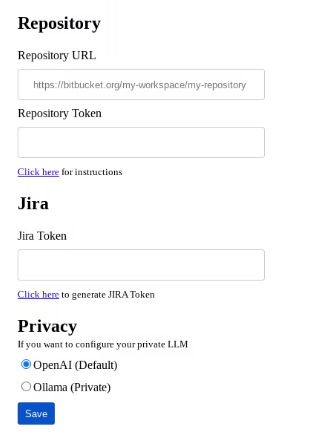
- Repository Name: Copy the following link, but remember to replace WORKSPACE by your workspace and REPOSITORY by the desired repository,
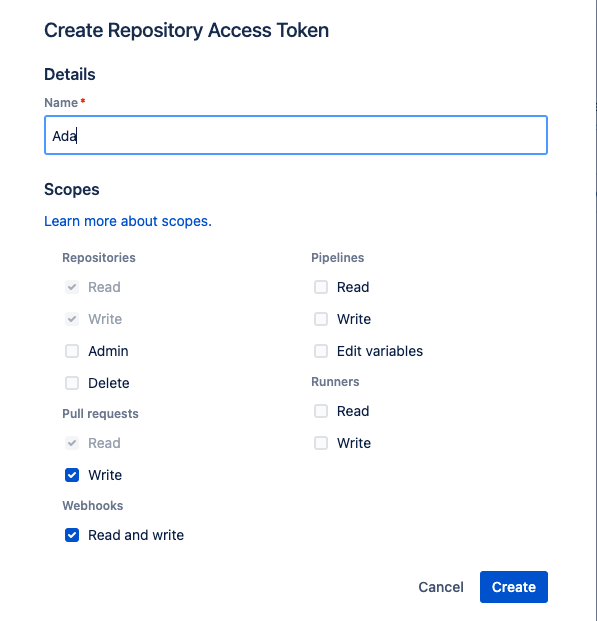
- Repository Token: Access: https://bitbucket.org/WORSPACE/REPOSITORY/admin/access-tokens, click on create a repository access token. Give 'Ada' as the name and select Pull Request Write, and Webhooks Read and Write, like the picture below
- Jira Token:
- Go to https://id.atlassian.com/manage-profile/security/api-tokens
- Create API token
- (Optional) Now you are set! Create a branch (matching the Jira card ID to make sure you will get your PR description well described),
- Open a PR. Then you will see that your code changes got reviewed by Ada, and the description session will be updated with a new concise comment.
- Feel free to interact with Ada through the comment session, you will need to use the command '.ada' before any interaction, like '.ada Who are you?' or '.ada give me a walkthrough of this PR'
Built With
- forge
- javascript
- langchain
- openai


Log in or sign up for Devpost to join the conversation.