-
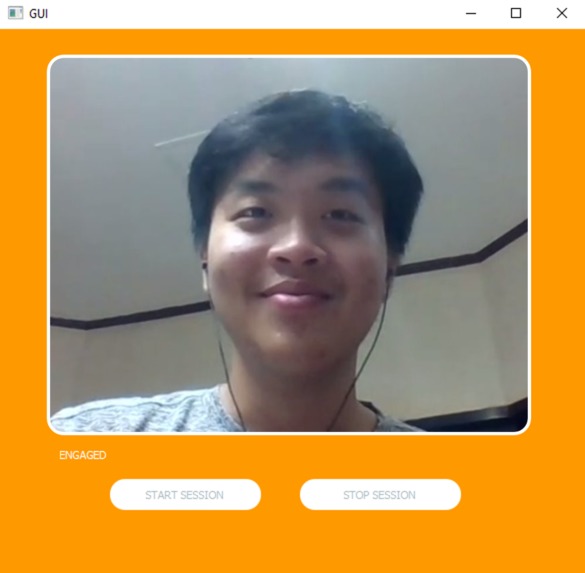
Demo

Inspiration
Little kids who have to stay at home during this pandemic. It can't possibly be easy for them to stay focused in the classroom while trying to study from home, especially during in this crucial stage in their early childhood education.
What it does
This desktop application allows the both users to see whether or not the student, in this situation, are paying full attention. The program tracks the eyes of the person on call, utilizing computer vision to track whether or not the person has their eyes set on the computer screen or not. Notifications will arise when the user does not pay attention and it can be clearly seen by both parties. This way both the students and teachers will be able to have a higher quality education.
How we built it
We built the program using the cv library in python, more specifically we applied the cascade classifier which is a model design for face and eye detection. In the project, we pass the video captured by the front webcam through a Gaussian filter and created a grey scale image from that. The Susan principle is utilized to highlight light and dark spots to help with edge detection. We then use the cascaded model to allocate the eyes and face at that particular frame. Then the program compares the current eye locations of both and right and left eyes with the previous frame. The ratio that indicates the horizontal and vertical direction of the gaze which is changing over time which means that we can track this parameter to see whether or not the person is paying attention or looking at the computer screen.
Challenges we ran into
We ran into problems with the user interface. We wanted to connect the user interface to the back-end code that we already have established to identify the eyes and the pupil. The interface that we designed on Figma was unable to display the correct engagement values and so this required a long tinkering session on our part.
Accomplishments that we're proud of
We are proud of learning how to utilize UI for the first time as well as learning to utilize computer vision for the first time.
What we learned
We learned how to test different algorithms for eye detection, making sure that we have the optimal way of tracking a person's gaze. Furthermore we also learned how to utilize QT as a UI design tool.
What's next for DooDeeDee
Right now we only have it on a one to one basis, however ideally this should be expanded towards a larger audience. So hopefully we can integrate multiple people onto the same system so that teachers will have more access to all of their students.


Log in or sign up for Devpost to join the conversation.