-
-
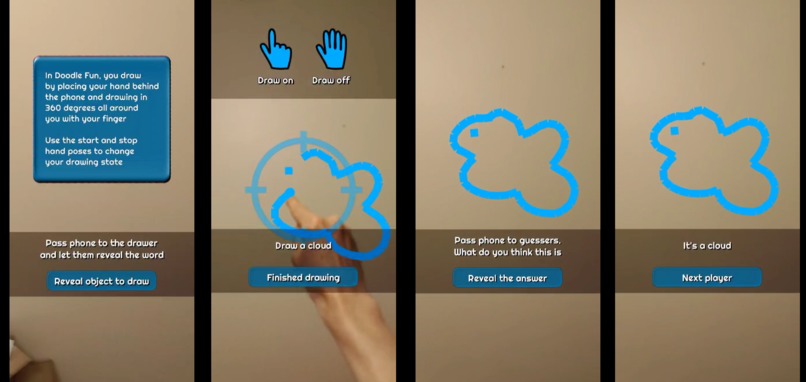
Game UI flow

Inspiration
I wanted to create something that would be fun to play with friends while introducing them to Snapchat world lens features. I wanted to include hand tracking to bring the user into the experience and was inspired by Googles "QuickDraw" machine learning experiments to do something with drawing.
What it does
- The drawer takes the phone and presses a button to be given a simple object to draw.
- They hold their hand behind the phone and use two special hand poses. A pointed finger is used to draw and a fully open hand stops drawing, allowing you to reposition your pen.
- You can draw all around you in 360 degrees. When you are done, give the phone to the guessers and they see if they can figure out what it is .
- A final button press reveals the answer to the amazement of your friends. It's quite challenging to make recognisable objects, but this just adds to the fun and laughter.
How we built it
This simple looking game took a great deal of consideration.
Hand tracking
I tried numerous approaches to make the drawing and non-drawing hand detection poses as robust as possible. The final solution uses a pointed finger to draw and an open hand to pause / stop drawing. A definite pointing pose is required to start drawing so you can position your hand before you start, but then a more forgiving pointing pose is used. The open hand will work if your fingers are together or apart as I noticed a tendency for people to not keep their fingers together as per the icon. The user is also encouraged to keep their finger within a target area to improve tracking accuracy. I also cope with fast movement where tracking is temporarily lost and regained within a short time period and a straight line is drawn between the 2 points.
Tracking method
Rotational tracking is used, allowing the phone to be passed between players while keeping the drawn image stable and in place.
Mesh builder
A mesh builder is used to create the lines drawn. The lines are really a 3d model that is made up of lots of small squares. I have to ensure that the vertices are arranged so that each square properly faces the camera and has end sides that are perpendicular to the direction of flow.
Challenges we ran into
I originally wanted to use Google's Quickdraw machine learning to also try to guess your drawings. While I did get this implemented, the guesses never proved to be accurate, so while a good learning experience, I had to leave this out of the release build. Drawing continuous lines, needs pretty solid tracking, so it took time to create a more robust solution and work around potential issues, such as temporary tracking loses and less reliable pose detection as the hand obscures itself at different angles. Originally I used a pinch pose to draw and a fist to stop drawing, but these were less reliable. I had to experiment with different ways to detect the poses with a degree of leniency.
Accomplishments that we're proud of
I'm pleased with the pose detection (although I could keep improving it) and the custom mesh as both got me deeply into the scripting elements of Lens Studio. I think using a spraying sound was a good way to add additional feedback to the player about the drawing state. I like how the drawer can use all the space around them to draw, much better then being limited to drawing on a screen.
What we learned
I gained knowledge of machine learning (I had no prior experience) even though my custom machine learning didn't make it into the final version. This was my first use of Lens Studio and Snapchat so I learned about the tool and platform. I covered material creation, textures, a custom mesh, audio and did lots of scripting.
What's next for Doodle fun
Add connected play support. Maybe have a count down timer.
Built With
- lensstudio


Log in or sign up for Devpost to join the conversation.