-
-
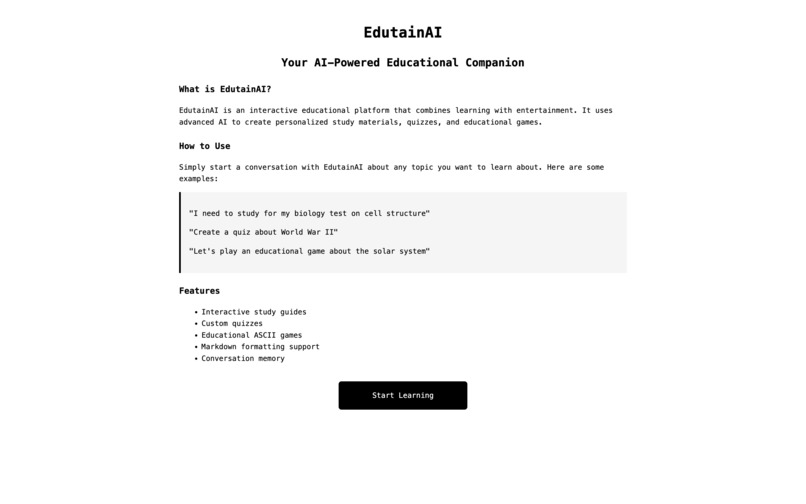
Landing Page
-
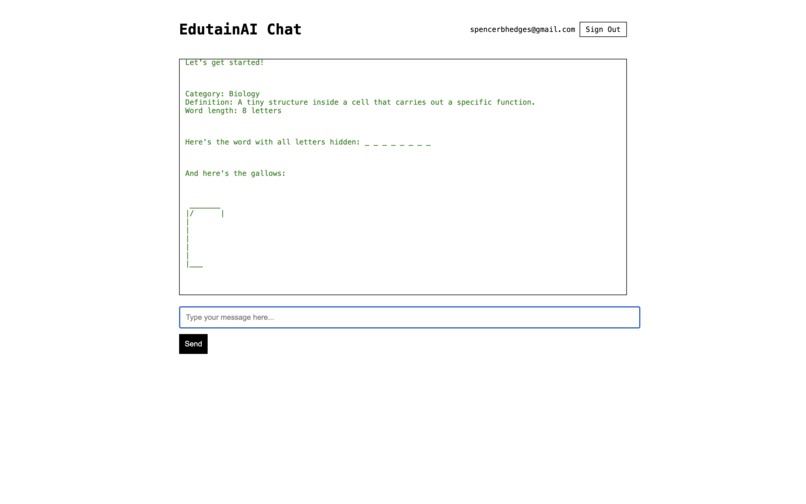
Chat Page


EdutainAI
Why I Made This
Hi! I'm Spencer and I made EdutainAI because school can be kinda boring sometimes. I was like, "What if learning was fun?" So I made this thing that's like having a robot friend who makes games, learning!
What It Does
- Play games while learning stuff (way better than homework!)
- Get help with your schoolwork without it being boring
- Take quizzes that are actually fun
- Learn about anything you want
- It's like having a super smart friend who's always ready to play!
How I Made It
- A really smart AI (OpenAI API)
- Made a website
- Made it remember conversation context
- Put in games and quizzes
The Hard Parts
- Making the AI understand kid talk
- Making games that are fun but also teach you stuff
- Getting everything to work right
- Keeping your stuff safe
- Making sure the AI is nice all the time
What I'm Super Proud Of
- Making learning feel like playing games
- Making an AI that's actually helpful
- Making cool games like Hangman
- Making a website that's easy to use
- Getting everything to work together
What I Learned
- Games make hard stuff easier to understand
- AI can be really helpful
- Making simple stuff is actually hard
- Everyone learns differently and that's cool!
Q&A
What problem you're solving? Many kids find traditional learning methods boring and disengaging. The problem is that education often feels like a chore rather than an exciting adventure. EdutainAI solves this by making learning feel like playing games, helping kids stay engaged and motivated while they learn.
How your project fits this year’s theme
- Using cutting-edge AI to create personalized learning experiences
- Transforming traditional educational content into interactive games
- Making learning accessible and fun for all kids
- Using technology to break down barriers to education
- Creating a new way of learning that's both effective and enjoyable
What tech or AI tools you used?
- Frontend: HTML, CSS, JavaScript for the website
- Backend: Firebase for user authentication and data storage
- AI: OpenAI's GPT-4 for intelligent responses and game generation
- Databases: Firestore for storing user data and chat history
- Authentication: Firebase Auth for secure user login
- Markdown: Marked.js for formatting text
Any challenges or learning moments?
- AI Understanding: Making sure the AI understands kid-friendly language and questions
- Game Balance: Creating games that are both engaging and hard
- User Experience: Making the interface simple enough for kids to use
- Data Security: Keeping user information safe and secure
- Performance: Making sure everything runs smoothly ## Challenges and Learning Moments
- Kids learn best when they're having fun
- Simple interfaces are often the hardest to design
- Testing with real users helps a lot
What's Next
- Add more games
- Make it work on phones
- Add cool pictures
- Make learning adventures
- Make it even more fun!
Try It Out!
- Make an account (it's free!)
- Pick what you want to learn
- Play games and take quizzes
- Save your stuff
- Have fun learning!
Got Ideas?
If you have cool ideas for:
- New games
- Stuff to learn about
- Ways to make it better
- Cool new features
Tell me! I'd love to hear your ideas! :)
Built With
- chatgpt
- firebase
- github
- html
- javascript
- openai


Log in or sign up for Devpost to join the conversation.