-
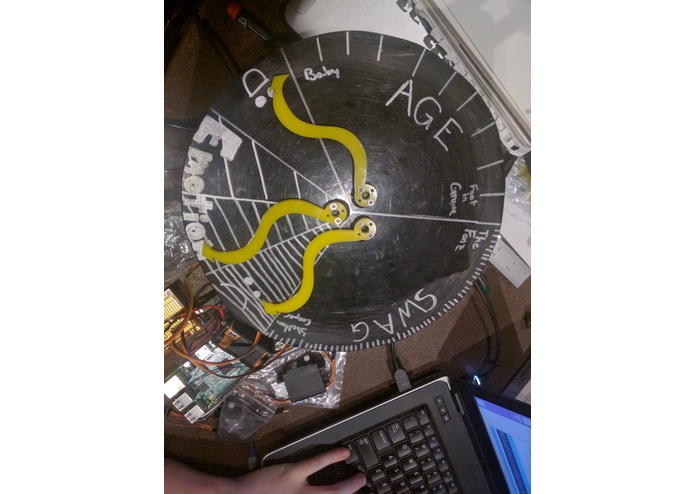
Picture of the clock!

Inspiration
We took inspiration from the Weasley Family clock from Harry Potter. The clock tells the user not the time, but the location of their family members. However, we don't really care where other people. We just want to judge them. Emoticlock has not just functionality, but personality. It sometimes throws shade at the user by insinuating that they are old and have no swag. Emoticlock is informative, playful, and sassy.
What it does
The Emoticlock leverages Microsoft's Cognitive Service APIs through Azure to gauge Age, Emotion, and Swag Factor of the user in front of it.
How we built it
We built Emoticlock using rapid protyping techniques like 3D printing and laser cutting. Python handles the backend, pulling images from a laptop webcam, and accessing Microsoft's services for evaluating them. Python also handles communication, sending commands over Serial to the Arduino for processing. The Arduino handles the movement. It controls the servos that communicate how it judges you.
Challenges we ran into
Communication over Serial with the Arduino is difficult. We had some trouble sending smooth commands due to issues with the Serial Buffer. Taking an image with Python via OpenCV and sending that to the Microsoft APIs for evaluation was also difficult. We powered through and ended up with a functional product.
Accomplishments that we're proud of
Functionality. We got hardware together pretty early on and had a lot of time at the end of the day for debugging. It enabled us to add some features to the Emoticlock like a dramatic fall of the hands when a user walks away.
What we learned
We learned about the power of the cloud. Microsoft's APIs made judging people very easy and took much load off of us. We also learned about manufacturing circles with traditional machine tools. The laser cutters were very clogged up, so we took it into our own hands to manufacture the Clock Face. Using a Bandsaw, Drill Press, sandpaper, and file, we were able to get a circular face. We also made our own Arduino shield for controlling the servos.
What's next for Emoticlock
Completely compartmentalizing to a Raspberry Pi. We want this clock to stand alone, and currently it must be tied to a computer to work. To do this, we will work with the Raspberry Pi to send servo commands and also have to interface with the Pi-Cam. We also want to add more functions to Emoticlock to give it more personality. These could be the hands spinning wildly when it is pet, or even deliberately being insulting when it thinks you deserve it.


Log in or sign up for Devpost to join the conversation.