-
-
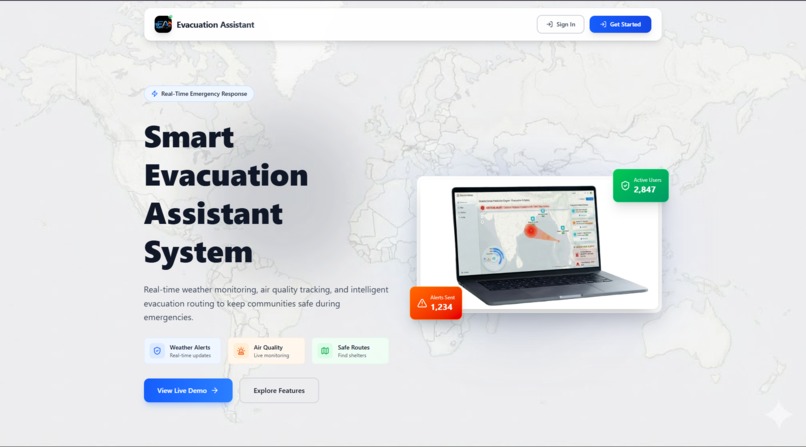
Landing-page
-
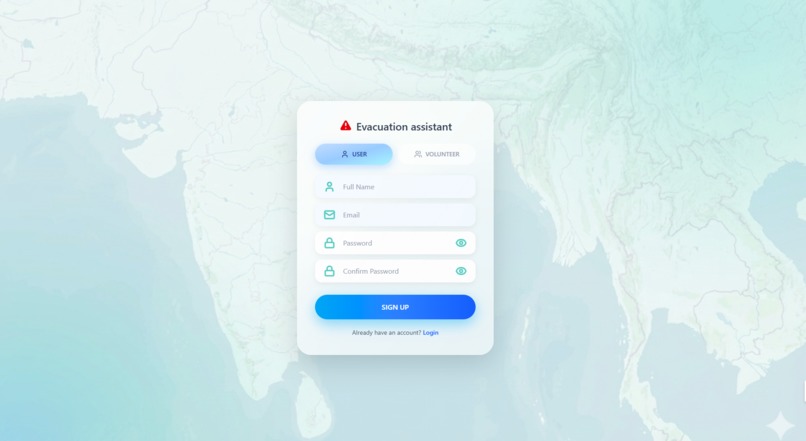
Sign-in-Page
-
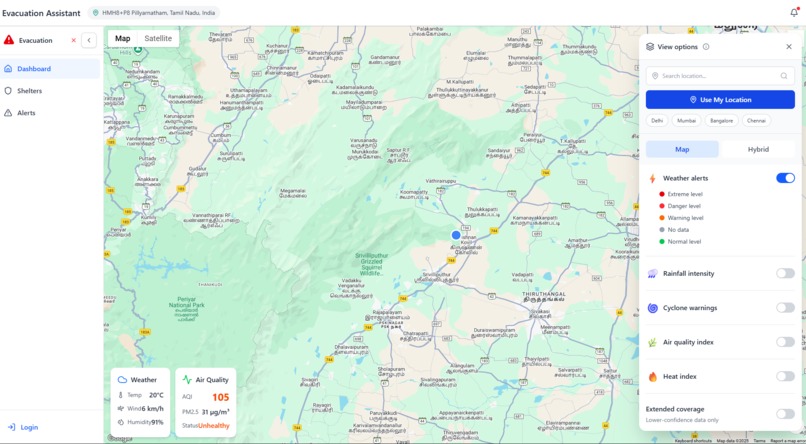
Dashboard
-
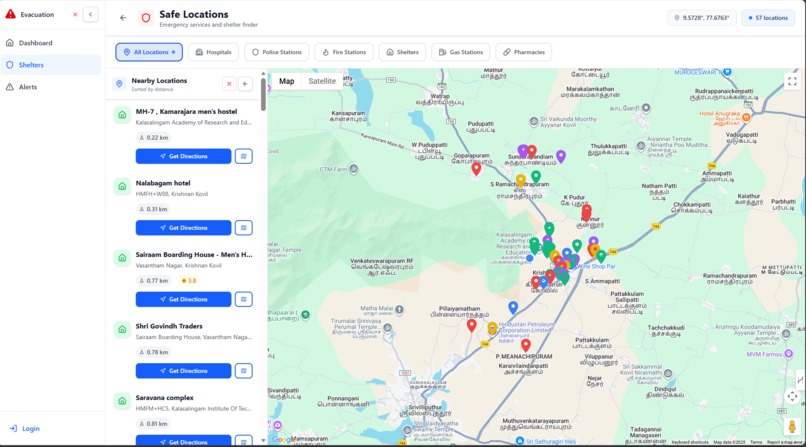
Shelters-page
-
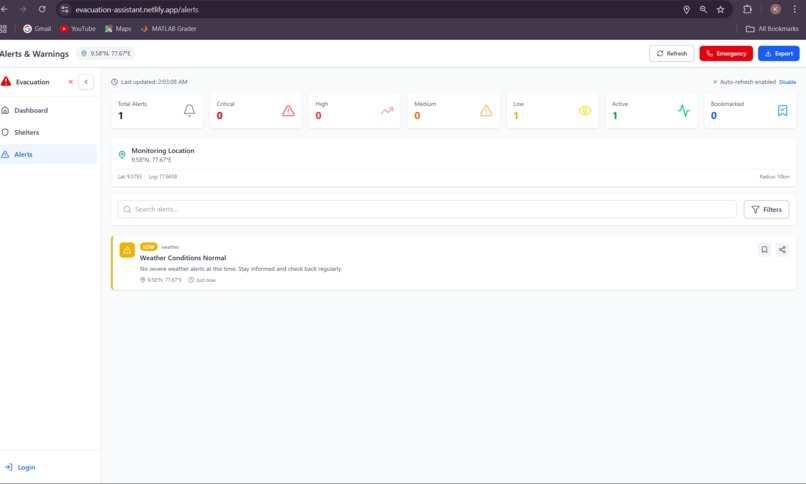
Alerts-Page


Evacuation Assistant - Project Description
Inspiration
Natural disasters and emergencies are becoming increasingly frequent and severe due to climate change. During critical moments, people need immediate access to accurate information about weather conditions, air quality, and safe evacuation routes. We were inspired by recent disaster events where communities struggled to find real-time information and locate emergency shelters quickly.
We envisioned a system that could automatically detect a user's location, provide real-time environmental data, and guide them to safety - all in one intuitive platform. Our goal was to create a tool that could potentially save lives by making critical information accessible to everyone, regardless of their technical expertise.
What it does
Evacuation Assistant is a comprehensive real-time emergency response system that helps communities stay safe during disasters and emergencies. Here's what it offers:
Core Features:
Automatic Location Detection
- Instantly detects user's current location using browser geolocation
- Provides fallback locations if permission is denied
- Displays location name with reverse geocoding
Real-Time Weather Monitoring
- Live temperature, humidity, and wind speed data
- Rainfall intensity tracking
- "Feels like" temperature calculations
- Weather condition descriptions
Air Quality Index (AQI) Tracking
- Real-time AQI measurements
- PM2.5 and PM10 particle monitoring
- Color-coded health status indicators
- Pollution level assessments
Interactive Map System
- Google Maps integration with custom markers
- Click anywhere to get detailed location information
- Distance calculations from user's position
- Hybrid and standard map views
Multi-Layer Data Visualization
- Weather alerts with severity levels
- Rainfall intensity heatmaps
- Cyclone warning overlays
- Air quality index layers
- Heat index monitoring
- Customizable layer toggles
Emergency Shelter Finder
- Locate nearby hospitals
- Find police stations
- Identify fire stations
- Discover emergency shelters
- Gas stations and pharmacies
- Real-time directions and routing
Weather Alert System
- Automatic alert generation based on conditions
- Severity-based categorization (Low, Medium, High)
- Detailed safety recommendations
- Emergency contact numbers
User Role Management
- Regular users for personal safety
- Volunteer accounts for emergency response coordination
- Secure authentication with Firebase
How we built it
Technology Stack:
Frontend:
- React.js - Modern, component-based UI framework
- React Router - Seamless navigation between pages
- Tailwind CSS - Responsive, utility-first styling
- Lucide React - Beautiful, consistent icons
- GSAP - Smooth animations and transitions
- Google Maps API - Interactive mapping and geocoding
Backend & APIs:
- Node.js & Express - Backend server and API routes
- Firebase Authentication - Secure user management
- Firestore - User data storage
- Open-Meteo API - Real-time weather data (free, no API key required)
- Open-Meteo Air Quality API - Live AQI measurements
- Google Geocoding API - Location name resolution
- Google Places API - Emergency facility search
Development Tools:
- Vite - Fast build tool and dev server
- Git & GitHub - Version control and collaboration
- ESLint - Code quality and consistency
Architecture:
Component-Based Design
- Modular, reusable React components
- Separation of concerns (UI, logic, data)
- Custom hooks for shared functionality
API Service Layer
- Centralized API calls in
apiService.js - Error handling and fallback mechanisms
- Automatic retry logic for failed requests
- Centralized API calls in
State Management
- React Context for authentication
- Local state for component-specific data
- LocalStorage for user preferences
Responsive Design
- Mobile-first approach
- Breakpoint-based layouts
- Touch-friendly interactions
Key Implementation Details:
- Location Detection: Implemented with browser Geolocation API with 8-second timeout and high accuracy mode
- Weather Data: Integrated Open-Meteo API with WMO weather code interpretation
- AQI Calculation: Primary source from Open-Meteo with backend fallback
- Map Interactions: Custom info windows with real-time data fetching on click
- Alert Generation: Rule-based system analyzing weather conditions
- Routing: Google Directions API for optimal evacuation paths
Challenges we ran into
1. Location Detection Reliability
Challenge: Browser geolocation can be slow, denied, or unavailable.
Solution:
- Implemented 8-second timeout with fallback to default location (New Delhi)
- Added manual location search functionality
- Provided clear user feedback during detection
- Graceful error handling with meaningful messages
2. API Rate Limits and Costs
Challenge: Many weather and mapping APIs have strict rate limits or require payment.
Solution:
- Switched to Open-Meteo API (free, unlimited, no key required)
- Implemented backend proxy for sensitive API calls
- Added caching mechanisms to reduce redundant requests
- Created fallback data for when APIs are unavailable
3. Real-Time Data Synchronization
Challenge: Keeping weather, AQI, and map data synchronized across components.
Solution:
- Centralized data fetching in parent components
- Props drilling for data distribution
- Implemented loading states and error boundaries
- Added refresh mechanisms for stale data
4. Cross-Origin Resource Sharing (CORS)
Challenge: Direct API calls from frontend were blocked by CORS policies.
Solution:
- Created backend proxy endpoints for sensitive APIs
- Configured proper CORS headers on backend
- Used environment variables for API keys
- Implemented secure request validation
5. Map Performance with Multiple Layers
Challenge: Rendering multiple data layers caused performance issues.
Solution:
- Lazy loading of map overlays
- Conditional rendering based on user selection
- Optimized marker clustering
- Debounced map interaction events
6. Responsive Design Complexity
Challenge: Making complex map interfaces work on mobile devices.
Solution:
- Mobile-first design approach
- Touch-optimized controls
- Collapsible panels for small screens
- Adaptive font sizes and spacing
7. "Unknown Location" Display Issues
Challenge: Reverse geocoding failures showed "Unknown Location" to users.
Solution:
- Improved error handling in geocoding functions
- Display coordinates as fallback instead of "Unknown"
- Added retry logic for failed geocoding requests
- Better API response validation
Accomplishments that we're proud of
1. Seamless User Experience
We created an intuitive interface that requires zero learning curve. Users can access critical information within seconds of opening the app.
2. Real-Time Data Integration
Successfully integrated multiple real-time data sources (weather, AQI, maps) into a cohesive, synchronized system.
3. Automatic Location Detection
Implemented robust location detection that works reliably across different browsers and devices with intelligent fallbacks.
4. Interactive Map Features
Built a fully interactive map where users can click anywhere to get detailed environmental information - a feature that sets us apart.
5. Multi-Layer Visualization
Created a sophisticated layer system allowing users to visualize different environmental data simultaneously.
6. Emergency Shelter Integration
Successfully integrated Google Places API to provide real-time information about nearby emergency facilities with directions.
7. Responsive Design
Achieved a fully responsive design that works flawlessly on desktop, tablet, and mobile devices.
8. Performance Optimization
Despite handling multiple APIs and real-time data, the app loads quickly and runs smoothly.
9. Clean, Maintainable Code
Wrote modular, well-documented code following React best practices and modern JavaScript standards.
10. Complete Feature Set
Delivered a production-ready application with authentication, multiple pages, and comprehensive functionality.
What we learned
Technical Skills:
API Integration Mastery
- Working with multiple third-party APIs simultaneously
- Handling API failures gracefully
- Implementing fallback mechanisms
- Managing API keys securely
Geolocation & Mapping
- Browser Geolocation API intricacies
- Google Maps JavaScript API advanced features
- Reverse geocoding and address formatting
- Custom map overlays and markers
Real-Time Data Handling
- Fetching and synchronizing data from multiple sources
- Managing loading and error states
- Implementing data refresh strategies
- Caching for performance
React Advanced Patterns
- Context API for global state
- Custom hooks for reusable logic
- Component composition and props drilling
- Performance optimization with React
Responsive Design
- Mobile-first development approach
- Tailwind CSS utility classes
- Breakpoint-based layouts
- Touch-friendly interfaces
Soft Skills:
Problem-Solving
- Breaking down complex problems into manageable pieces
- Finding creative solutions to technical limitations
- Debugging across multiple layers of the stack
User-Centric Thinking
- Designing for emergency situations
- Prioritizing critical information
- Creating intuitive interfaces under pressure
Time Management
- Prioritizing features based on impact
- Balancing quality with deadlines
- Iterative development approach
Research & Learning
- Quickly learning new APIs and technologies
- Reading documentation effectively
- Finding solutions to unique problems
What's next for Evacuation Assistant
Short-Term Enhancements (1-3 months):
Push Notifications
- Browser push notifications for severe weather alerts
- Customizable alert preferences
- Location-based automatic alerts
Offline Mode
- Service worker implementation
- Cached map tiles for offline access
- Stored emergency contact information
- Last known location data
Multi-Language Support
- Internationalization (i18n) implementation
- Support for major languages (Spanish, Hindi, Chinese, etc.)
- Localized weather descriptions
Enhanced Alert System
- Integration with official weather services (NOAA, IMD)
- Historical alert tracking
- Alert sharing via SMS/WhatsApp
- Community-reported hazards
User Profiles & Preferences
- Save favorite locations
- Custom alert thresholds
- Preferred units (metric/imperial)
- Emergency contact list
Medium-Term Features (3-6 months):
AI-Powered Predictions
- Machine learning for disaster prediction
- Pattern recognition in weather data
- Risk assessment algorithms
- Personalized safety recommendations
Community Features
- User-reported incidents
- Real-time crowd-sourced information
- Volunteer coordination system
- Community safety status updates
Advanced Routing
- Multi-stop evacuation routes
- Traffic-aware routing
- Accessibility-friendly paths
- Alternative route suggestions
Shelter Management
- Real-time shelter capacity tracking
- Check-in/check-out system
- Resource availability (food, water, medical)
- Volunteer assignment
Integration with Emergency Services
- Direct connection to 911/emergency numbers
- Automatic location sharing with responders
- Emergency SOS button
- Medical information sharing
Long-Term Vision (6-12 months):
IoT Integration
- Connect with smart home devices
- Automated emergency responses
- Sensor network integration
- Real-time environmental monitoring
Government Partnerships
- Integration with official emergency systems
- Data sharing with disaster management agencies
- Official alert distribution
- Evacuation order coordination
Mobile Applications
- Native iOS app
- Native Android app
- Wearable device support (Apple Watch, Fitbit)
- Offline-first architecture
Advanced Analytics Dashboard
- Historical data visualization
- Trend analysis
- Risk mapping
- Predictive modeling
Global Expansion
- Support for all countries
- Region-specific disaster types
- Local emergency service integration
- Cultural adaptation
Accessibility Features
- Screen reader optimization
- Voice commands
- High contrast mode
- Simplified interface option
Enterprise Solutions
- Corporate emergency management
- School safety systems
- Hospital evacuation coordination
- Large venue emergency response
Research & Development:
Satellite Imagery Integration
- Real-time disaster visualization
- Damage assessment
- Flood mapping
- Fire spread tracking
Blockchain for Data Integrity
- Immutable alert records
- Verified shelter information
- Transparent resource distribution
Augmented Reality (AR)
- AR navigation for evacuations
- Hazard visualization
- Safe zone identification
Drone Integration
- Aerial surveillance during disasters
- Supply delivery coordination
- Search and rescue support
Social Impact
Our mission is to make emergency preparedness and response accessible to everyone, regardless of economic status or technical expertise. We believe that access to real-time safety information is a fundamental right, and we're committed to keeping Evacuation Assistant free and open to all communities worldwide.


Log in or sign up for Devpost to join the conversation.