-
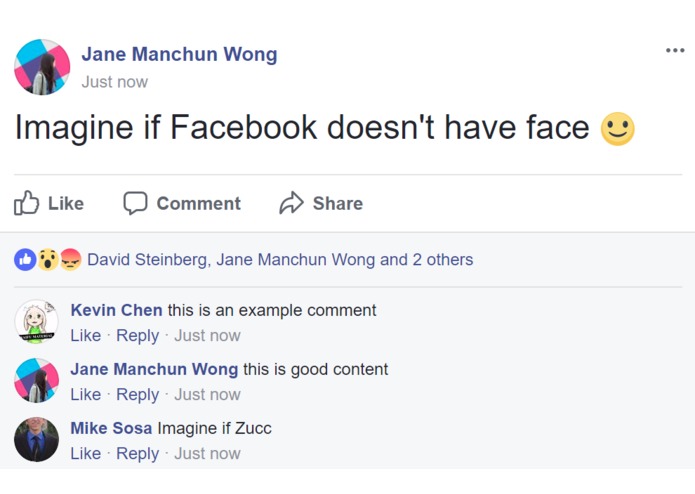
Before
-
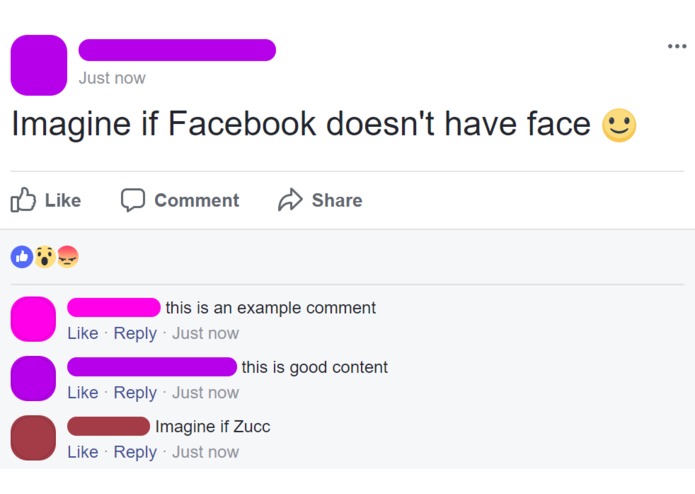
After!


Inspiration
Whenever we wanted to take a screenshot of something funny or interesting on Facebook, we had to blur out everyone's names for the sake of privacy. This takes a LOT of time if there are multiple people and we want to keep track of who's who.
What it does
Facelessbook removes faces and names from a Facebook page so that you can respect and maintain privacy in screenshots.
How we built it
We made a Chrome Extension with basic framework and used JavaScript to edit the page on-click.
Challenges we ran into
Our biggest challenge was correctly identifying elements on the Facebook page. As we worked on this project, we realized more and more little elements on the page which could reveal names and lose privacy; and we ran into some difficulties altering the DOM to correctly hide specific people's statuses in groups, such as a member being new, a group admin, or a group moderator.
Accomplishments that we're proud of
We are really proud of reducing the difficulty of maintaining privacy. Hopefully, by making the process easier and extremely automated, more people will be willing to make the (greatly reduced!) effort to obscure names and pictures in screenshots.
What we learned
We learned some category theory and a little distributed functional JavaScript programming.
What's next for Facelessbook
The sky is the limit!! We'd love to add more options such as keeping the name of the user taking the screenshot name and posts visible, whitelisting specific names from being removed, customizable colors, and more. Hopefully, we will be able to introduce a nice user-friendly interface on right-click to manage these customizations.



Log in or sign up for Devpost to join the conversation.