-
-

The Booking Beaver is dreaming of becoming an F1 driver...
-
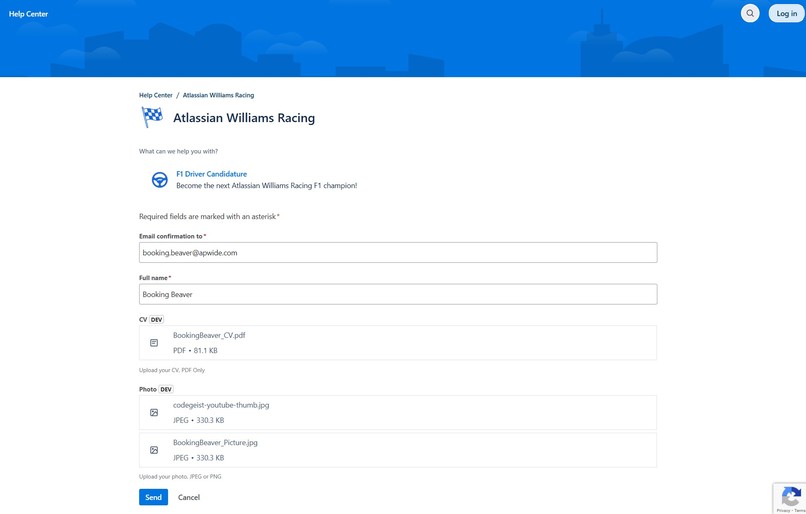
He applies through the JSM portal, attaching the required CV and photo.
-
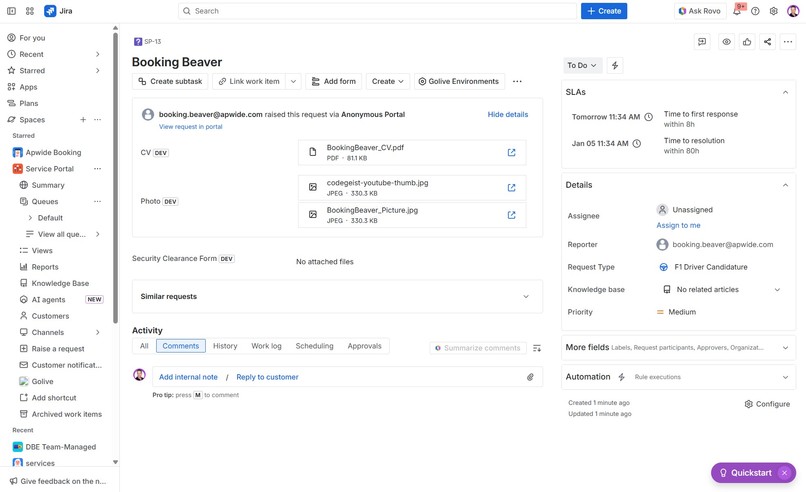
The application is saved as a new ticket, with attachments stored in dedicated file fields.
-

The recruiter reviews the application.
-
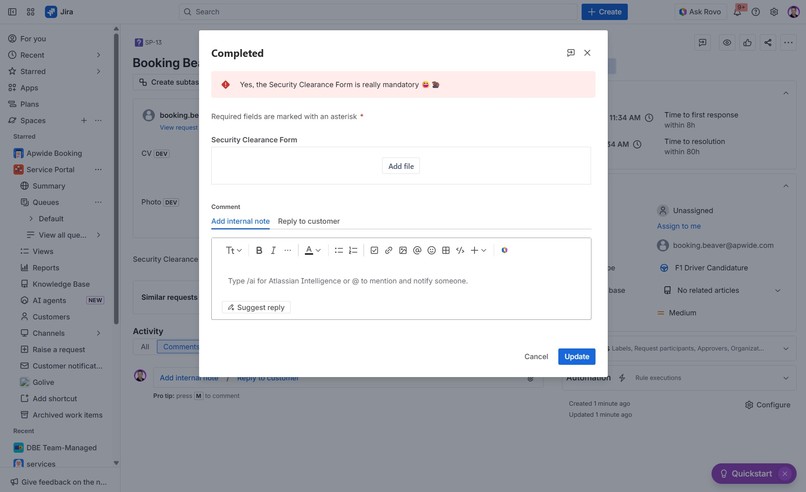
A security clearance form is required!
-
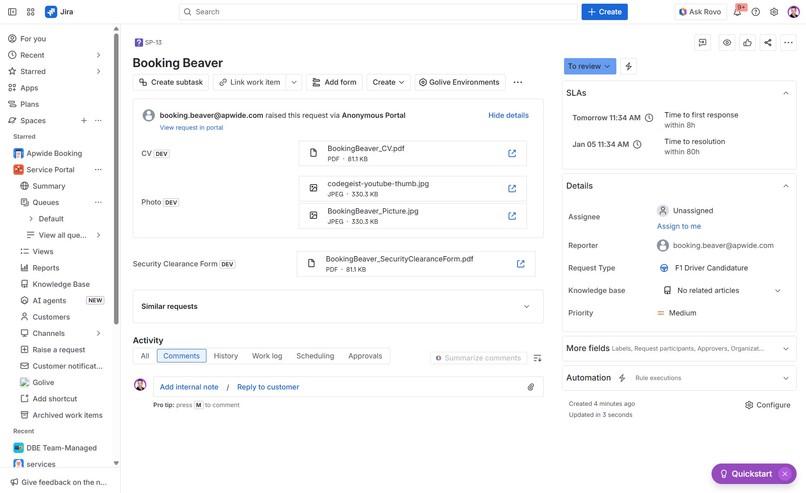
The Booking Beaver's application is now complete.
-

Time to train more! =)


Inspiration
Ten years ago, we started receiving requests from teams who needed to capture documents with purpose in dedicated attachment fields, instead of relying on generic Jira attachments. To address this, we released the first version of File Field for Jira Server in 2017.
As Jira Cloud adoption increased, the same requests came back from Cloud users, but platform limitations prevented a proper implementation. Recent advances in Forge finally changed that, and Codegeist 2025 was the right opportunity to bring File Field to Jira Cloud in a native way.
Inspired by the Atlassian Williams Racing theme, File Field Cloud is about precision: the right document, in the right place, at the right moment.
What it does
File Field for Jira Cloud lets teams create dedicated custom fields designed specifically for attachments, instead of relying on generic issue attachments. These file fields can be used on Jira and JSM screens, including the customer portal, and they can:
- Restrict file types (e.g. PDF only)
- Limit file size and number of files
- Be marked as required and block workflow transitions if files are missing
- Be used in Jira Automation rules
This enables structured, purpose-driven document handling for use cases such as recruitment, compliance, finance, ITSM, and approvals - all directly inside Jira, without external tools.
How we built it
File Field Cloud is built entirely on Atlassian Forge and runs on Atlassian, meaning files are stored directly within the customer’s Jira Cloud instance.
Key technical components include:
- Forge Object Storage (EAP) for secure and structured file handling
- Forge custom fields for Jira and Jira Service Management
- Forge Jira full page (preview)
To accelerate parts of the implementation, we also experimented Rovo Dev, Atlassian’s AI development assistant.
Challenges we ran into
Building on capabilities that are still in early access comes with limitations, as some features are not yet fully stable or fully documented.
Two main challenges remain today:
1- Files stored within Atlassian Cloud cannot be displayed as thumbnails in our file fields. Generating and storing thumbnails externally would break our Runs on Atlassian approach.
2- Files cannot be previewed or downloaded directly from the file field using dialogs. We must open or download them with a new browser tab.
These constraints are tied to current platform limitations rather than implementation choices. We expect future Forge improvements to help us overcome them.
Accomplishments that we're proud of
- Solving a long-standing customer problem by delivering a native solution running on Atlassian Cloud.
- Using Forge Object Storage (EAP) in a real-world scenario, beyond demos or prototypes.
- Enabling file uploads in dedicated fields on JSM portals, without relying on Jira Forms.
- Demonstrating that Forge can support advanced, secure, and fully Runs on Atlassian use cases.
What we learned
We learned that Forge can support far more complex and data-driven applications than many assume.
We also learned that users do not just want files in a single attachment section. They want intent, rules, and process enforcement around documents. When files are treated as first-class data, workflows become clearer and more reliable.
What's next for File Field Cloud
Our immediate next step is to launch File Field Cloud for all users as soon as Forge Object Storage becomes generally available, currently planned for February 2026.
In parallel, we plan to expand capabilities as the platform evolves, including new display options, thumbnail previews, additional file restriction controls, and downloadable file templates directly from file fields.
For teams struggling with managing all attachments in a single section, File Field Cloud provides a structured alternative. More details are available on our Marketplace listing: https://apwide.app/filefield
Built With
- atlassian
- coffee
- forge
- forge-object-storage
- jira
- jira-service-management
- react
- rovo-dev
- typescript




Log in or sign up for Devpost to join the conversation.