-
-

Project Logo
-
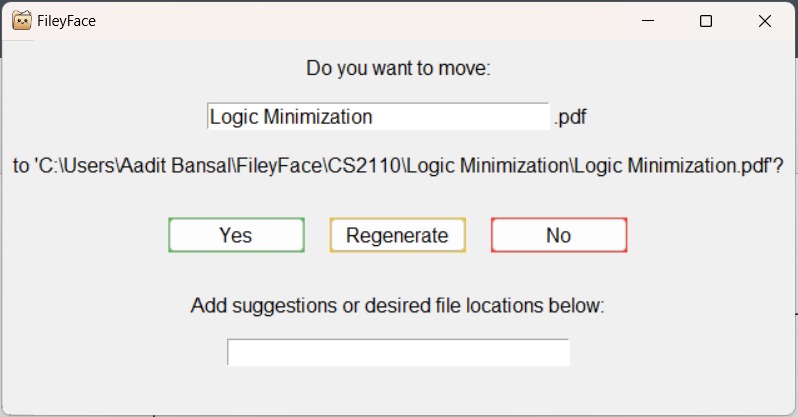
UI Example


Inspiration
FileyFace was conceived at a late-night dinner and brainstorming session among the team. We were going through our computers and saw one of our teammate's downloads folder. It was horrendous. Absolutely everything was in that folder: homework, personal projects, video downloads, random pictures, source code files, and more. We were laughing about it, and the idea suddenly came to us! An application that could organize your files for you.
What it does
FileyFace works in a three-step process: File Analysis, Decision Making, and File Placement.
File Analysis
Immediately upon file download, the file name and extension are read. The web address of download (e.g. "canvas.com" for an assignment download) is read from Chrome history, and the file is parsed and summarised depending on document type. OpenAI API assists in general file summarisation and RazorText API assists in keyword location based on weights in entities, phrases, words, and topics.
In the GUI, the user is able to change the file name of their download. If the name is changed, then the file name is re-read. The user is also able to add specific instructions, such as "put this file into the homework folder".
Decision Making
Firstly, our directory tree is loaded from computer using Python OS functionality. The file analysis data (file name, extension, summaries, web address) are evaluated by OpenAI API and the "best folder destination" is outputted to user. A new folder can be created with OS functionality if necessary (e.g. there are no existing acceptable folder matches) and miscellaneous files are filtered into an "Other" file. If the user is unsatisfied, the "Regenerate" button can be used to re-evaluate inputs for a potentially more accurate folder destination output. The "Regenerate" button can be pressed as many times as necessary.
File Placement
After the file is unzipped from package (if necessary), the Python OS package is used to move file from src to destination. If file already exists at that location, then file is left in the Downloads folder with a message to the user. If the file is successfully moved to the destination, its name, file path, and timestamp is stored in a file_history.csv file in the FileyFace folder.
How we built it
Our application leverages OpenAI and TextRazor APIs to immediately place a newly downloaded file into its best-suited folder. We use OpenAI's API to generate the final prediction score for each folder or whether a new folder should be created, and we use TextRazor to parse through keywords from each document. Our software engages with the Operating System in order to move, create, and rename files and has been heavily tested with the Windows OS. FileyFace supports multiple file formats, including .pdf, .docx, .pptx, .txt, and more! We use many Python libraries, including but not limited to: os, shutil, sqlite3, tkinter, pathlib, and watchdog. We are combining AI, OS, and Tech Stack to determine the intended folder location of a downloaded file, right when it's first downloaded.
Challenges we ran into
Aside from our blistering sleep deprivation, we also were challenged by a lack of experience with Tech Stack. There was a steep learning curve for Python watchdog (which we used to monitor the downloads folder of a computer) and TextRazor API (which we used to extract keywords from a large file). Additionally, it was particularly difficult to summarise the file contents and obtain the web address from which the file was downloaded. We tested multiple file summarising APIs, before deciding upon leveraging a combination of OpenAI API summarisation and TextRazor API keyword parser. To obtain the web address, we had to dig into File Explorer, and find the file that saves all Chrome history.
Accomplishments that we're proud of
We are honestly really proud of our product. Regarding functionality, we are proud of how well it works, and how much we were able to build in 36 hours. What takes a human at least 60 seconds, takes our application less than 5. Additionally, we are proud of our User Interface and GUI; it's complex on our end, but simple on the users. Our minimalistic GUI also lacks the steep learning curve of other software, making it more approachable for all ages and backgrounds.
What we learned
Prior to this project, none of us had experience working directly with Operating Systems. Thus, as expected, all four of us learned a great deal making a simple application that was designed to "micromanage" an OS. We also gained experience in using APIs efficiently and prompt engineering.
What's next for FileyFace
We have a lot coming up, including an automatic sort upon installation, customisation in setup wizard, and more robust AI methods.
See more on our website! fileyface.co


Log in or sign up for Devpost to join the conversation.