-

Logo
-
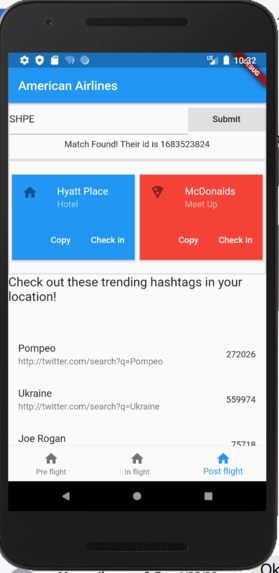
Android Version


Inspiration
- We wanted to make the transition of a passenger into a new city smoother, while also enticing companies to promote American Airlines!
- Our initial idea was to create a website since all of us had some experience in website building. But after discussing with the AA team, we decided to create a IOS and Android application since the majority public prefer to use an app over a website.
What it does
- It allows passengers to view trending twitter hashtags.
- It show popular places to eat and explore hotels at their destination.
How we built it
- Flutter to be able to create the IOS and Android application
- Google api to grab food places near your destination
- Twitter api to grab trending hashtags at your location
- MongoDB to store the information we receive from companies
- Weather api to check the weather
Challenges we ran into
- Flutter was new to all of us.
- Local database would not connect with our emulator.
- UI/UX issues
- not enough snacks at hackathon
- api calls would not work at first
Accomplishments that we're proud of
- We all learned some flutter and successfully connected it with MongoDB.
- We focused more on learning than getting a hardcoded project out
What we learned
- Flutter is way better than react native
- how to connect mongodb to applications
- sql vs nosql
- UI patterns
What's next for Destination Connection
- Check weather condition before flight. So if you are worried about missing your flight due to weather, we will warn you.
- Implement twillio api to give also text messages
Built With
- android-studio
- dart
- flight-engine-api
- flutter
- google-maps
- mongodb


Log in or sign up for Devpost to join the conversation.