-
-
"Gemini CodeSync" Logo
-

Chrome Extension Icon
-
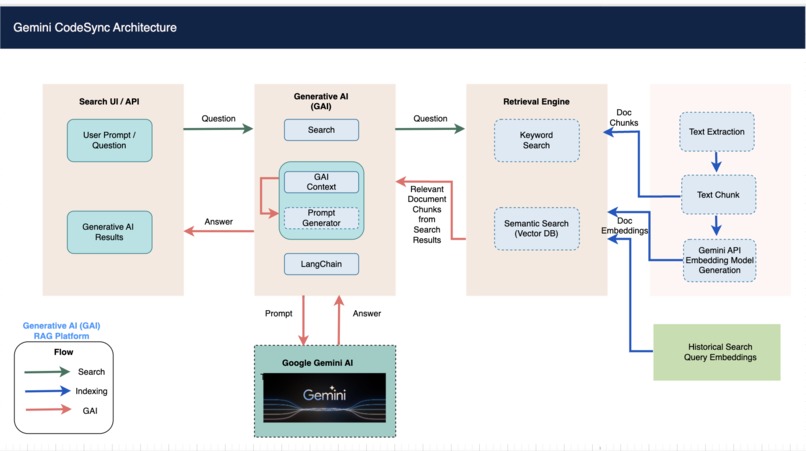
Architecture Diagram
-
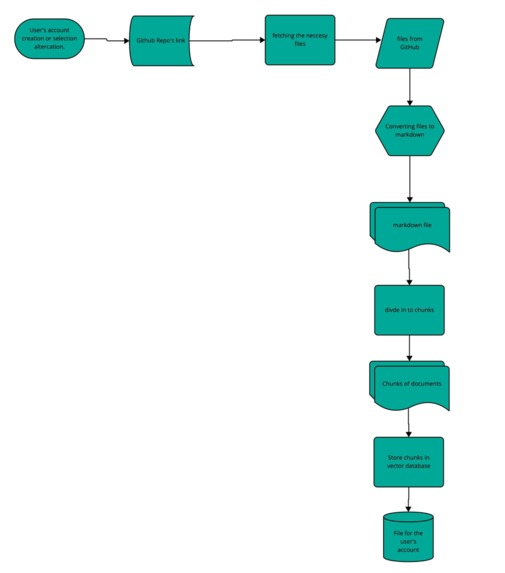
Flow Chart 1
-
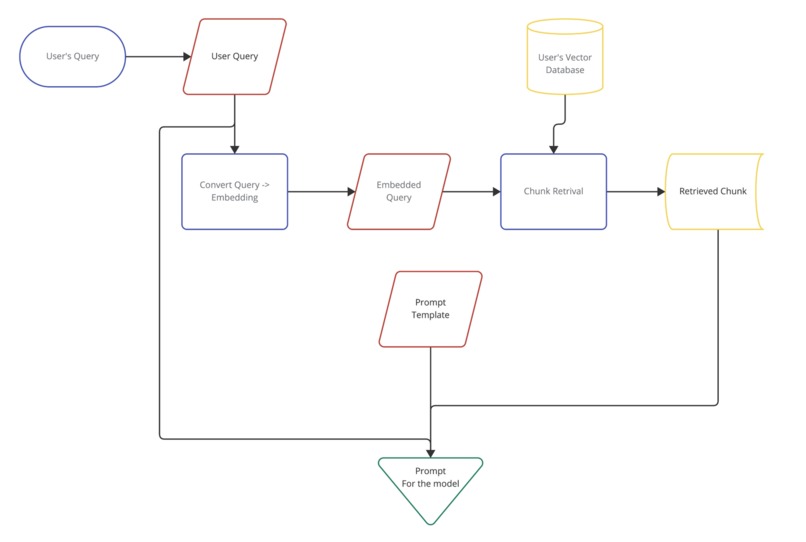
Flow Chart 2


Inspiration
Starting a journey in computer science can be a little daunting and it gets even worse if you have no prior coding experience. However, it is not limited to just that. There are people looking for a way to break into tech but language barriers are becoming a dealbreaker in this career journey. That's why we created a solution which will make coding easier and accessible to everyone, regardless of their background.
For real-world industry, in fast-paced technical consulting roles and projects with a tight deadline, it often fails to serve the purpose of comprehensive learning for the developers as there is not much time to learn beyond the basic concepts and look into better code and security practices. For new hires, it can be extremely hard to get familiar with the company codebase within a short amount of time and start making contributions as quickly as possible.
When we started thinking a little beyond that, as someone trying to explore open-source contributions the struggle is almost the same. From setting the code on the machine to making effective contributions, there is a lot of learning and going back and forth between communications through emails or any other similar platform takes forever, which eventually slows down the process.
What it does
Our product, a user-friendly Chrome extension powered by Gemini AI, is here to support through every step of the way. For learners, we understand that it can be a little difficult to copy and paste the code each time from one tab to Gemini, therefore we streamlined the process by introducing screenshot + chat functionality for our freemium model where the user can get easily tailored explanations with a chance to ask quick question through the chat feature.
For our premium model, we decided to provide direct integration with GitHub where our model can read from the public and user-owned private repositories with proper access and provide context-aware explanations which makes it easier for the user to learn better, get familiar with the code and context in a quicker time, tailored explanations and what's even more is that you can even ask it for the secure practices and in case you're accidentally leaking any confidential information through the chat feature.
How we built it
We built this Chrome extension using various technologies and tools, however primarily:
- For Frontend: TypeScript, JavaScript, cropper library, Chrome Extension API
- For Backend: Flask, Python, Gemini API (Gemini Pro and Pro Vision), Google Embedding API, GitHub API, RAG Framework (LangChain), Vector DB (ChromaDB), GitHub Oauth Apps
Challenges we ran into
There are multiple challenges while making the extension work from beginning to end and some major ones are as follows:
- Different technical expertise of team members which was a challenge at first, however with open communication and teamwork, we utilized those unique skills that each member carried and pulled it all together
- Unfamiliarity and lack of documentation of developing Chrome extensions with TypeScript
- Routing between different pages for the extension and GitHub Oauth Apps integration with it (primarily with callbacks and homepage URL)
- Using screenshot cropping feature directly through extension and synchronizing various API calls together
- Fetching Github private repositories through user Token so we had to pivot to following a different approach
- Storing the Github files through ChromaDB in markdown format and processing it as context for our model
Accomplishments that we're proud of
We are proud that we were able to make the application work with all weeks of research and group work. We are glad that we could create something that empowers individuals from various backgrounds, including those with limited coding experience and non-native English speakers so that they can embark on their journey with confidence. Above all, it's not just limited to learners, but tech professionals in consulting and similar work industries along with open source developers can benefit themselves from it.
We are happy to announce our creation and revolutionize the developer's journey. We are proud that we were able to solve the challenges that we faced in our day-to-day lives whether as learners or industry tech professionals.
What we learned
Through this journey, we learned invaluable lessons that helped our understanding of technology, teamwork, and problem-solving. Some key takeaways include:
- Effective Communication: Clear and open communication was essential for the success of our project to make sure that everyone had enough support to do the assigned tasks.
- Continuous learning: We realized the importance of continuous learning which was only possible by pushing ourselves out of our comfort zone. As none of us had worked on creating Chrome extensions before, it was new to all of us. We expanded our knowledge of different technologies, explored new development frameworks and honed our problem-solving skills with each challenge we encountered.
- Diversity drives innovation: Having a diverse set of people whether in terms of technical proficiency or background, it proved to be a strength. By leveraging each individual's unique expertise, we were able to overcome challenges and create a product which caters to a wide range of users.
What's next for Gemini CodeSync
While we're proud of what we've accomplished so far, we're also excited about the future of Gemini CodeSync. Here are some of our plans for the next phase of development:
- Automated Code Testing Integration: Enhance Gemini CodeSync with automated code testing capabilities, allowing users to easily test their code for errors and vulnerabilities directly within the extension.
- Security Vulnerability Detection System: Implement a robust security vulnerability detection system to help users identify and address potential security risks in their codebases.
- Personalized Learning Paths: Introduce personalized learning paths tailored to each user's skill level and learning goals, providing guided pathways for continuous skill development and growth.
- Integration with Additional Platforms: Explore opportunities to integrate Gemini CodeSync with other platforms and development tools, expanding its reach and usability for developers worldwide.
This is just the beginning!
Built With
- chromadb
- chrome-extension-api
- figma
- flask
- gemini-api
- gemini-pro
- github
- github-api
- google-gemini-ai
- javascript
- langchain
- node.js
- oauth
- python
- react
- typescript





Log in or sign up for Devpost to join the conversation.