-
-
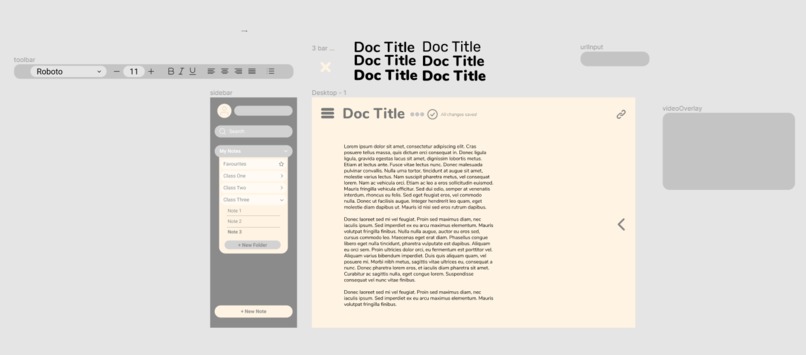
We created our design in using Figma

Inspiration
We've experienced the difficulty of learning online and teaching yourself, finding ourselves often watching many hours of YouTube videos to learn the topics from lecture, as well as getting lost on YouTube and procrastinate. We wanted a way to make studying easier and more productive.
What it does
Inscription is a clean and modern note-taking app with embedded video to allow for studying while having the peace of mind your work is saved in the cloud securely. The minimal design lets you write your notes in peace without having distractions from the YouTube recommended section.
How to use
First head to our site at: link and also linked down below.
Make your account that will be used to store all your notes.
After you create your note, just get the link to the video you want to watch while studying, and put it into the link URL section.
Enjoy studying and having any YouTube video play, as well as having captions, playback speed, and other features provided by YouTube.
Remember, all your notes are saved automatically, so don't worry about losing your notes.
How we built it
We built Inscription using the React framework for JavaScript and CSS for speed and customization. We also used Google Firebase to handle the database -- using Firestore for the live database. Before we started, we used Figma to draft a concept of our site.
The full list of technologies used are:
JavaScript
- Node.js
- React
- React Context API
- Firebase Authentification
- Firebase Firestore (database)
- Google Fonts API
CSS
Tools
- Figma
- Spotify (of course)
Challenges we ran into
When we developed the first version of the project we hadn't integrated authentication. After the integration all users had the same notes; it turns out they were all using the same collection. To fix this problem we used the users' email for the collection, that way each user has their own collection.
We also ran into issues with embedding the video. The normal YouTube URL's wouldn't work with the embedding component. They would only work with an embedded link so we had to make a function to convert the normal YouTube URL to embedded links.
Accomplishments that we're proud of
We're proud of how we were able to utilize the React Context API to share information across the application. Prior to this hackathon none of us had used it before, we were able to learn and utilize it to meet our own unique challenges. Also, we were able to learn and deploy a functional authentication system and integrate it with our system. We're also proud of having a live database to auto-update the notes after every change, linked with their emails it created a cool Google Docs-esque app.
What we learned
We learned how to utilize various higher-level React Hooks such as useContext, useRef as well as designing our own custom Hook. We also learned how to integrate firebase authentication and Firestore within our application. Finally, we were able to learn how to provide real-time saving for the document similar to what Google Docs does.
What's next for Inscription
After this, we want to provide more advanced editing functionality for the editor such as adding tables, images and other media. Also, we want to allow users to navigate for videos within the editor as opposed to entering the URL. Finally, we want to support other types of documents such as PowerPoints and excel files.


Log in or sign up for Devpost to join the conversation.