-
-
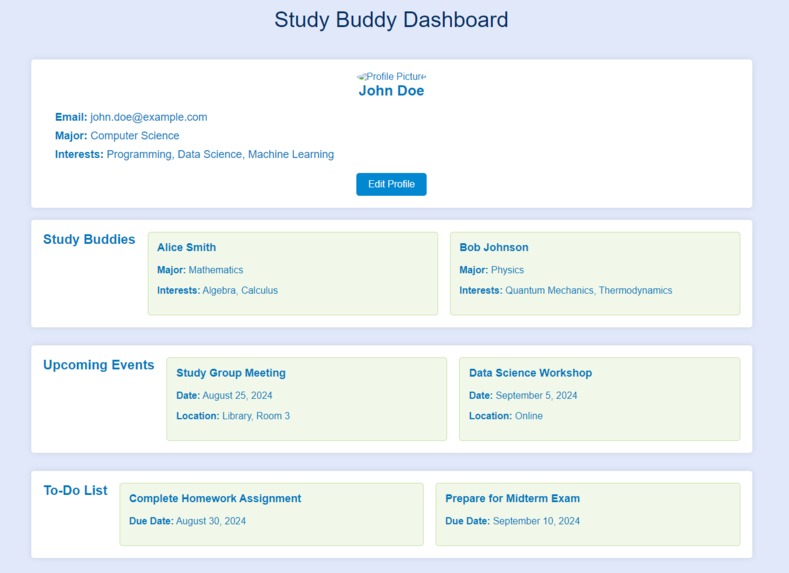
Personal Dashboard
-
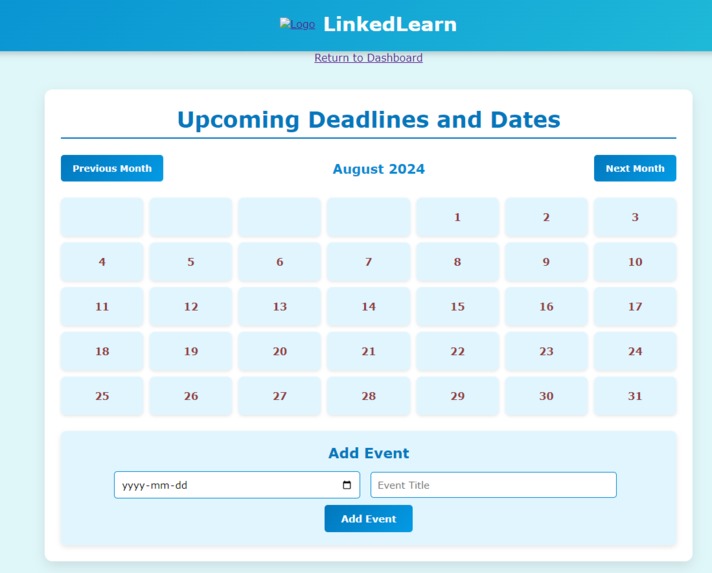
Calendar/upcoming events
-
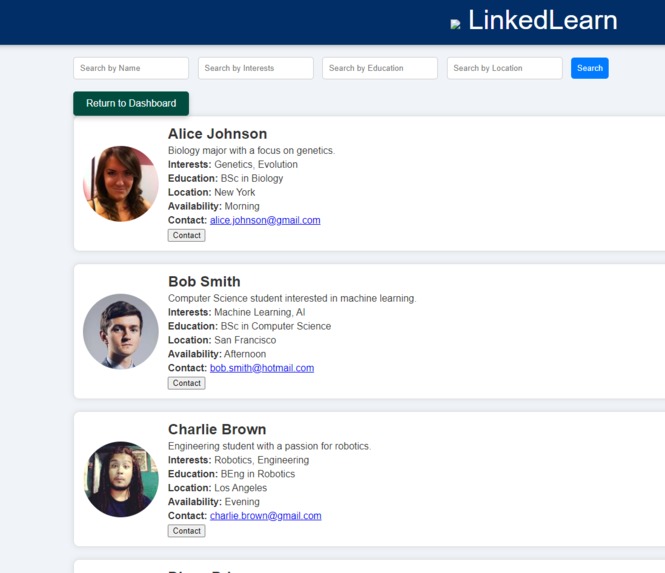
Study Buddies available


Inspiration: With students around the globe navigating stressful high school courses and university exams, issues such as procrastination, lack of motivation, and loneliness often occur. Inspired by our own experiences with these problems, we decided to create an application for students to take control and accountability of their studies. With study groups, students can engage in collaborative learning to be more productive and optimize their academic success.
What it does: LinkedLearn allows users to sign up then sign in to their account, where they are then taken to their profile dashboard. Under the “find buddies” tab of the dashboard, students can find others in their area and filter by name, interests, education and location for their convenience. After selecting a buddy they are interested in connecting with, they can chat through a chatbot on the website. They can send messages, complete surveys, add their meetings to their own personal calendar, and modify their profile.
How we built it:
- Planning the Project Before diving into development, we spent time planning what LinkedLearn would look like and how it would work. We decided that the website should allow students to easily find study partners based on their interests, location, and availability. We used canva to make a working prototype as to how our desired product would look. We then aimed to convert that prototype into a product using code.
- Designing the User Experience We wanted to make sure that using LinkedLearn would be easy and enjoyable. This meant designing how the website would look and how users would interact with it. We focused on creating: Search Features: Users can search for study buddies based on different criteria. User Profiles: Each user has a profile with information about them, like their study interests and contact details. Interactive Elements: Buttons, forms, and other interactive features that make it easy for users to navigate the site.
- Building the Frontend The frontend is everything that users see and interact with on LinkedLearn. Here’s how we built it: HTML: This is the basic building block that defines the structure of the website. For example, it tells the browser where to put text, images, and buttons. CSS: We used CSS to make the website look good. This includes choosing colors, fonts, and layout styles. We used a blue theme to make the site visually appealing and consistent. JavaScript: This makes the website interactive. For instance, JavaScript handles the search functionality and updates the user interface when you click buttons or enter information. React.js: We used a tool called React.js to build the frontend more efficiently. React helps manage the different parts of the website and ensures they work together smoothly.
- Developing the Backend The backend is where all the behind-the-scenes magic happens. It handles data storage, user management, and other essential functions: Node.js: This is a technology that allows us to run JavaScript on the server. It handles requests from the frontend and performs actions like saving user information or searching for study buddies. Express.js: This tool helps us manage how the server communicates with the frontend. It processes requests and sends back the necessary information. MongoDB: This is our database, where all user data and profiles are stored. It’s like a big digital filing cabinet that keeps everything organized and accessible. We used an online cloud server, MongoDB Atlas, which allowed us to store user data.
- Making the Website Live Once the website was built, we needed to make it accessible to users: Deployment: We used services like Heroku and Vercel to host LinkedLearn. This means that the website is stored on servers and can be accessed by anyone with an internet connection. Version Control: We used GitHub to keep track of all changes to the website’s code. This is like a detailed log of everything we’ve done, making it easier to manage updates and fix issues.
- Testing and Improving Before launching, we made sure everything worked correctly: Testing: We checked the website for bugs and issues using special tools. This included testing different features to ensure they performed as expected. Monitoring: After launch, we continued to monitor the website to catch and fix any new issues. We used tools that alert us if something goes wrong, allowing us to quickly make improvements.
Challenges we ran into:
- User Authentication and Security Challenge: Ensuring that user data was secure and that the authentication process was reliable was critical. Handling passwords and sensitive information required careful management. Solution: Implemented bcrypt to hash and securely store passwords. Used Passport.js for managing user authentication and sessions. Configured HTTPS to encrypt data transmitted between users and the server.
- Cross-Origin Resource Sharing (CORS) Challenge: When connecting the frontend and backend, we faced issues with CORS, which prevented the frontend from making requests to the backend due to security restrictions. Solution: Configured CORS settings in the Express.js backend to allow requests from the frontend domain. Implemented CORS middleware to handle preflight requests and set appropriate headers.
- Handling User Data and Database Management Challenge: Managing and efficiently querying user data, especially with a growing number of profiles and interactions, presented a challenge. Solution: Utilized MongoDB for its flexible schema and scalability. Implemented Mongoose to create data models and manage database interactions smoothly. Optimized database queries and indexed frequently searched fields to improve performance.
- Responsive Design Challenge: Ensuring that the website looked good and worked well on different devices (phones, tablets, desktops) was challenging. Solution: Used Bootstrap for responsive design components and grid systems. Conducted extensive testing across various devices and screen sizes to ensure consistency.
- Performance Optimization Challenge: As the number of users and data grew, the website’s performance began to lag, impacting user experience. Solution: Implemented lazy loading for images and components to reduce initial load time. Optimized JavaScript and CSS files by minifying and bundling them. Leveraged caching strategies to improve response times for frequently accessed data.
- Deployment and Environment Configuration Challenge: Deploying the application and managing different environments (development, staging, production) introduced complexities. Solution: Used netlify hosting, simplifying the deployment process. Managed environment variables using tools provided by the hosting platforms to securely store sensitive information.
- Error Handling and Monitoring Challenge: Identifying and fixing bugs in a live environment required effective error tracking and monitoring. Solution: Integrated Sentry for real-time error tracking and performance monitoring. Set up automated alerts to notify the development team of issues, enabling prompt resolution.
- User Interface Consistency Challenge: Maintaining a consistent and aesthetically pleasing user interface across different parts of the application required careful design. Solution: Applied design patterns and CSS frameworks to ensure a cohesive look and feel. Conducted user feedback sessions to refine the design based on real user experiences.
- Integration of Third-Party Services Challenge: Integrating third-party services for features like email notifications or external APIs posed compatibility issues. Solution: Conducted thorough testing and validation to ensure seamless integration. Used API documentation and SDKs provided by third-party services to streamline the integration process.
- Scalability Concerns Challenge: Ensuring that the application could scale as the user base grew was a critical concern. Solution: Designed the application with scalability in mind, using cloud services that support automatic scaling. Implemented load balancing and distributed database architecture to handle increased traffic and data load.
Accomplishments we’re proud of: A feature we are proud of is the “find buddies” tab under the dashboard profile of the user. Allowing the user to filter their buddy search enables them to connect with profiles most similar to theirs, optomizing their success and increasing their possibility of not only meeting study buddies, but lifelong friends!
What we learned: Over the course of this 36-hour hackathon, we developed as a team and strengthened a variety of skill-sets. We learned how to work efficiently under a strict time-constraint while producing quality work. Through building our prototype, we learned to understand what the user wants which allowed us to build our creativity with this project. As for the technical skills, we learned the fundamentals of front-end design and how to use react.js to make a website more visually appealing. Our goal was to make all the website pages and elements consistent in design to provide a more plausible UI. For the back-end, we learned how to make secure data-pipelines for when the user signs up. We also learned the techniques to authenticate user sign-ins and store their data. We developed our skills in using MongoDB Atlas as a storage space for the data that our website will require. Finally, we also were introduced to the principles of scalability planning to take our project to the next level.
What’s next for LinkedLearn: Although we are extremely proud of our project, the possibilities are endless. WIth more time, LinkedLearn will introduce a time-blocking application, a more engaging way for students to manage their time, by allocating a set time interval for a task. Next, we would like to add a progress tracker, to track how much time the user is spending on the site which reflects their dedication to improving their study habits through LinkedLearn.
Built With
- atlas
- bootstrap
- cors
- css
- express.js
- html5
- javascript
- jest
- mongodb
- mongoose
- netlify
- node.js
- react.js


Log in or sign up for Devpost to join the conversation.