-
Logo
-
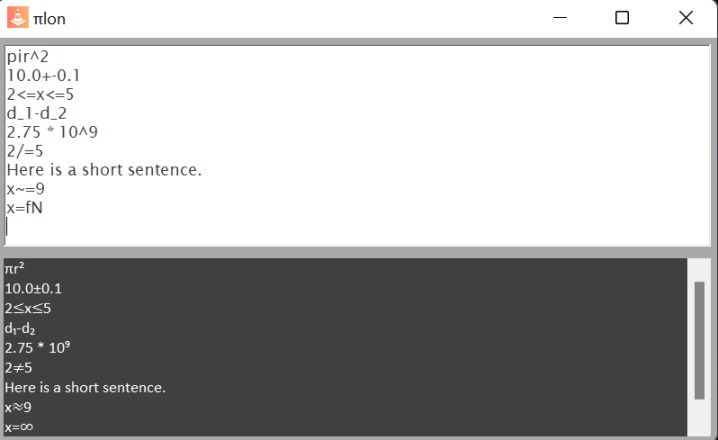
Current User Interface


Inspiration
Writing mathematical equations with a keyboard is time consuming, beyond basic arithmetic there are various symbols that are non-existent on a regular keyboard. While there are keyboard shortcuts to type these, most are difficult to remember and require a number pad which most modern day laptops and keyboards don't have. Most current equation writing tools do not help with this problem, they are time consuming and tedious, we wanted to fix that.
What it does
Our user friendly interface allows users to automatically convert their words into symbols. Take for example the symbol π, with our application users can simply just type "pi" and it will automatically convert into the symbol in real time. Users typing experiences will not be interrupted with this conversion and they can continue writing as if nothing happened. Our application allows this to be done with various other symbols, these include squareroots, exponents, subscripts and more. Through all their shortcuts users can save hours depending on their task by staying on one application and not having to jump between tabs to copy and paste their required symbols.
How we built it
We first considered how we wanted to store the corresponding mathematical symbols along with strings that users can easily type, and we figured that dictionaries were the best way to go, as they allowed us to store two values in pairs in a list and allows us to easily find which string corresponds to which mathematical symbol. We then needed to figure out how to print out the proper symbols, in which through some research, we discovered that C# supports strings formatted in Unicode. We then needed to solve how to be able to output the proper symbols in the program, which we spent a considerable amount trying to perform this task by detecting when a desired string was inputted then replacing such string with the corresponding mathematical symbol. We found this very difficult and couldn't think of a way to do this, mostly because the event sent by the textbox were received by the textbox first and couldn't be intercepted by the developer to act on the input before it reaches the textbox. However, this issue led us to come up with the solution of creating an output textbox in which the raw input goes into the first textbox and the intercepted and modified output goes out the second textbox. We then set up the dictionary to contain the necessary pieces of string that allows us to find where a mathematical symbol is required, and this is done by writing the program to suspect if a corresponding string to a mathematical symbol is coming, in which a string builds the upcoming corresponding string. If a match is found in the dictionary, then the second textbox outputs the correct mathematical symbol. Lastly, as we started to fill our dictionary with more and more symbols, we began to work on the visual appeal of the program, changing the shading and updating to the name of our program.
Challenges we ran into
Our group was entirely full of first time hackers who had no idea how a hackathon worked, we were lost many times along the way and needed guidance, having most our group being highschoolers our experience in this field was nothing exceptional. On top of this one member of the team did not have a laptop that supported Visual Studio Code or Github so they were not able to contribute to the code directly. Our original idea was a keyboard with math functions but we had too much difficulty setting it up and some of our equipment was faulty so we had to scrap that idea. Instead we decided to turn it into software, our goal was to make a chrome extension which would give users little pop up boxes underneath with suggestions, similar to that of Visual Studio Code to simplify writing equations without extra steps but we were under a heavy time constraint. We realized it would be impossible to complete our idea in time so we made a substitute out of something more manageable in the time frame given that we could eventually build off pf in the near future.
Accomplishments that we're proud of
At one point we were about to give up on creating anything this year but we decided to push forward and by the end we had something tangible that we could present to others.
What we learned
Some members learned how to use Visual Studio We learned to work with a team for hours on end to create a project We learned how hackathons worked so we are more prepared for any future hackathons we attend
What's next for πlon
Turn our application into a chrome extension Add a built in drop down feature instead of auto converting characters into symbols Add symbols used in other areas such as physics and chemistry Continue updating our User Interface


Log in or sign up for Devpost to join the conversation.