-
-
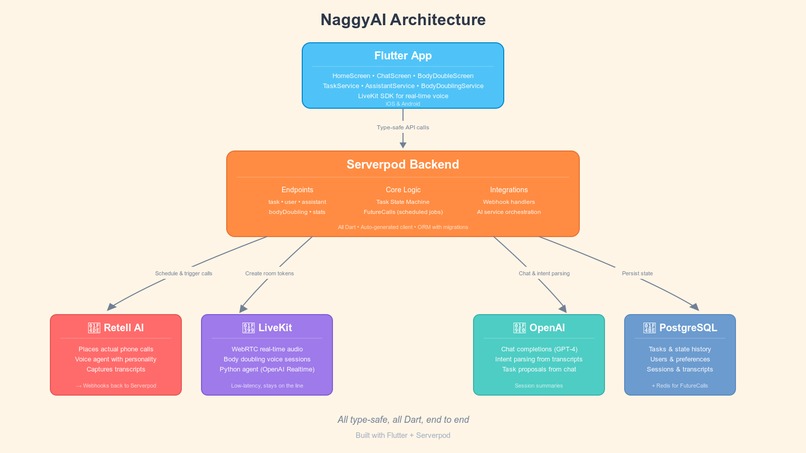
architecture - overall
-
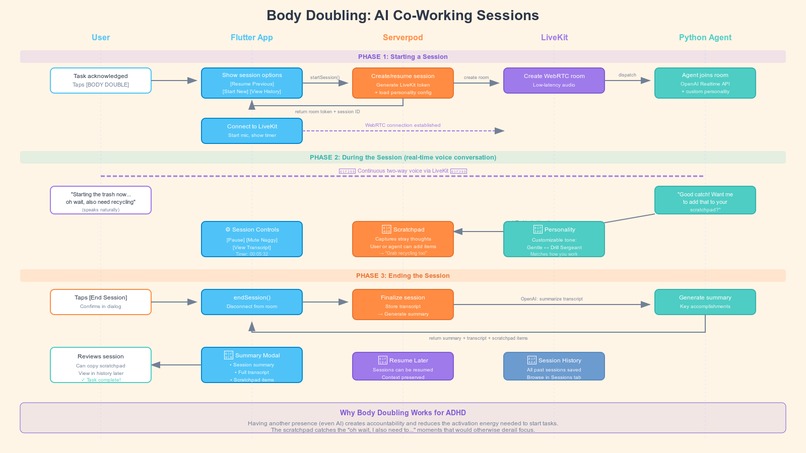
architecture - body double flow
-
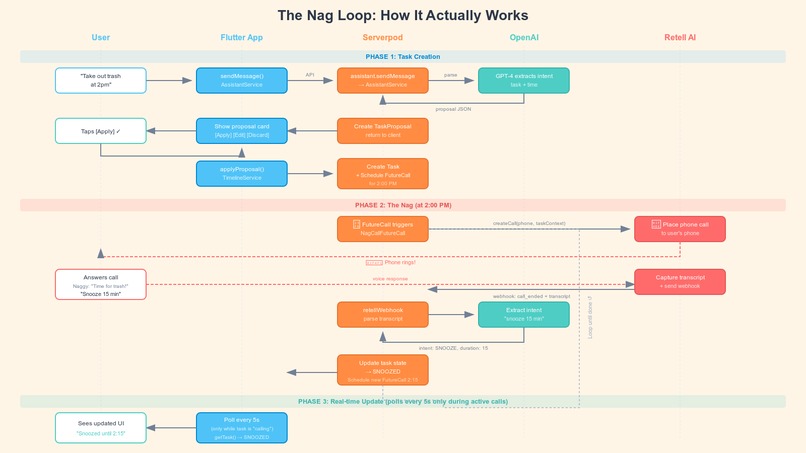
architecture - nag loop
-
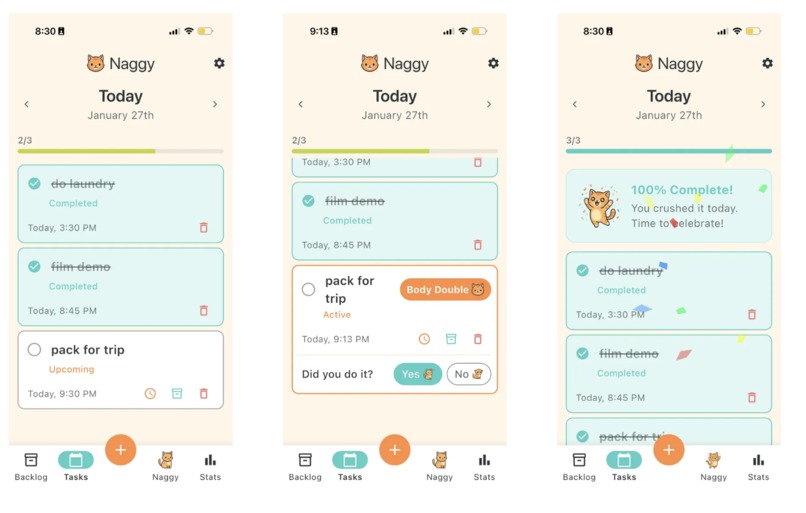
Tasks tab - upcoming, active, complete tasks
-
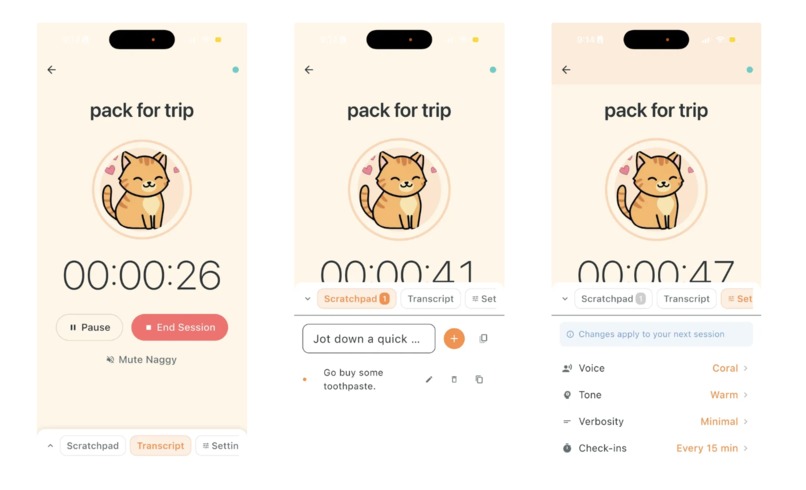
Body Doubling - add notes to scratchpad, customize Naggy
-
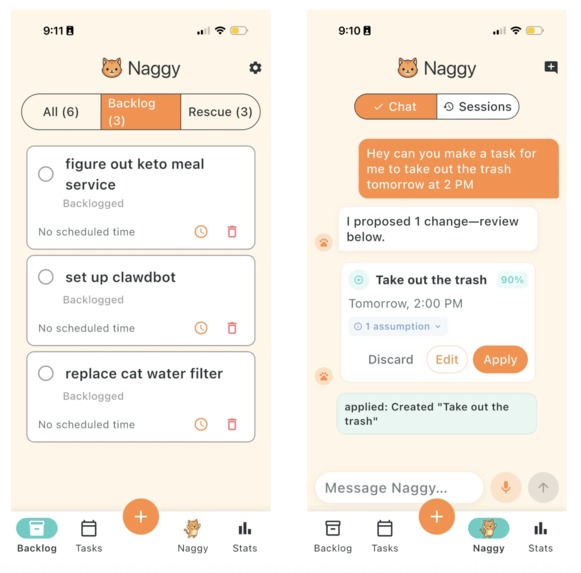
Backlog tab and Chat tab
-
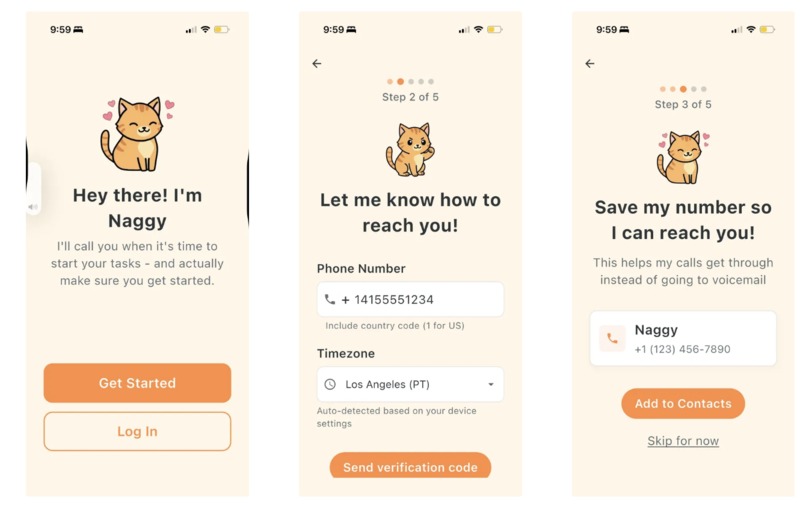
Onboarding - save to contacts
-
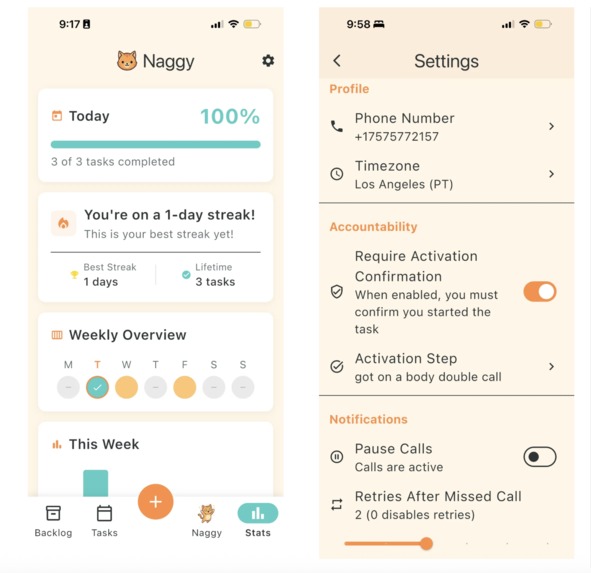
Stats tab and Settings - add an activation step Naggy will always confirm
-
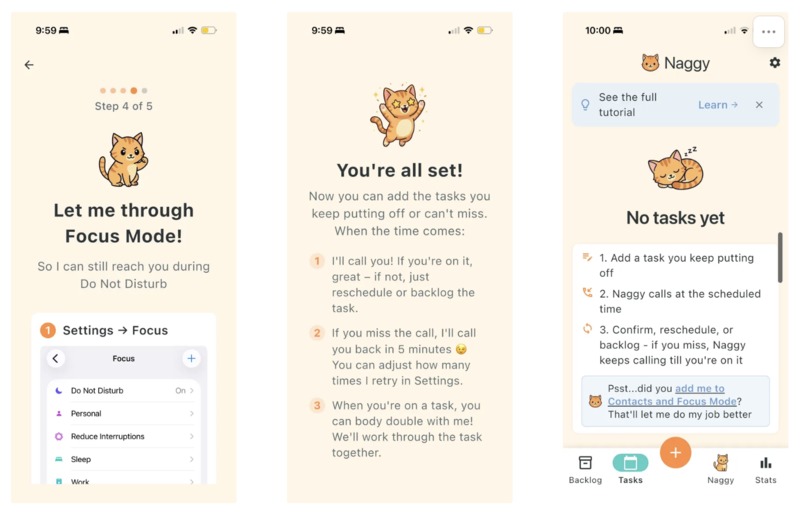
Onboarding - finish and initial state
-
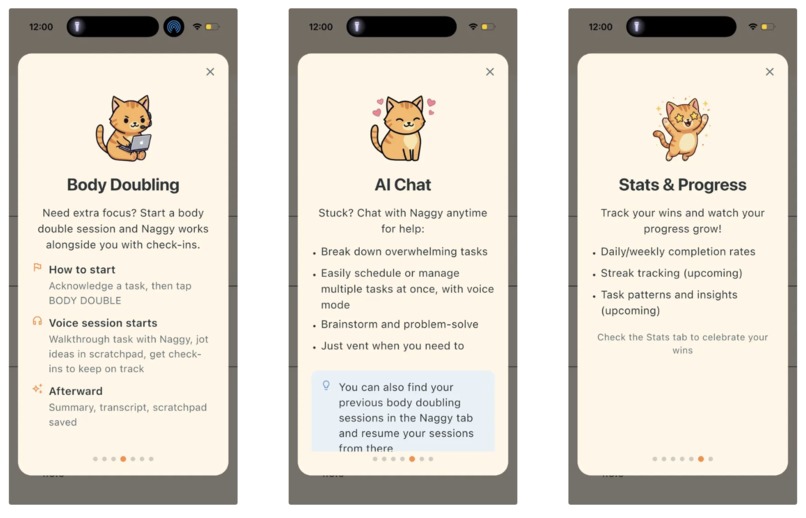
Tutorial - part 2
-
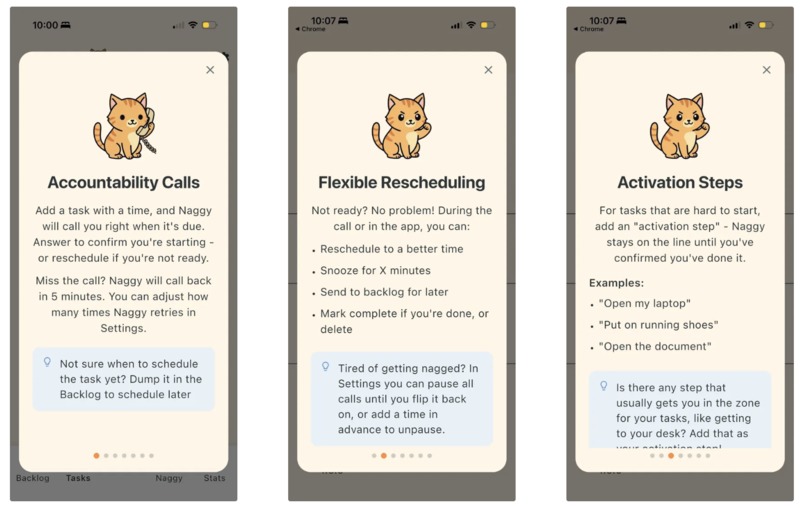
Tutorial - part 1


Inspiration
My husband has ADHD. He's brilliant — an infra engineer and founder who can hyperfocus for hours on complex problems — but he'll forget to eat if no one reminds him. Traditional to-do apps and alarms don't work for him. The notification pops up, he swipes it away while focused on something else, and the task disappears from his mind entirely.
I watched him try every productivity system: Todoist, Apple Reminders, calendar blocking, Motion, Post-it notes everywhere. Nothing stuck. What actually worked? Me yelling at him across the room. Me calling him. His EA calling him 5 and walking him through todos. A real interruption from a real person who wouldn't let him say "I'll do it later."
But I can't be his personal assistant 24/7. So I built him one.
What it does
NaggyAI is an AI accountability partner that calls you to keep you on track.
The Nag Loop: You add tasks by chatting naturally with Naggy ("Hey, I need to take out the trash around 2pm"). Naggy creates the task and schedules a phone call. When the time comes, Naggy actually calls your phone. You can snooze, reschedule, or mark it done, all through natural conversation.
Body Doubling: For harder tasks, sometimes a reminder isn't enough. Body doubling is a technique where having another person present helps you focus. Tap the "Body Double" button and Naggy joins you on a voice call, keeping you company while you work. It catches stray thoughts ("Oh, I also need to grab the recycling") and adds them to a scratchpad so nothing slips away. You can customize Naggy's personality for these sessions — from gentle encourager to drill sergeant — so the experience matches how you actually work.
Happy Design: Every interaction is designed to feel good. Naggy the cat mascot celebrates with you. Completing all your tasks triggers confetti. The whole UX is built around positive reinforcement. I'd like to add more gamification later, but the idea is that you should be able to see and celebrate your progress and crunch through backlogged/missed tasks easily.
How we built it
Flutter powers the mobile app — a single codebase for iOS and Android, and even web for an easy demo (see naggy.app).
Serverpod handles the entire backend in Dart. Task scheduling, user management, AI orchestration, and webhook handling all run through type-safe endpoints. Having the same language on frontend and backend eliminated an entire class of integration bugs.
Retell AI places the actual phone calls and handles voice interaction. So you're talking to a real AI agent that understands context and can take actions.
LiveKit provides real-time WebRTC audio for body doubling sessions. I was looking for a low-latency, two-way voice communication that feels like having someone in the room with you.
OpenAI powers the main natural language understanding — parsing chat messages into task proposals, understanding voice intents, and generating session summaries.
The architecture is intentionally modular: the Flutter app talks only to Serverpod, which orchestrates all external services. This made it easy to swap providers during development and will make it easy to add new AI capabilities later.
Challenges we ran into
Emotional attunement, not just latency. The hardest challenge wasn't technical — it was making Naggy feel like a supportive friend instead of a call center bot. Phone calls are expensive, so we can't let users have hour-long coaching sessions over the phone. Our solution: keep phone calls short and focused (the "nag"), then guide users into the app for body doubling sessions where they can spend as long as they need with Naggy's full, customizable personality.
State machine complexity. A task can be scheduled, calling, snoozed, acknowledged, missed, failed, completed, or backlogged — and transitions between states trigger different behaviors (retry calls, cancel calls, enable body doubling). Getting this right required careful modeling and extensive testing.
The UX design. It's really tempting to stuff the app with features and want to onboard a user through them all, but ADHD users especially can easily get overwhelmed by a ton of context. A product needs to provide immediate value, then they can discover the rest later. After testing with another user, we realized the app was confusing — too many screens, unclear what to do first, they thought that the chat was where they had to make tasks. We redesigned the entire UX around one obvious action: create a task. Everything else flows from that.
Accomplishments that we're proud of
It actually works for my husband. He uses Naggy every day and notices when the server is down! That's the most important thing for me. It's helped him accomplish his major task of the day to a much more consistent extent than his previous alarms and notifications; when I asked him why, he noted that having a voice there feels different to his brain, and the fact it is flexible and doesn't relent. And as a call, it also helpfully lets you escape social situations to go do your task! That feels far more "legit" than the gazillions of notifications that pop up on his screen.
End-to-end Dart. Flutter + Serverpod allowed for type safety from the database to the UI. That made it surprisingly easy to develop even though I used Dart much before. I didn't have any JSON mapping bugs or API contract mismatches, which makes sense since when we change a field, the compiler tells us everywhere it needs to update.
Body doubling as a feature. Most productivity apps treat tasks as items to check off. We built body doubling into the tasks because ADHD people especially often benefit from it, as a way of supporting their working memory and creating social stimulation. The scratchpad really helps with the ADHD experience of "oh wait, I also need to..." mid-task.
The UX. I'm not a designer by any means but I do love building cute, whimsical apps and I wanted to make something with a bit of a dopamine kick. It was surprisingly easy to add simple animations in Flutter. Inspiration also came from our cat Aggy (short for AGI :P), an orange cat who somehow always knows exactly when it's mealtime and will absolutely nag you until you do it!
What we learned
Serverpod is production-ready. I was initially nervous about using a newer framework for the backend, but Serverpod's type safety, built-in ORM, and FutureCalls system (for scheduling) made development faster, not slower.
Voice AI is a different paradigm. Building for voice interaction requires thinking about conversation flow, not just UI flow. Users say things in unexpected ways, and the AI needs to handle ambiguity gracefully.
ADHD users are great testers. They have a really strong pain point and are willing to try a lot of things to help. We found an ADHD discord and looked at what they said about tasks and body doubling and did a few interviews with them with our web app version (naggy.app).
What's next for Naggy
I'd love to ship Naggy on the app store! Here's a product road map I've been thinking of:
- Calendar integration. Automatically create nag calls from Google Calendar events, so "meeting prep" actually gets done before the meeting.
- Recurring tasks and habits. The nag loop works great for one-off tasks; extending it to daily habits ("Did you take your medication?") is the obvious next step.
- Integrate memory and context. Integrate more context from the user (gmail, google drive) etc such that Naggy is fully personalized to the person and can do things like be more helpful during body doubling and offer smarter task suggestions (e.g. "You mentioned wanting to call your mom — want me to schedule a reminder?"). I'd like to make Naggy more of an emotionally attuned coach with history and insight on you instead of just a voice agent.
Built With
- dart
- flutter
- livekit
- openai
- postgresql
- retell
- serverpod


Log in or sign up for Devpost to join the conversation.