-
-
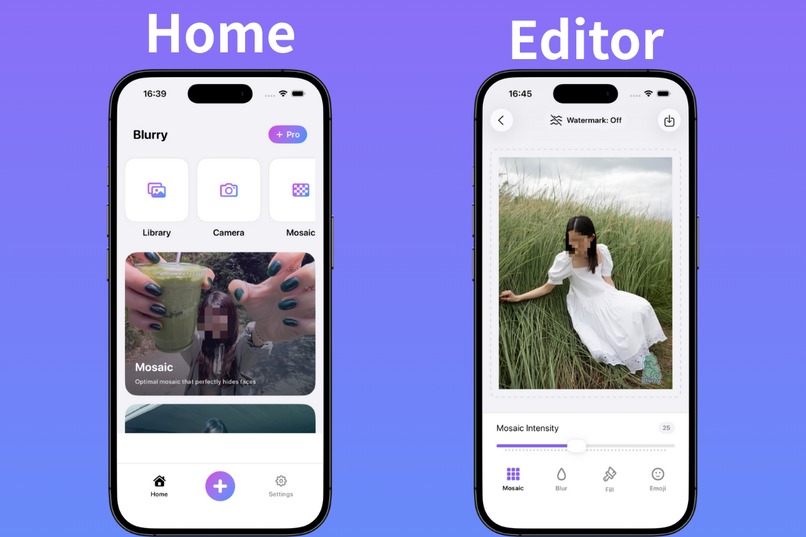
Home Screen and Editor Screen
-
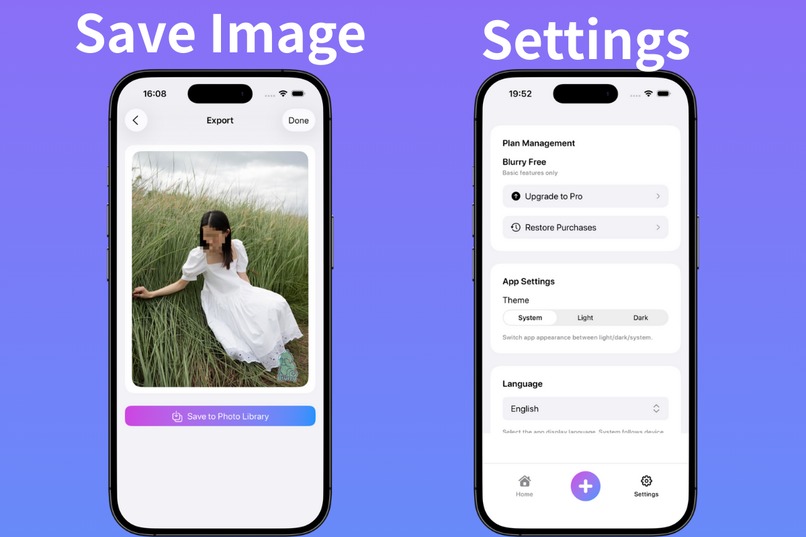
Save Image Screen and Setting Screen


Blurry - Face Privacy Protection - Hackathon Submission
Inspiration
The inspiration for Blurry came from observing how Gen Z users interact with social media. Research shows that 21.7% of young users prefer hiding their faces in profile pictures—not primarily for privacy concerns, but because they feel embarrassed about "trying too hard" or looking too posed. We realized there was a gap between wanting to share memories and feeling comfortable doing so. Traditional face-blurring apps felt too clinical and focused on security rather than self-expression.
With Blurry, we wanted to make privacy protection feel natural and even stylish—transforming the act of hiding faces into a form of creative expression.
What it does
Blurry is a simple yet powerful iOS app that automatically detects faces in photos and applies privacy-protecting effects with just one tap. Users can choose from:
- Blur effects: Natural, soft blurring that keeps the photo aesthetic
- Mosaic patterns: Classic pixelation for strong privacy
- Emoji overlays: Fun, expressive emojis that hide faces while adding personality
- Solid color fills: Clean, minimalist coverage
All processing happens 100% locally on the device, ensuring that no photo or personal data ever leaves the user’s phone. The app is designed for the modern social media workflow—quick, intuitive, and privacy-first.
How we built it
We built Blurry using modern iOS technologies to ensure both performance and privacy:
Core Technologies
- SwiftUI: Main interface and user experience
- MediaPipe Tasks Vision: High-accuracy, real-time face detection
- Core ML & Core Image: Optimized on-device processing and visual effects
- RevenueCat & Google Mobile Ads: Subscription and monetization integration
- iOS Localization: Full multilingual support
Architecture
- SwiftUI-based simple architecture (instead of MVVM)
- Singleton patterns where appropriate in actual implementation
- Local storage only—no cloud services or external APIs
- Privacy-by-design principles from day one
Development Process
- Started with user research on social media privacy behaviors
- Iteratively tested detection accuracy across diverse demographics
- Migrated from React Native + Expo to native SwiftUI for performance and accuracy
- Optimized


Log in or sign up for Devpost to join the conversation.