-
Logo
-
Demo


Inspiration
We were inspired by how cities are mapped. Buildings, roads, and lights forming a living ecosystem. Codebases have similar structures, but they’re hidden in folders and files. I wanted to create something that lets developers see their entire project like a city and understand it intuitively.
We also wanted to bridge visualization with AI, not just showing what’s there, but why it matters. That’s where Gemini comes in: explaining every file in three levels of understanding.
What it does
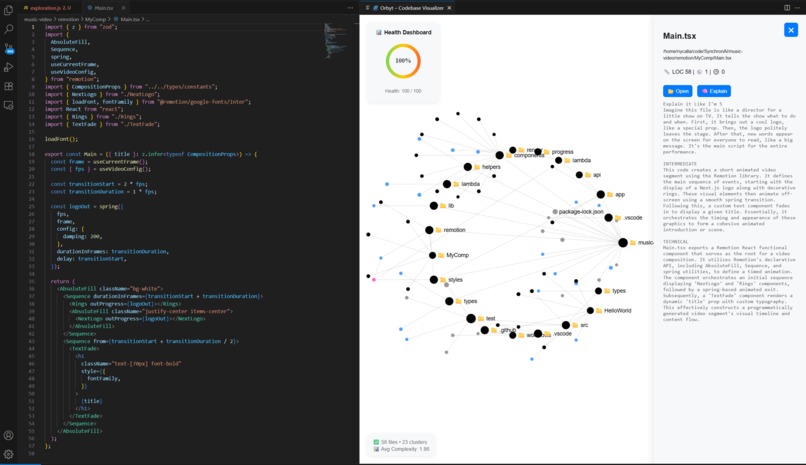
Orbyt is a VS Code extension that visualizes your entire repository as an interactive map.
- 🟣 Each file or module is a node
-🔗 Each import or dependency is an edge connecting the nodes
-💡 The size, color, and position reflect complexity, cluster, and contribution history
You can click on any file to:
- 📂 Open it instantly in VS Code
- 🧠 Ask Gemini AI to explain it at three levels (ELI5, Intermediate, Expert)
- 💬 Chat with Gemini to ask contextual questions like “Where is authentication handled?”
It’s like having Google Maps + ChatGPT for your codebase.
How we built it
We built Orbyt as a VS Code Webview Extension in TypeScript.
- Parsed code using Babel to extract dependencies and functions.
- Built a dependency graph using Graphology and Sigma.js for visualization.
- Integrated Google Gemini 2.5 Flash API for AI-powered explanations and chatbot Q&A.
- Used Node.js and dotenv for environment handling and configuration.
- Designed a clean, minimalist UI/UX with tooltips, animations, and real-time updates.
Challenges we ran into
- Parsing large codebases efficiently without freezing VS Code.
- Keeping Gemini prompts short while maintaining rich context.
- Rendering thousands of files dynamically while preserving performance.
- Managing CSP (Content Security Policy) inside the VS Code Webview sandbox.
- Designing a chat interface that felt natural inside a developer tool.
Accomplishments that we're proud of
- Built a fully working AI-powered developer visualization tool in under 24 hours.
- Created an interactive map that makes large repos understandable at a glance.
- Integrated real-time AI explanations and contextual chat — something few VS Code tools do.
- Designed an intuitive UI/UX that feels futuristic but remains functional.
What we learned
- How to combine static code analysis with LLMs to create intelligent dev tools.
- The importance of designing for clarity and performance when visualizing large data.
- Deepened our understanding of VS Code’s Webview APIs and Gemini SDKs.
- AI isn’t just for generating code — it can help developers understand what they already wrote.
What's next for Orbyt
- Enhance the Gemini Chatbot to remember context across sessions.
- Add “trace dependency” and “find similar files” features.
- Introduce Team View, allowing shared visualization across repositories.
- Improve theming with dark/light modes and node type icons.
- Publish Orbyt on the VS Code Marketplace for global access.
Built With
- gemini
- graphology
- node.js
- sigma
- typescript
- vscode


Log in or sign up for Devpost to join the conversation.