-
-
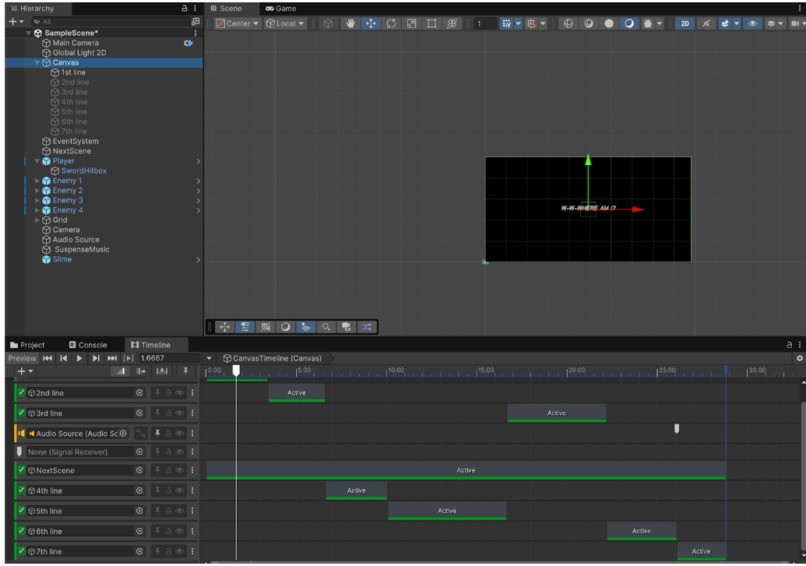
Building the first part of the game using Timeline and creating a Canvas for the player to walk around.

Inspiration
Cybersecurity is a growing topic around the world, and we were inspired to make a huge change in the education industry, cybersecurity industry, and the video games industry alltogether. That's why Data Heist is here to change that! With our integrated video games design interface along with seamless AI integration as well as the educative interests of cybersecurity, we are sure that the user will experience a great time overall.
What It Does
Data Heist is a cybersecurity video game that uses Generative AI to make question prompts for the user to answer. How it works is once the user enters the game, they will go through screens of informative text about the game before they go into the 2D interactive map in which they can walk around and find the NPCs. The integration of NPCs will now allow the user to get challenged by attacking the NPC with 5 different cards (Phishing, Metadata, Hack, Person in the Middle, and Fingerprinting). These cards will test their knowledge in cybersecurity to be able to effectively use their card and apply the card to the NPC. If they successfully do so, then they gain 1 point. Since this is a single-user interface for the game, the player can try to get a high score offline and be able to keep track of their points, gaining knowledge over time. Currently, the mechanic to transport players to a new screen upon left-clicking on an NPC isn’t complete. This could be achieved by tagging the NPCs with an 'NPC' tag and implementing a script to detect the click and initiate the transition to the challenge screen. The NPC should also have a Box Collider 2D and have IsTrigger set to be true, to detect the sword hit.
How We Built It
We used C# as our language, basing off of the Game Engine Unity. As well, we used Google's Gemini API which is a Generative AI that has allowed us to seamlessly input any prompt we want the AI to assume and act in during certain scenarios for the questions part of the game.
We built the first part of the game (the introduction cutscene) using Timeline.
By creating a Canvas and assigning when certain sentences are displayed to the user, we made a “video-like” cutscene to introduce the world building. The “glitchy” effect text is made by importing a font and making it a Font Asset. Then the text is modified with color settings of Unity like shadow color, overlay, underlay, etc. The audio is imported and downloaded from YouTube and a script is used to run it and stop it. After the music stops (duration is specified in script), the canvas would then be destroyed and we’ll be brought to our main game.
In the main game, the terrain itself is made from tiles that can be found in Unity’s Asset Store. First off, we made a TileMap for the Grid and also “Split” or crop the images into individual tiles using the editor. After splitting these assets, we dragged them into the Tile Palette which made them available to use throughout building the landscape.
There’s a few layers to make this map. The first layer is the lowest layer, which is the grass. It’s order layer is set to be -1 to ensure it’s always below the whole thing. The second layer is used to add puddles or decorations as it can overlay the first layer without fully replacing the tile. The last layer is the Collision Objects layer which are basically layers that are the second highest order. Every tile made under this Collision Objects layer has a script attached to it, that doesn’t allow user to get past through it, making things like fences, trees, houses, NPCs, impossible to past through by players. This is done by restricting the movement of the Player and also giving a RigidBody2D and BoxCollider2D to these objects under the Collision Objects layer.
The Animations are made using the Animator Window. By dragging assets into the animation window, it’s possible to make animations of the player is standing, attacking, dying, and walking. By creating an animation controller, the transition between these animations can be done by defining parameters. Parameters specifically for the Player are namely, “isMoving” which indicates whether the player is moving, and also the parameter “swordAttack,” which tries to see if the player clicks their mouse or trackpad. This way, users would continuously get the right animation for the right actions.
A background music is also played throughout the game which is done by making a script to enable this. The characters itself are all tailored to fit the theme of the game and are imported from various sources to make the map as colorful, diverse, and aesthetically-pleasing as possible. Each of the NPCs are also added animations for standing still, to make user interaction livelier. This was built with Unity, Unity Assetstore, and Itch.io.
Challenges We Ran Into
There was another API that we ran into problems with as we were not getting the data as expected, which is why we used Google's API Service instead called Gemini AI.
Accomplishments that we're proud of
That we got to create a project that is influential on all different types of topics, and that we all learned C# within the span of 24 hours (we all knew Java, Python and some C languages except CSS, so learning C# was a challenge but all worth it in the end as we were familiar with the syntax of C# since it was similar to a mix of Java and C/C++).
What We Learned
We learned about what and how does an API work, key terminology used for APIs (ex. token, model, requests), and how can APIs be used in applications.
What's Next for Data Heist
Try to implement more types of cybersecurity attacks (such as Spam Emails, Text, Calls, etc...), and be able to make the game into an online game instead of an offline game while also using multiple languages to store data more effectively and efficiently. As well, try to implement a points system where the person can determine if they would go for a harder difficulty for a greater amount of points they get in return.


Log in or sign up for Devpost to join the conversation.