-
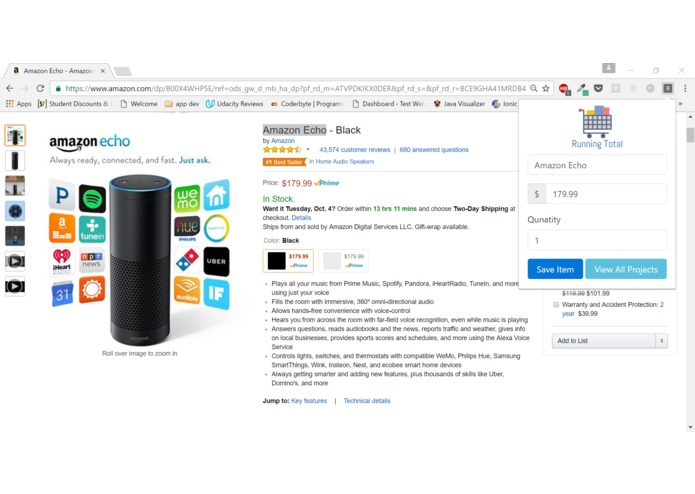
Chrome Extension Screenshot

Inspiration
While working on a previous project, I tried to source parts while comparing prices and keeping track of all my links. When the amazon wish list chrome extension didn't show all the data I wanted, I began to maintain a spreadsheet. It was a hassle, and I wanted a simpler way to keep track of my parts.
What it does
When users click the extension button while selecting the item name, a popup appears that allows the user to enter a quantity, price, and comments as needed. These are then added to a project page in the form of a dynamic table.
How we built it
The chrome extension was built as a pop up using javascript where the user can highlight the name of the item, click the extension and then it would be auto populated with the name and a default quantity of 1. The information from the popup name,price, and quantity is added as an entry to our projects page which you can access through the extension.
Challenges we ran into
We initially built a web scraper using node.js so that we could auto populate the name and price of the item with little user input, but it isn't compatible with chrome extensions, so we had to find a way to access the DOM from our extension or work around it. Unfortunately we weren't able to complete that part so we went with highlighting the name to pre fill it and having the user enter the price manually.
Accomplishments that we're proud of
Making our first chrome extension and web scraper!
What we learned
How to build a web scraper with node.js and how to build a chrome extension.
What's next for Project Planner
In the future, we would like to be able to retrieve pricing/name data from a page without the need for user input. We would also like a way to compare items of the same category, and manually manage the list as needed (custom add / delete).


Log in or sign up for Devpost to join the conversation.