-
-
Logo
-
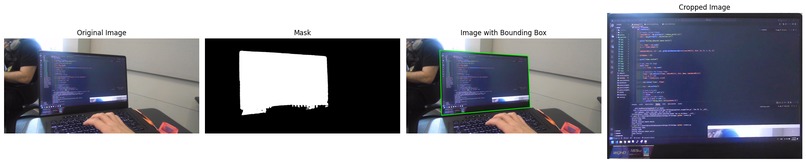
Image Segmentation
-
Camera Setup


Inspiration
Pypointer draws inspiration from a video showcasing a gaming setup devoid of a keyboard and mouse. Inspired by the lack of use of traditional tools, Pypointer challenges the concept of conventional computer interaction as all you need is your hand and voice.
This idea was chosen due to our team's drive to innovate. We aim to harness both new and traditional technologies and strategies at every Hackathon, pushing boundaries to create projects that defy the constraints of a 24-36 hour time limit.
What it does
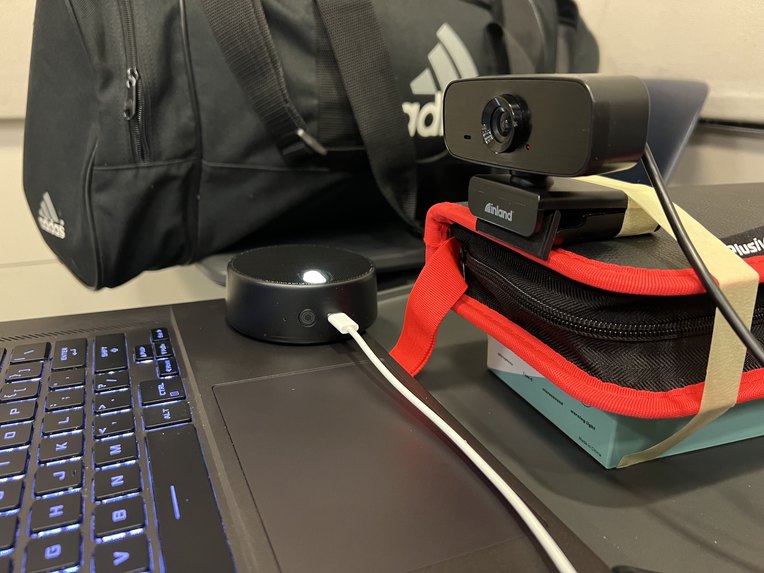
Pypointer allows any screen to be interactable with just one's fingers and speech. Users are able to control their cursor with just their fingertips and are able to execute commands via speech to text. Users are able to say key words to activate certain commands, such as saying the word "click" to perform a mouse left click action.
How we built it
- To segment the computer display we used a modification of Meta's Sam mode as well as text encoders. Originally, we used PCA analysis and eigenvectors to calculate bounding boxes but realized that did not account for perspective shift. Ultimately, we ended up solving the issue using OpenCV contour detection and convex hull algorithm.
- To recognize the index finger being used as a cursor we utilized OpenCV with MediaPipe to be able to see if there is a hand in view.
- Voice commands are recognized by OpenAI's Whisper, a machine learning model for speech recognition.
- Control of the cursor and keyboard is done using the library Pyautogui.
Challenges we ran into
Multithreading in Python: Python is single threaded, meaning that it has a hard time utilizing two processes at the same time in compared to other languages. This resulted in us having issues running the OpenCV webcam with MediaPipe and our speech to text at the same time.
Perspective distortion: To recognize where a computer screen is we used image segmentation; however, the images contain perspective. Due to this, the coordinate system we use to have the cursor match the movement of our finger would be inconsistent.
Pivot from Gestures to Voice Commands: Our original idea was to use gestures as shortcut for controls. However, we realized it was hard to get both a gesture and position the cursor at the same time. Due to the time constraints and our current knowledge, we decided it was better to pivot to voice commands for easier accessibility.
Accomplishments that we're proud of
- Laptop screen is accurately read in the image segmentation, allowing us to easily identify a laptop screen in an image.
- Get a rough reading of the finger movement to be translated into cursor movement.
- Solving the multithreading issue in python, by utilizing a multiprocessing library.
What we learned
- Image Segmentation:
- Dealing with multiple processes at the same time in Python by using the multiprocessing library.
- Utilized new libraries: pyautogui and learned its functionality.
What's next for PyPointer
- Implementing gesture recognition
- More accurate reading for the coordinates to allow for a smoother finger/cursor movement
- Adjusting pyautogui drag speed equation for a more seamless interaction when a user wants to drag tabs/programs on their screen.
Built With
- machine-learning
- mediapipe
- opencv
- pyautogui
- python
- whisper


Log in or sign up for Devpost to join the conversation.