-
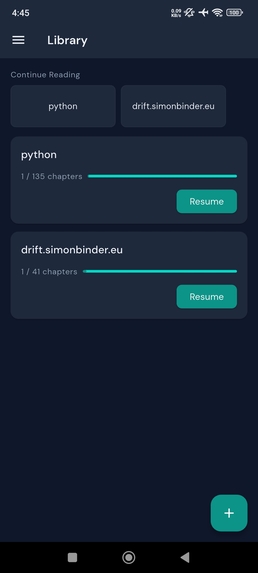
Home screen
-
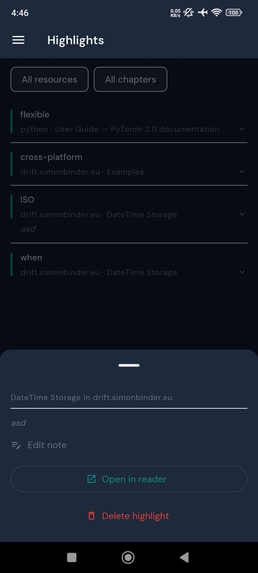
Highlights collection
-
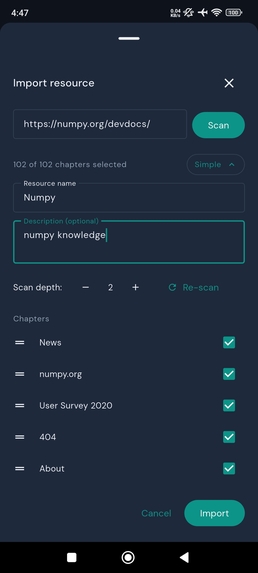
Import docs
-
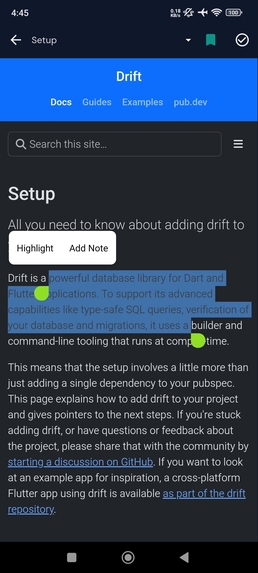
Reader view


Developers and students are great at saving links. They're bad at finishing them.
Read4ever bridges the gap between a read-it-later tool and a personal LMS. Instead of a browser tab graveyard, you get a structured library where every resource has chapters, progress, and annotations — all in one place.
How it works: Share any URL from Chrome (or paste it into the app) and Read4ever automatically detects sitemaps, presenting a checkbox tree of all available chapters. Select the pages you want, give the resource a name, confirm — and you're reading immediately in a full-screen WebView with a clean custom toolbar.
As you read, select text to highlight it or attach a note. Highlights are stored with XPath-based position data so they restore precisely every time you open the chapter. All your annotations live in a Highlights screen, filterable by resource or chapter, with one tap to jump back to the exact location in the reader.
The Library screen shows every resource as a card with a live progress bar (in-progress → not-started → done ordering) and a Continue Reading strip for your last 3 active resources. When every chapter in a resource is marked done, the resource automatically sinks to the bottom with a full bar and muted treatment.
Technical highlights:
- Flutter + Drift (SQLite ORM with full codegen) for a fully local, offline-capable data layer
- Riverpod with code generation for reactive state across the entire app
- go_router ShellRoute for drawer navigation with zero-flash chapter transitions
- XPath-based JS bridge (selection_listener.js + highlight_restore.js) for precise highlight capture and restore across arbitrary HTML structures
- flutter_inappwebview for WebView with full JS injection support
Built for: Developers and students who learn from documentation, tutorials, and guides — and want to actually finish what they start.
Inspiration
I built Read4ever from a pain I kept seeing in myself and others: we save great articles, docs, and tutorials, but rarely finish them. Bookmark tools help collect links, but they don’t help you learn. I wanted something that turns “I’ll read this later” into “I actually completed it.”
What it does
Read4ever is a read-it-later app with LMS-style structure. You can share a URL from Chrome (or paste one), detect its sitemap, pick chapters in a checkbox tree, and start reading right away in a focused full-screen reader. As you read, you can highlight text, add notes, track chapter progress, and jump back to exact locations from a centralized Highlights view.
How I built it
I built the app with Flutter, using Drift + SQLite for a fully local offline data layer, Riverpod codegen for state management, and go_router ShellRoute for clean navigation. For the reader experience, I used flutter_inappwebview with injected JavaScript to capture and restore highlights using XPath-based positioning. That let annotations survive reopens and stay accurate across chapters.
Challenges I ran into
The hardest problem was reliable highlight restoration across real-world HTML that changes structure and styling. I also had to make chapter transitions feel smooth, keep progress states consistent, and sync reader state with library and highlights screens without UI flicker. Getting all those moving parts to feel simple for the user took several iterations.
Accomplishments that I'm proud of
I’m proud that the experience feels practical and complete: import, structure, read, annotate, and continue. The automatic chapter completion flow and resource ordering make progress visible, which helps motivation. I’m also proud of the precision of highlight restore and the fact that the app is fully usable offline.
What I learned
I learned that product clarity matters as much as code quality: users need momentum, not just features. Technically, I got much stronger in state architecture, local-first data modeling, and WebView-to-Flutter bridges. I also learned that small UX details, like reducing transition flash and preserving reading context, have outsized impact.
What’s next for Testing
Next, I want a tighter testing pyramid across the app: unit tests for providers and progress logic, integration tests for import-to-reader flows, and widget tests for key screens like Library and Highlights. I also plan to add regression tests around highlight capture/restore and chapter completion ordering, since those are core trust features. After that, I’ll add performance checks for large resources and long annotation histories.


Log in or sign up for Devpost to join the conversation.