-
-
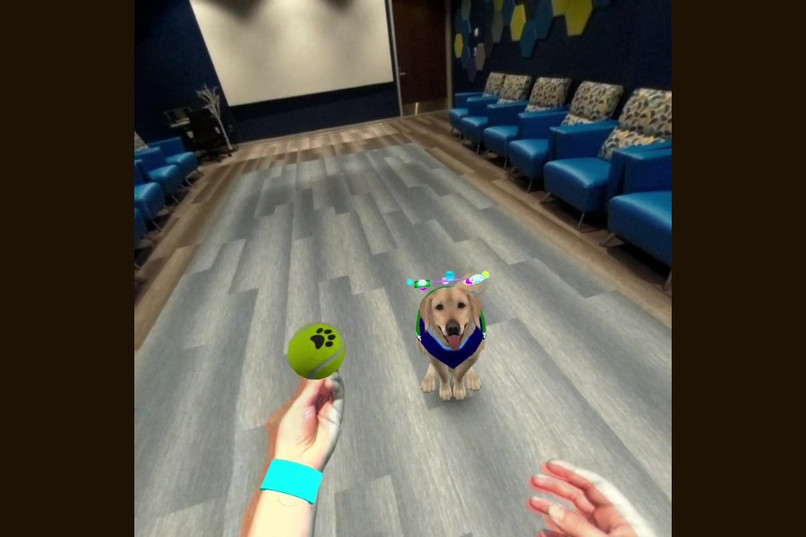
Playing catch with virtual Galaxy.
-
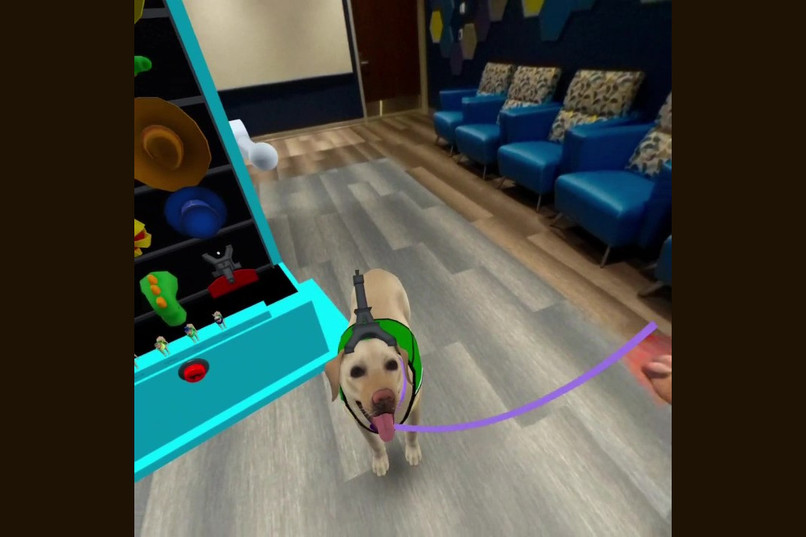
Taking virtual Kit on a walk.
-
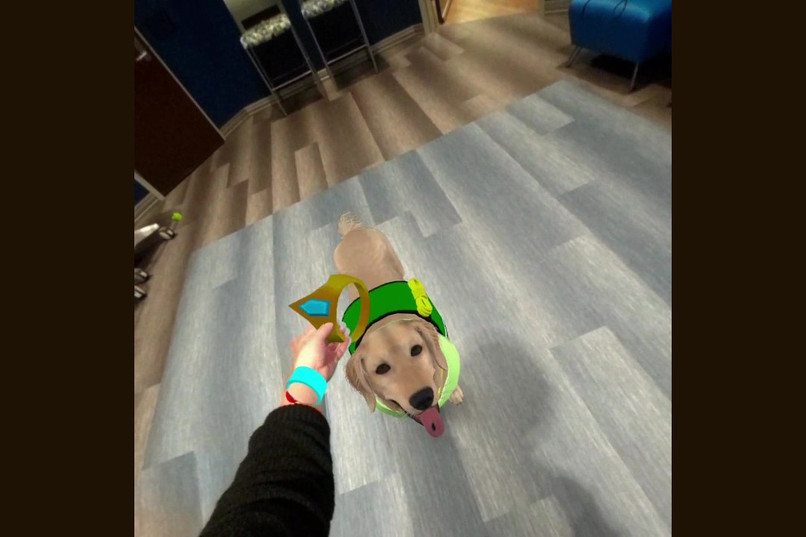
Dressing up virtual Ruffles.
-
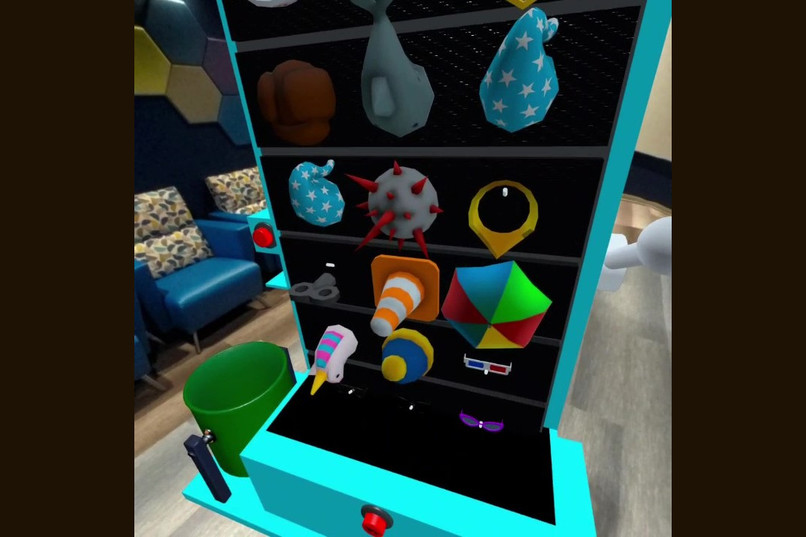
The magic closet.
-
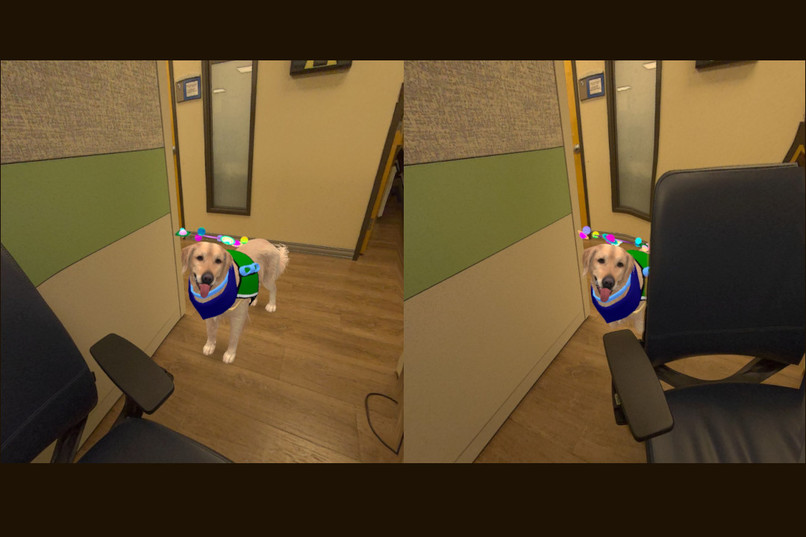
Depth occlusions (Quest 3 only)
-
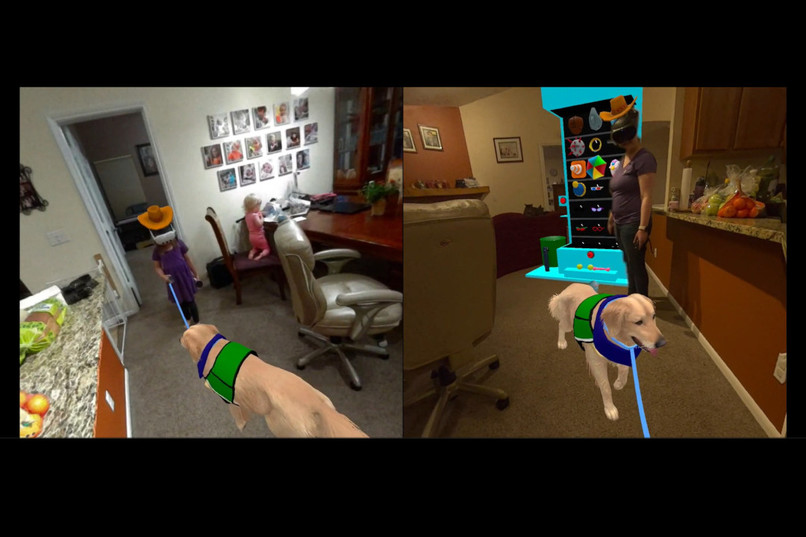
Playing with my daughter in Reality PAWS using co-located multiplayer


Inspiration
At Children's Hospital Colorado, we create Extended Reality (XR) games and applications to improve the hospital experience for patients and their families. Reality PAWS is a Mixed Reality (MR) game featuring our Medical Dogs that is used to provide social and emotional support to our patients.
Reality PAWS was the result of a collaboration with our Medical Dog handlers. We have six Medical Dogs in the Children's Hospital Colorado network that provide support to our patients; however, we learned that patients on isolation precautions are not allowed visited by the Medical Dogs. The handlers asked us if there was a way to use XR to better support these patients, which inspired the development of Reality PAWS.
What it does
Reality PAWS is a Mixed Reality experience that allows patients to interact with a virtual Medical Dog. Each of our Medical Dogs has a virtual counterpart in Reality PAWS, and patients are able to select their favorite dog. Patients can interact with the game in the following ways:
- Take the dog on a walk. Each dog has a leash bundle on the side of their vest that is grabbable. When grabbed, a leash extends from the dog's collar. Walking around your space will cause the dog to follow you.
- Give the dog commands (hand tracking only). Our real Medical Dogs respond to hand gesture commands, and so do our virtual ones in Reality PAWS. The virtual dogs will sit, lay down, get up, jump, and come to the player with specific hand gestures. To see all of the commands, you can press the Settings button (hamburger menu on left controller or left hand) and press the "Tutorials" button.
- Dress up the dog. By pressing a red button attached to your left wrist or the 'B' button on your controller, a "magic closet" appears from the ground filled with hats and glasses. You can select any of these and put them on the dog.
- Give the dog treats. The "magic closet" has a treat dispenser button on the left side of the machine. Press it to dispense a treat, and then toss it and watch the dog eat it.
- Play fetch. The "magic closet" also has toys that can be grabbed and thrown. The dog will get the toy, come to the player and put it down in front of the player.
- Give the dog some pets. Try reaching out and touching the dog to see what he or she does!
- Play with others. Co-located multiplayer allows clinicians see what the player is doing or assist the patient in the experience, and additionally allows family and friends to join in the fun. In addtion to dressing up your dog, you can also dress up other players or toss a treat in their mouth.
Reality PAWS can be used with either hands or controllers. When using hand tracking, players can grab objects and throw them, grab the dog's leash, poke buttons on their wrist or on the "magic closet", and perform gestures to get the dog to do tricks. Using controllers provides the same direct manipulation of objects as hands do, but also allows for distance grab and "distance placement" of objects, and telling the dog where to go using the joystick. To try "distance placement", grab and object, push the joystick forward while pointing where you want it to go, and release.
Designing for accessibility
Most available XR games assume a certain level of physical ability, and therefore are inherently not very accessible for our patients. Our patients may have restricted mobility, limited or no ability to use standard XR controllers, limited ability to use one or both hands/arms, limited range of motion, and slower movements. Therefore, accessibility is one of our primary considerations for every game we create. We want our games to be useful and enjoyable to as many of our patients as possible. Here are some of the ways we designed Reality PAWS to be more accessible:
- Make the game center around the user. Interactable elements in Reality PAWS are available to the player without requiring significant movement. For example, the dog moves to the player, and the "magic closet" appears in front of the player and is rotated towards them. This was intended to be inclusive of patients in beds and wheelchairs, and with otherwise restricted movement.
- Provide multiple modes of interaction. We provide both hand and controller tracking in Reality PAWS. Using the controllers, patients can distance grab interactables, as well as "distance place" interactables using the joystick to toss the object they're holding. This is generally a great method of interaction for kids with redstricted movement. Hand tracking is also provided to allow patients that can't physically hold controllers to interact with the game.
- Use simplistic diegetic user interfaces. We try to limit the use of text and menus in our games to make them more inclusive of younger patients (we use XR with patients as young as 6), patients with learning delays, and patients that speak different languages. We employ diegetic UIs, or interfaces occurring in the virtual environment that are naturally discovered by the patient as they play, to include these populations. The "magic closet" is an example of a diegetic user interace; patients may not know what to do with it at first, but can figure it out by pressing buttons, pulling levers, and grabbing things.
- Adding co-located multiplayer. Despite designing this game with all of the previously-mentioned accessibility considerations, there are still patients who will not be able to engage with the experience fully. This is where co-located multiplayer is incredibly useful: we can have a second player join in the experience, such as a clinician or family member, and have them help the patient with the experience.
How we built it
Meta SDKs
Reality PAWS is built in Unity and uses several Meta SDKs, including the Meta XR Interaction SDK and Meta Platform SDK. It is primarily intended to be used with the Quest 3 headset, but will run on the Quest Pro and Quest 2. We've included the following features provided by Meta XR SDKs:
- Real-time depth occlusions using the Depth API (Quest 3 only).
- Passthrough to allow the player to see the world around them.
- Scene understanding to create realistic physics collisions with the floor, walls, ceiling and objects within the room.
- Shared Spatial Anchors to allow alignment of players' virtual environments during co-located multiplayer.
- Gesture-based interactions to allow players to give the dogs commands (hands only).
- Switching between hands and controllers to allow different methods of interaction with the virtual content.
- Invite to App and Destinations to allow players to easily invite others to their game.
Dogs
Each dog model is customized with features that match the real dog. We asked each handler to provide photos and videos of their dog, and we incorporated their unique features and behaviors into their virtual model. The original dog models were purchased from the Unity Asset Store, and the meshes were modified to make them look more like the real dogs. Each dog's textures are hand-painted, and a few have custom animations (for example, Pringle does a "sploot" when he lies down). We added fur to the Retrievers using the Fluffy Grooming Tool. The dog's vests, collars and bandanas were hand-modeled in Blender and made to bend with the dog's movements, and are based on what they typically wear at the hospital. The dog's behavior and movement around the room is based on Oppy from the Passthrough Pet scene from Meta's The World Beyond sample.
Gestures
We asked the handlers to perform gestures the dogs knew and recorded video of them. We then attempted to program in these gestures using Meta's sample gesture scene as a guide, and tested them out on ourselves. Because everyone performs these gestures a little differently, we would have our patients and staff try these gestures and observer. From there we could see which gestures worked, which didn't, and which were a little too sensitive. We would then modify the parameters of the gesture recognition for the gestures that were problematic, and test them again. We could continue this cycle until we were able to get the gestures to work reasonably well with several people.
Magic closet
The magic closet is built out of basic primitives, and the hats and glasses are purchased from the Unity Asset Store. We allow the player to view or hide the closet by pressing the "B" button on the controller or the button on their wrist. The closet position and rotation when raised is based on the position and rotation of the player's head. You can move the closet to a different location by lowering it and then raising it again.
Multiplayer
Multiplayer was implemented using Riptide Networking. We designed it so that one headset would act as a server (host), and any joining players would behave as clients. The host is largely responsible for sending all transform updates, animation updates, events, and room data, but clients can claim authority of grabbable objects and send transform updates for that particular object.
Co-located multiplayer is implemented using Spatial Anchors. Each player initially has a local spatial anchor that is created at the start of the game and saved to the cloud. The entire environment is aligned to that anchor, and then the anchor is disabled from that point. When joining a game, the player creates a new anchor and binds to the anchor shared by the host, and then aligns their environment based on that anchor.
To test the mutliplayer functionality, we used ParrelSync to test two instances of the game on a laptop, or one running on the laptop and one in Quest Link. To test with 2 headsets and make sure co-location was working, our lead developer would use circular label stickers placed over the sensor inside the headsets and switch between wearing each headset.
Challenges we ran into
Gesture programming
Programming gestures was challenging because users would often perform them differently from one another. We wanted to make the gesture recognition pretty forgiving, but also not create too many false positives. We had to modify the gesture parameters several times after watching patients use the application.
Distance placement of objects
While Meta's Interacton SDK makes it easy to distance grab objects, we noticed that patients with movement limitations struggled to use the object they had grabbed, such as place a hat on the dog's head or throw a ball. We needed a way to toss an object to a specific place without the player being required to move their hands or arms. Our solution was to modify Meta's locomotion/teleportation interactor so that instead of teleporting the player to a specific place, it tossed a held object to a specific place. It ended up being a very useful mechanic, and we extended it to allow a player to use this same method to tell the dog to move to a specific place. To try our "distance placement" mechanism, grab a hat with the controllers, and while holding the hat, push the joystick forward, point where you want it to go, and release.
Simultaneous hand and controller tracking
We would like to use simultaneous hand and controller tracking in Reality PAWS, as it could potentially make Reality PAWS more accessible. However, we ran into issues while integrating this we weren't able to solve before the end of the hackathon. We had some issue with gesture commands firing unintentionally, and problems determining whether a button press was fired by the player's hands or controllers. In the end, we decided to put this functionality on the back burner for now.
Mesh API causing problems for NavMeshAgent
Though we were able to use the mesh created by the Quest 3 for occlusions and physics collisions, as well as share the mesh with other connected headsets, we ended up disabling this functionality for the hackathon. This was due to the NavMeshAgent behaving somewhat erratically after adding the mesh. We plan to bring back this functionality at a later date once we can make the NavMeshAgent behaviors more robust.
Invite to app and co-located multiplayer
App invites and local multiplayer was a challenge to develop due to app invites not working unless the application was built and put into App Lab. Making this functionality work in Quest Link would speed up development time, since uploading to App Lab for each change takes considerable time.
Making this game work in a multiplayer context was probably the biggest challenge we faced. Developing multiplayer games is inherently difficult, and even more so when virtual elements need to be synchronized in physical space. We had to determine not only how virtual objects would be shared between two players, but also how the elements provided by Scene Understanding would be shared and synchronized as well.
Shared Spatial Anchor problems
To enable co-located multiplayer, each player has a single spatial anchor that controls the alignment of their environment. When a player invites another player to join their game, they share their spatial anchor with that player. We ran into problems with the fact that spatial anchors update their position and rotation frequently, creating problems for alignment of virtual objects and causing NavMeshAgents to misbehave. We overcame this problem by disabling spatial anchors immediately after using them. We additionally do this with scene anchors.
Accomplishments that we're proud of
Getting co-located multiplayer working is the biggest technological accomplishment for us. Implementing any sort of multiplayer is challenging, but implementing it in mixed reality with spatial anchors and scene understanding proved to be a significant challenge for our lead developer. There are few resources showing how to implement a game like this, and it is also challenging to test co-located multiplayer as a single person. Despite all these challenges, we are very pleased that the multiplayer part of this game works really well!
We're also proud that we've created a purposeful game that helps to improve patients' hospital stay, and that we've designed it to be as accessible as possible. While XR games are often not designed with accessibility in mind, XR is such a powerful tool for patients; we use it for physical therapy, social-emotional support, distraction, and to provide kids with a "virtual blanket fort" when they want a break from their current reality. We hope that we can encourage other developers to consider how they can make their own games more accessible!
What we learned
Our lead developer hadn't created a local multiplayer MR game prior to this experience. However, now that she's had this experience, we can apply this to so many other games we create at the hospital.
What's next for Reality PAWS
New Medical Dog
We will soon be getting a new Medical Dog at Children's Hospital Colorado, who will need to be added to the game!
Mini-games
We would like to add mini-games within Reality PAWS that have different clinical aims. For example, we could add a mini-game where floating coins are spawned around the room, and the patient must walk the dog around the room to collect the coins. This would encourage patients to walk, which is often an important part of a patient's recovery.
Allowing three co-located players
Currently the game only supports 2 players in co-located multiplayer. We'd like to be able to support 3.
Improving multiplayer speed
We can probably improve performance by finding ways to reduce the number of packets sent between headsets.
Add global mesh to game
We currently don't use the scanned mesh from Quest 3 devices in the game, but would like to add it in for better physics and occlusions. We did figure out how to send the room mesh scanned with a Quest 3 to other headsets, which allows us to fully synchronize the room geometry between headsets (including from a Quest 3 to headsets like the Quest Pro and Quest 2 that don't have room scanning functionality). Although we opted to not include the global mesh in our submission due to it creating problems with the NavMesh, we plan to add it back in once those issues are resolved.
Reality PAWS for other hospitals
We are considering creating versions of Reality PAWS for other pediatric hospitals with their own Medical Dog programs, featuring their own Medical Dogs.


Log in or sign up for Devpost to join the conversation.