-
-
Sessions
-
Question
-
Availability
-
Book
-
Room
-
Profile


Team: LeetCode Hard
Members: Albert Choi, James Peralta, Issack John, Justin Flores, Nathaniel Habtegergesa
Inspiration
As people physically distance themselves due to the COVID-19 pandemic, many are forced to spend more time alone, and feelings of stress, anxiety, and loneliness may be heightened and as students, this problem is only exacerbated. Studies have shown that social connectedness improves mental health, as we have felt through this group experience. This is where we came up with the idea for Sessionly. We wanted to create a platform where classmates can interactively collaborate with their peers, enhance learning and improve assessment performance. Sessionly will provide students with an entirely new and fun way to learn, collaborate and connect!
What it does
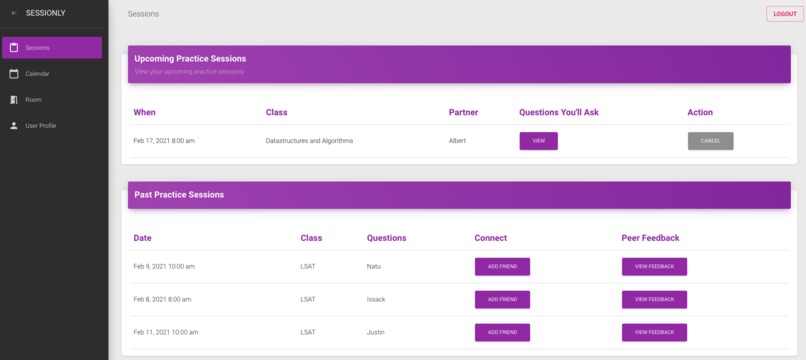
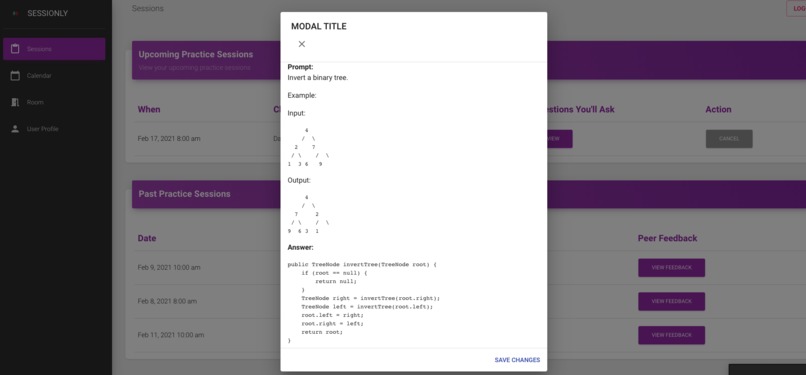
Our platform allows users to join 1-on-1 live video sessions. Users can select a time and a topic for each session. After finalizing the session details, our platform will automatically find a partner for the user. Our platform matches users based on their availability and their topics of interest. For each practice session, users will get the chance to ask their partner a set of questions and also answer questions that their peers will ask them. These questions will be taken from our database so users do not have to worry about what they will ask their peers. Users have the chance to view their upcoming sessions along with the details such as the date and time it starts, and the set of questions for their peers. This way users can try answering the questions so they can better help their partner during the session. After each session is complete, peers can give feedback to each other, which they can view the feedback they received in the “Past Sessions” section of the Sessions tab. In there they can also see the questions that were asked during their past sessions in case they want to review them.
These are the main components that we have developed to promote collaboration and learning.
Sessions
This section provides a record of the students’ past practice sessions and upcoming practice sessions. The past practice sessions display the date, class, the question asked, feedback and a chance to connect. We thought feedback would be a great way to improve a student's confidence, self-awareness and enthusiasm for learning. Feedback also allows for individualized commentary to best accommodate the needs of each student. The feature to connect is meant to push students to engage and work with those with who they find they’re they are compatible.
The upcoming practise sessions allow you to view who you’re interviewing with and the question you’ll be asking that individual. You also have the ability to cancel an upcoming practice session at the click of a button.
Availability
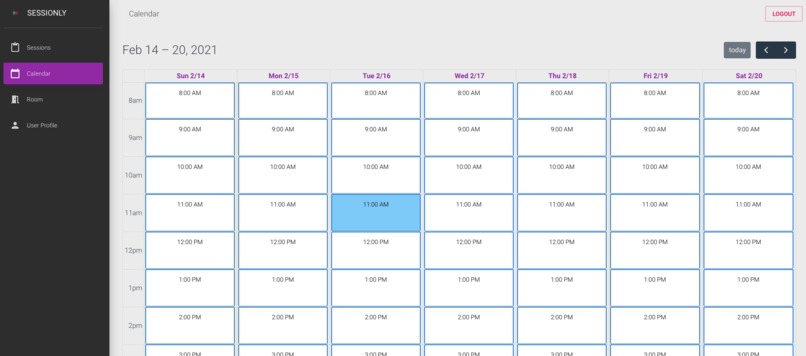
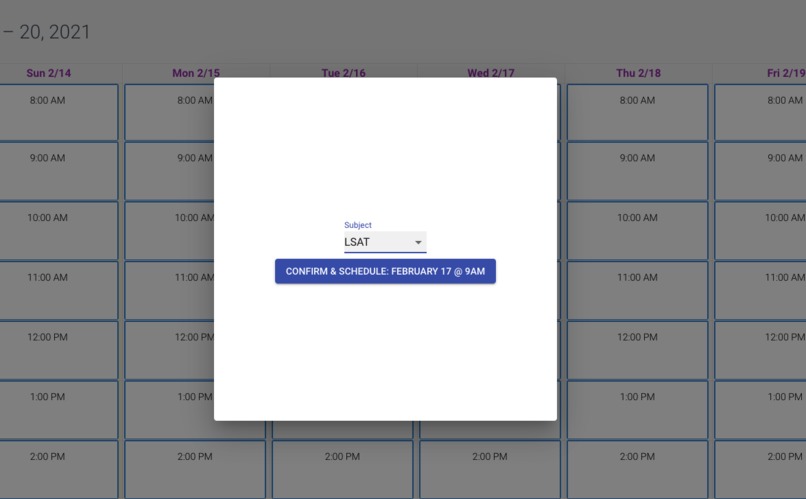
In the Availability view, a student can book a practice session with other classmates. This view is meant to allow a user to easily see what’s available to them and select a time that works. Once a time slot has been selected, the table in the session view automatically populates and pairs you up with a classmate.
Room
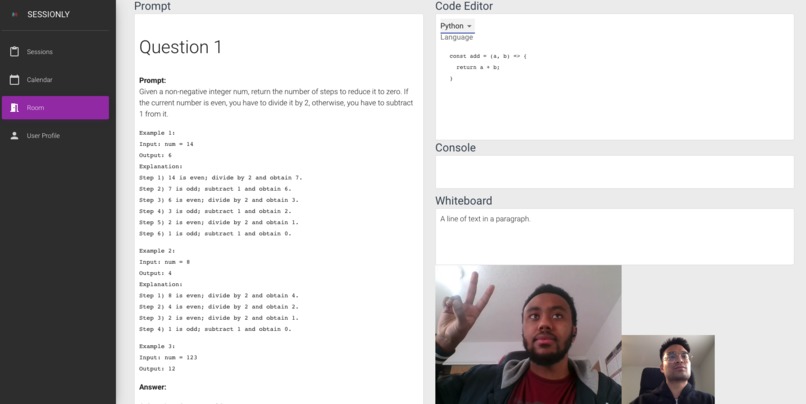
Users were able to join their upcoming sessions and would see real-time voice and video interactions between themselves and their partner. The rooms contained a prompt, which contained the question to present to their partner, a code editor, where solutions could be typed up, and a console for the respective output of the code.
User Profile
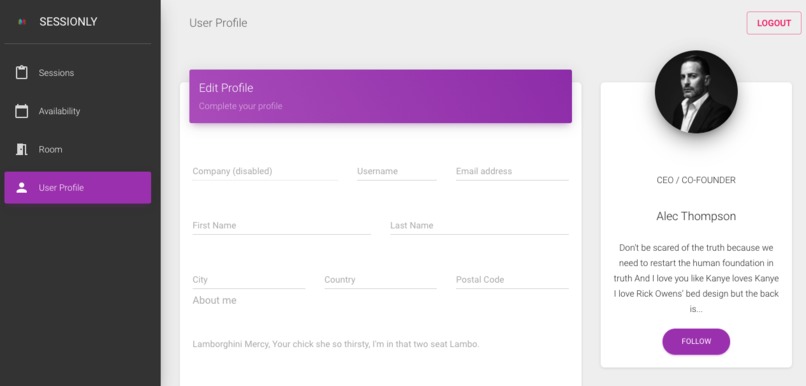
The User Profile is a directory of stored user settings and information for the related user account.
How we built it
When it came to the session room, there were a few requirements for getting it operational. A React frontend A Nodejs server Flask Server Real-Time Voice and Video communications React.js allowed us to create a user-interface efficiently and effectively.
The Nodejs server allowed us to spin up a host for our sockets which would facilitate the communications among peers as well as manage the lobbies that a user joins so that all communications are shared only among the participants.
Voice and Video communications were done using WebRTC technology which made peer-to-peer communications between the browser possible with the help of the Nodejs server. Upon joining a room the two peers would exchange messages to establish the 1-to-1 connection all handled behind the scenes. We were able to send and receive a full audio and video signals for both parties.
For storing data, we decided to use a Firestore as it is easy to set up and get started. Another reason for choosing Firebase is that it is a NoSQL database which mean that we can add new data types without having to redefine the schema, which we know will happen a lot in projects like these.
Google Cloud Platform
Our platform consisted of multiple services, each running on a Google Cloud product. Our database was hosted in Google’s Firebase DB. Our Rest APIs and video-chat servers were hosted on Google App Engine. We also made use of Google Cloud Builds to auto-deploy our services after every commit.
Challenges we ran into
One of the challenges we ran into was collaborating remotely and communicating what problems were blocking one another. Luckily we were able to do some pair programming through live sharing on visual studio code to overcome an aspect of this challenge. We also decided to take a different approach to communicate our plans. Rather than tell everyone about our plan at the same time, we started each meeting by talking about what each team member was currently working on, and what problems they’d solved so far. Then, during the meeting, we talked about the goals that we all agreed on and the rough outlook for when we’d need to have everyone working on a particular set of tasks. This helped keep everyone focused, and productive.
Another challenge we ran into was the time constraint, as we had several additional features that we wanted to add to our project. On top of that, the majority of our team only had moderate experience with React, but the experienced React developer in the team helped a lot with answering any questions we had and suggested possible solutions. Also, the eagerness of everyone to accomplish their task helped to deal with the frustrations of learning a new tool.
Accomplishments that we're proud of
We are proud of working as a team to implement a solution to a problem that we all face during these times, connecting. As the tool was being developed we could all see ourselves using this application after this hackathon to assist in both learning and collaborating but also providing valuable insights and personalized feedback right at our fingertips.
What we learned
Everyone in the group had experience building full-stack applications coming into this Hackathon, and the hackathon helped us reinforce what we know by putting them into practice, helped us identify what we need to work on to become better developers, and we also learned new things that would help us in the future.
What's next for Sessionly
Due to the time constraint of a Hackathon, we weren’t able to implement all the features we wanted for this project, so our next step is to implement those features and refine the app. One of these features is to include interfaces where users can personalize their sessions such as adding filters to make studying feel more like an activity rather than a task. Another feature is to allow group sessions so that more than two people can be in a session or have public sessions where any users can join. We all look forward to working with each other again on cool and exciting projects.


Log in or sign up for Devpost to join the conversation.