-
-
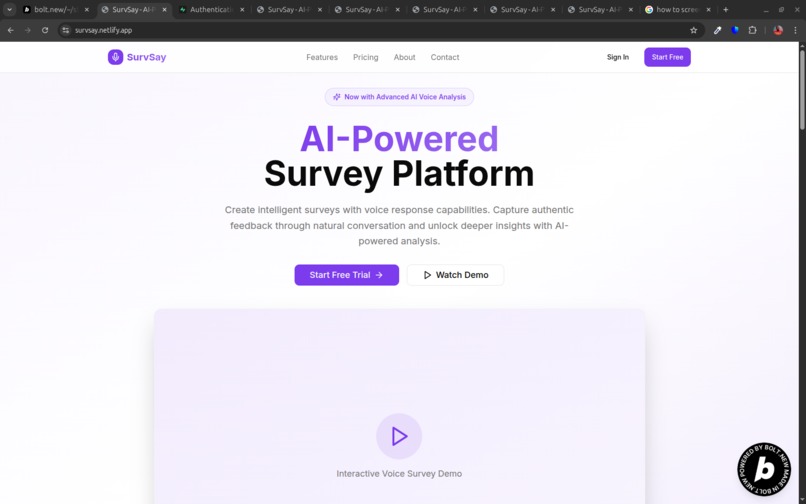
Hero section

Inspiration
The Story of SurvSay: From Frustration to Innovation
Inspiration
The inspiration for SurvSay came from a common pain point: the dreaded long survey. My friend sent me a survey with over 40 questions, and I had to type out every single answer. It was tedious, time-consuming, and frankly, quite annoying. This experience sparked an idea: what if there was a better, more natural way to collect detailed feedback? What if people could simply speak their answers, and the platform could handle the rest? This led to the vision of an AI-powered survey platform that leverages voice responses to make feedback collection more efficient and insightful.
What I Learned
Building SurvSay was a journey filled with learning and problem-solving. Key areas of learning included:
- Supabase Row Level Security (RLS): Implementing robust data security was paramount. I learned how to craft intricate RLS policies to ensure users could only access their own data or data within their teams, preventing unauthorized access and maintaining data privacy. This involved understanding
auth.uid(),EXISTSclauses, andWITH CHECKconditions. - OAuth Authentication Flows: Integrating Google OAuth with Supabase and handling the redirect and session management across different environments (local and Netlify) was a significant learning curve. This required a deep dive into how OAuth tokens are exchanged and how to persist user sessions securely.
- Real-time Audio Processing and Transcription: Working with browser-based audio recording (MediaRecorder API) and integrating with external AI services like ElevenLabs for speech-to-text transcription was fascinating. This involved handling audio blobs, FormData, and asynchronous API calls.
- Serverless Functions (Netlify Functions): Deploying the backend API as serverless functions on Netlify introduced concepts like cold starts, environment variable management in a serverless context, and structuring the Express app for serverless deployment using
serverless-http. - React State Management and UI/UX: Effectively managing complex component states, especially with dynamic forms and real-time interactions (like the voice recorder's waveform), was crucial. I also learned to refine UI/UX details, such as adding tooltips for mobile buttons, to ensure a smooth and accessible user experience across devices.
- Database Schema Design for Multi-tenancy: Designing a flexible database schema that supports individual users and team collaboration (teams, team members, invitations) while maintaining data integrity and performance was a core learning.
How I Built the Project
SurvSay was built using a modern web stack:
- Frontend: The user interface was developed with React and Vite for a fast development experience and optimized build. Shadcn/UI components provided a beautiful and accessible foundation, styled with Tailwind CSS for rapid and consistent styling.
- Backend: A Node.js and Express.js API handled all server-side logic, including user authentication, survey management, and integration with external services. This API was deployed as Netlify Functions, making it serverless and scalable.
- Database & Authentication: Supabase served as the primary backend, providing a PostgreSQL database, built-in authentication (email/password and Google OAuth), and object storage for audio files.
- AI Integration: ElevenLabs API was used for real-time speech-to-text transcription of voice responses, transforming spoken answers into text for analysis.
- Deployment: The entire application was deployed on Netlify, leveraging its continuous deployment capabilities and serverless functions.
The development process involved setting up the core React application, designing the Supabase schema, implementing authentication flows, building the survey creation and response submission features, integrating the voice recording and transcription, and finally, adding analytics and team collaboration functionalities.
Challenges Faced
Building SurvSay presented several significant challenges:
Complex Supabase RLS Policies: The most challenging aspect was undoubtedly the Row Level Security (RLS) policies in Supabase, especially for the
team_memberstable. I encountered "infinite recursion detected in policy" errors multiple times. This happened because a policy would try to check team ownership by querying theteam_memberstable within its own definition, creating a circular dependency. Resolving this required carefully restructuring policies, sometimes breaking them down into multiple, simpler policies, and using SQL functions likeis_team_ownerto abstract complex checks and prevent direct self-referencing loops. The numerous migration files in thesupabase/migrationsdirectory are a testament to the iterative process of refining these policies for both security and functionality.Google OAuth and Session Persistence: Getting Google OAuth to work seamlessly, especially in a production Netlify environment, was tricky. Issues arose with redirect URLs, token exchange, and ensuring the user session persisted correctly after the OAuth callback. This involved debugging
AuthContext.tsxandnetlify.tomlto ensure the client-side application correctly processed the OAuth response and established the user's session.User Data Synchronization (
auth.userstopublic.users): Ensuring that user data from Supabase'sauth.userstable was correctly synchronized with thepublic.userstable (which holds additional profile information like name and image) was a recurring challenge. This involved creating database triggers and functions (handle_new_auth_user,sync_user_to_public) to automate this process, handling edge cases like duplicate emails during OAuth sign-up, and ensuring theemail_verifiedstatus was correctly propagated.UI Accessibility and Component Usage: An error regarding
DialogContentrequiring aDialogTitlefor accessibility highlighted the importance of adhering to UI library best practices. This was resolved by correctly associating theDialogTitlewith theDialogContentusingaria-labelledbyanduseIdhooks, ensuring the application is accessible to screen reader users.Dynamic UI for Different Devices: Adapting the UI for various screen sizes, such as adding tooltips for mobile buttons (
src/pages/dashboard/surveys/index.tsx), required careful consideration of user interaction patterns and responsive design principles.
These challenges pushed the boundaries of my understanding and led to a more robust and well-engineered application. does
How we built it
Challenges we ran into
Accomplishments that we're proud of
What we learned
What's next for SurvSay
Built With
- bolt.new
- elevenlabs
- express.js
- gemini
- react
- supabase


Log in or sign up for Devpost to join the conversation.