-
-
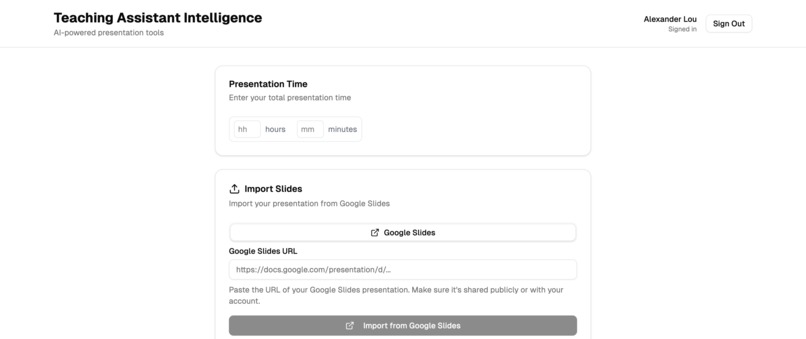
UI For teachers to submit lecture slides and add a class countdown
-
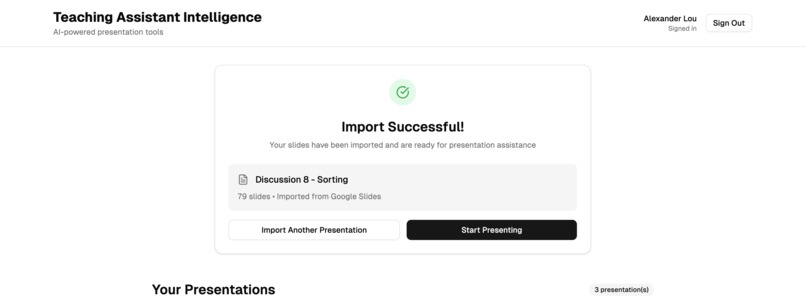
Slides uploaded successfully
-
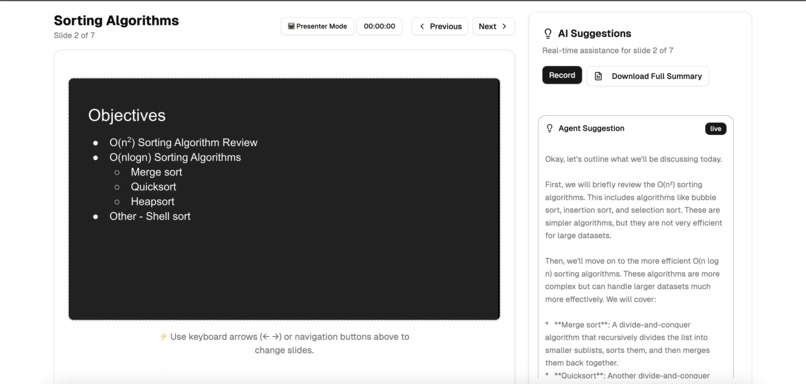
Example of what the teacher will see with agentic suggestions
-
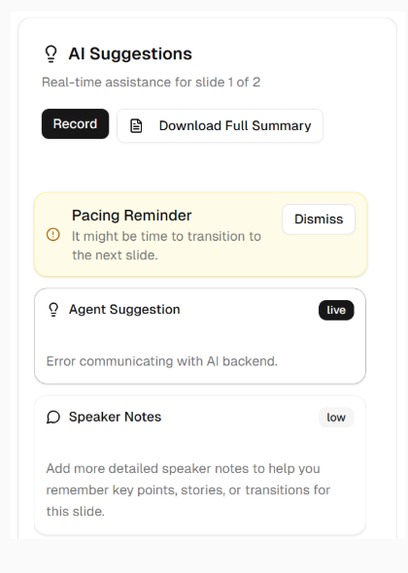
Pacing reminder for the teacher


Inspiration
Have you ever sat through a presentation that was hard to follow?
Or delivered a lecture and realized you forgot to cover key points?
We were inspired by these common challenges, especially those faced by teachers: keeping students engaged while delivering content effectively. Having attending countless lectures ourselves, we noticed that presenters often struggle to balance clarity, pacing, and audience engagement. TA.I was created as a teacher-first tool designed to enhance presentations and improve learning outcomes for students while keeping the audience experience clean and distraction-free.
What it does
TA.I is a web application that allows teachers or any presenter to import slide decks and receive real-time, presenter-only guidance while keeping the audience view clean and distraction-free. Features include private prompts, suggested talking points, pacing feedback, and other guidance to help presenters stay on track and manage their time effectively.
AI agent-powered features:
- Smart Suggest: Analyzes slides to recommend talking points and real-world examples.
- Summarizer: Monitors speech to generate post-presentation reports, allowing presenters and audiences to review key points and improve future sessions.
How we built it
We built TA.I as a web application with a dual-view interface: the audience sees only the slides, while the presenter has a private dashboard with real-time suggestions. The frontend is developed in TypeScript using Next.js, providing a responsive and interactive UI. Supabase handles the backend and real-time data synchronization, ensuring the presenter and audience stay perfectly in sync. For AI-powered features like Smart Suggest and Summarizer, we integrated Google ADK to analyze slide content and speech. Throughout development, we prioritized a lightweight, intuitive interface so teachers can focus on delivering engaging lectures rather than managing the tool.
Challenges we ran into
- Real-time synchronization: Ensuring that the presenter’s suggestions and the audience slides stay in sync.
- Balancing AI support: Making recommendations helpful without being distracting.
- Time constraints: Implementing a working prototype with a polished dual-view interface during the hackathon.
Accomplishments that we're proud of
- Successfully created a working dual-view system separating audience and presenter interfaces.
- Implemented real-time private suggestions, enhancing the lecture experience.
- Learned how to use Google ADK to customize features like Smart Suggest and Summarizer.
- Developed a clean, intuitive UI that educators can use without training.
What we learned
- Real-time collaboration tools are challenging but rewarding to implement.
- Effective AI assistance requires careful design to avoid overwhelming users.
- Building a teacher-focused product requires balancing technical innovation with user experience.
- Always plan for the unplanned
What's next for TA.I
- Presenter Focus: Use STT + slide embeddings to detect off‑topic drift and nudge privately.
- Slide Question Heatmap: Log questions per slide; show heatmap overlay and recap.
- Tone Analysis & Coaching: Track WPM, fillers, sentiment; give post‑run tips and trends.
Try it out here!
Built With
- adk
- cloud
- css
- gemini
- javascript
- next.js
- python
- supabase
- typescript
- vercel




Log in or sign up for Devpost to join the conversation.