-
-
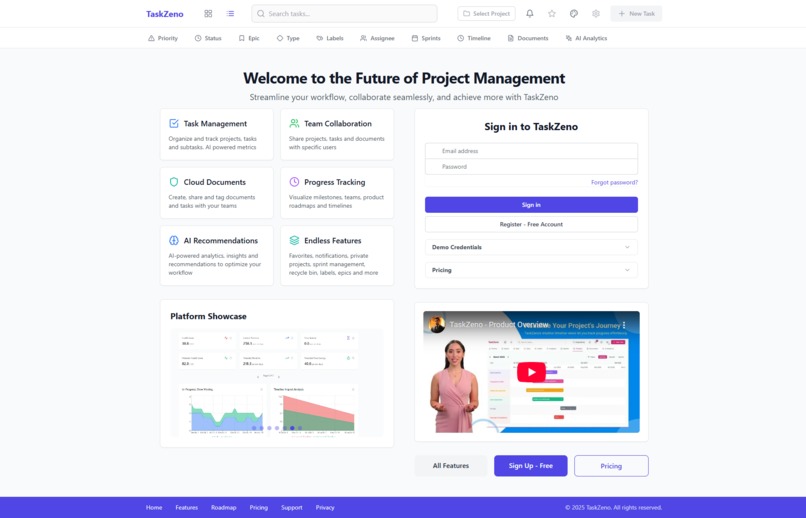
Homepage with login, registration, demo credentials, key features image gallery and promo video
-
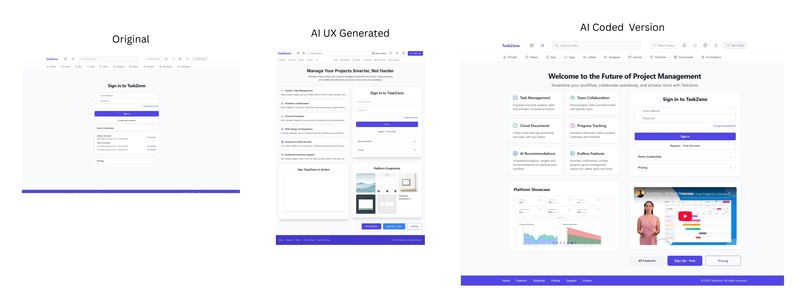
Showing how I used AI and Bolt to dramatically improve the UX
-
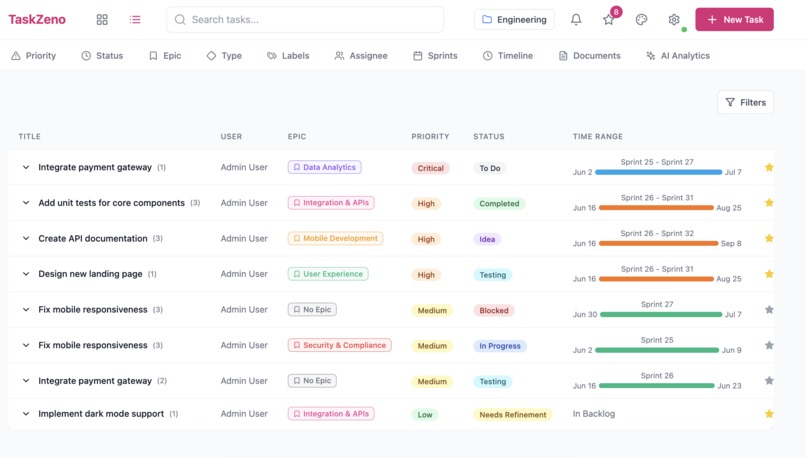
List view of tasks within a project - Project Overview
-
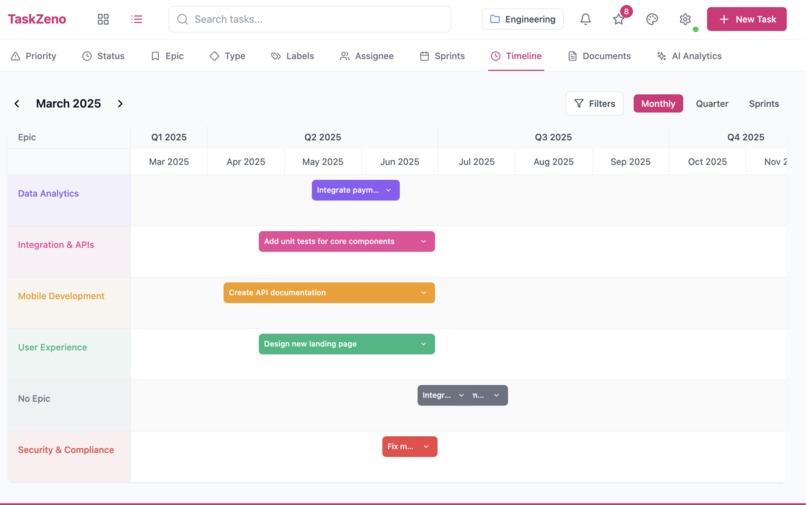
Auto-generated timeline view
-
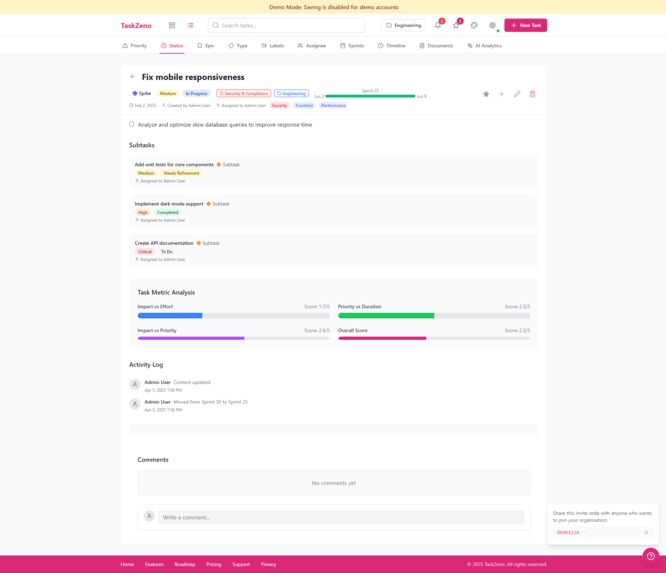
Task detail mode shows auto-generated analysis
-
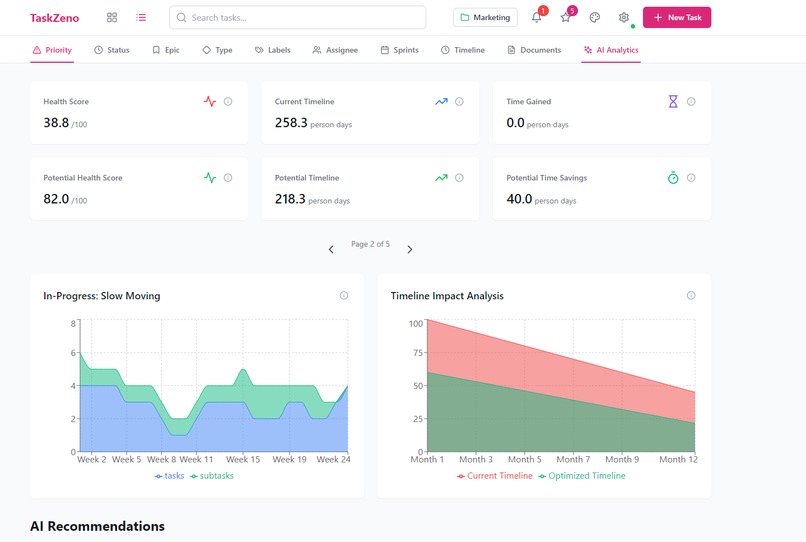
AI generated dashboards
-
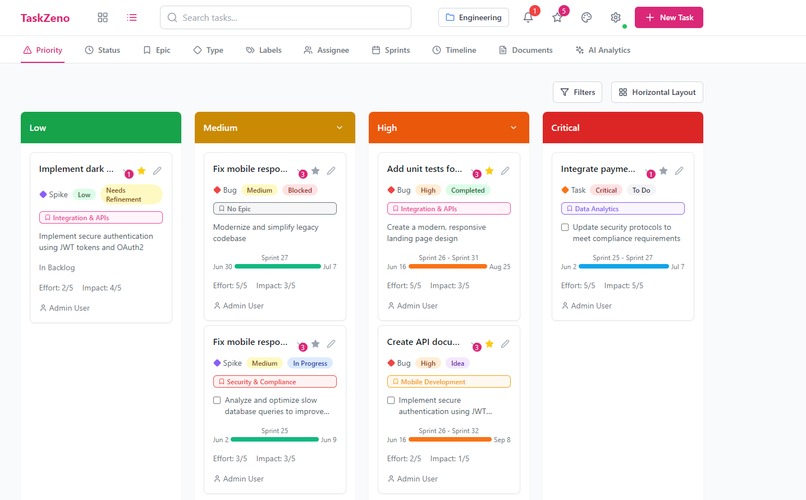
Kanban view of tasks within a project
-
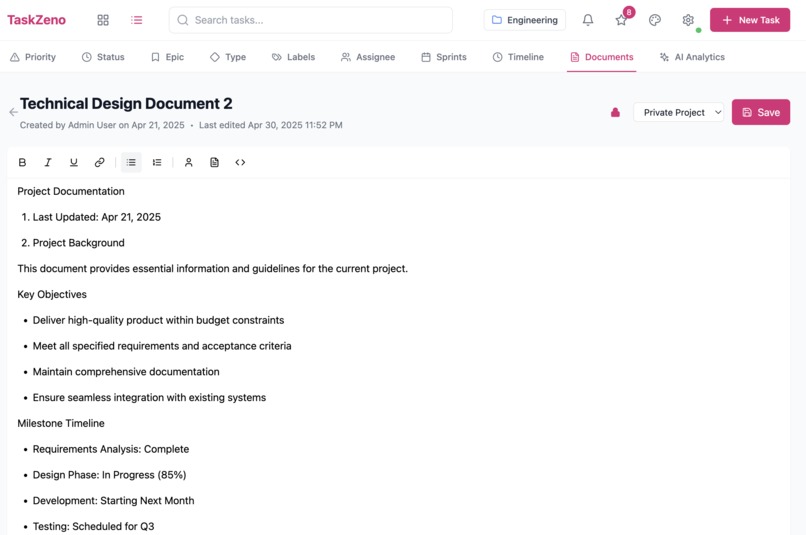
Cloud document editort that lets you tag users and tasks
-
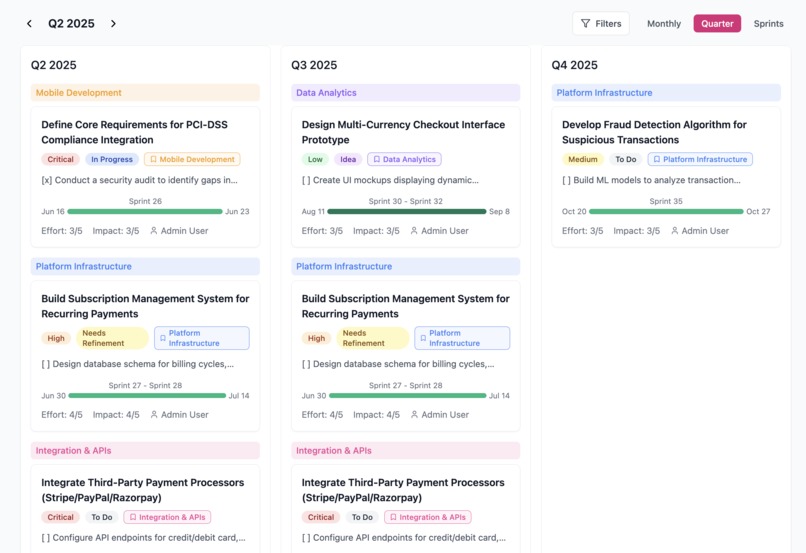
Roadmap quarterly view - auto-generated
-
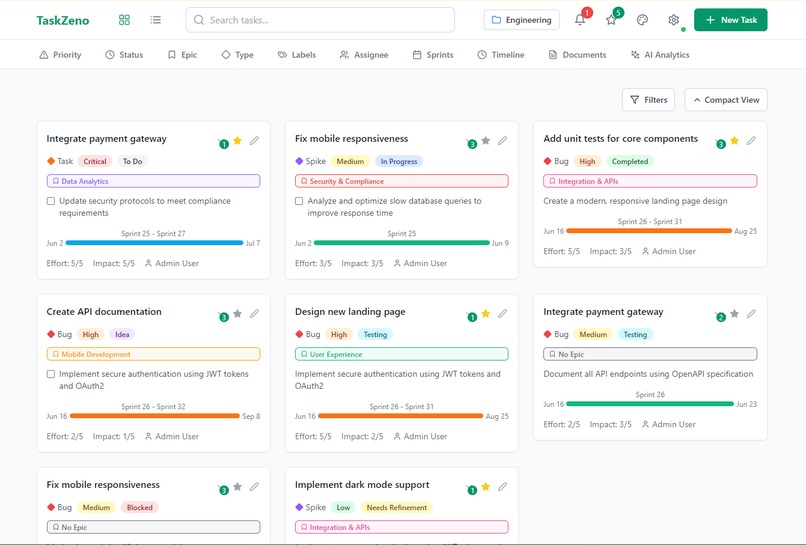
Grid view of tasks within a project
-
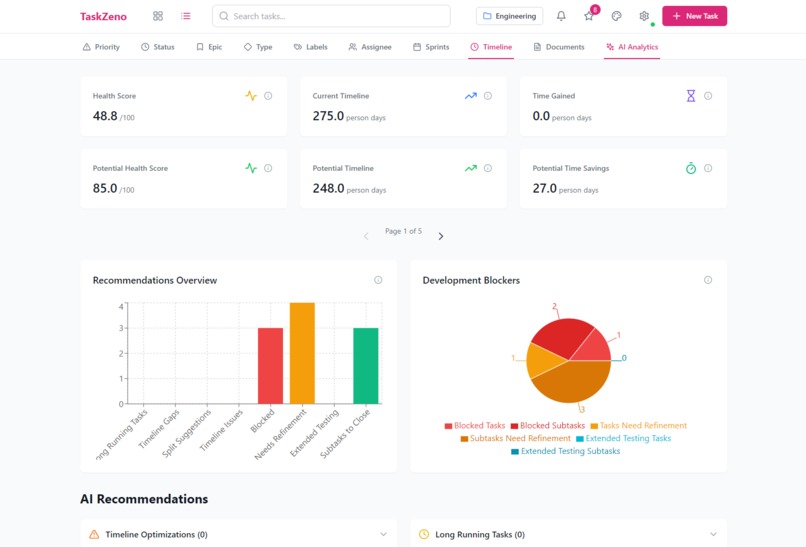
AI generated dashboards


Inspiration
- I've worked in Product and Tech for 15 years and realised that most of the tools for managing and tracking tasks, product and projects are too bloated, basic and could be improved
- So I created TaskZeno, which is fully production-ready task and project management tool.
- This is not an MVP, it's packed with 100s of smart features to make managing small tasks to ultra large software builds and projects much more simple and cleaner
- I hear 1000s of complaints from users of similar tools that they need a tool that is simpler and automates with ease, so I built it using Bolt!
- The inspiration was to make a powerful word-class tool that lets users set up in a few clicks, create projects and tasks in 1-3 clicks and then automation manages everything, whilst always having clean, simple UX. I achieve this and made sure users never need to code or press more than 1-3 clicks to get anything done.
What it does
- TLDR; A super powerful but simple task, project and product management tool that lets your add, view and track your items in slick visual and automated ways. It even has a document editors that is like a mini Google Docs.
- Free and paid plans: Clever permissions that have lots of different types of free and paid limits that are configurable on a per organization / user basis with simple UI's
- Task Management: Organize and track projects, tasks and subtasks. AI powered metrics
- Project Management: One click creation of projects that can be shared with the team or kept as private per user.
- Private and Shared Items: For tasks, subtasks, documents and projects
- Cloud Documents: Literally a mini Google Docs / Conflluece that users get access to which they can tag users and tasks into.
- Task Metric Analysis: Visuals and scores that automatically generates for each task based on all the items inside it and related to it
- User Roles and Permission management: All UI controlled and admins in each organizations can manage this for their teams and users
- Joining Organizations and Team Members: Each organization can allow its staff / team to join and can control what each user can see securely with simple UIs.
- AI Analytics: Auto-generating dashboards, suggestions and even clickable recommendations that start to modify tasks and subtasks on a per-project basis
- Timeline and Planning: Views for weekly, monthly, quarterly and sprints. All auto-generated.
- Smart Notifications: When users are tagged in items or their items change state. Saved in Supabase and displayed in the front-end
- Commenting: Users can comment on tasks, subtasks and documents, tag others in and notifications are sent whilst data is saved in Supabase.
- Recycle Bin: So you never lose tasks, documents and projects.
- Favorites and Bookmarks: So each user can track and find tasks and documents with ease.
- Customiszation: Colour schemes, UX configurations, etc.
- Advanced search and filtering against projects, epics, labels, statuses, durations, etc.
How we built it
- bolt.new to code the front-end, back-end and everything (I did not use one line of custom code or other coding tools)
- Supabase for the user logins, databases and backend functions and triggers (Bolt talks to Supabase and does all the DB coding)
- Make.com for background automation, i.e. scanning the payment processor for new signups and cancellations (as Edge functions were not working good and I was in a rush)
- Stripe as the payment processor for subscriptions
- GitHub to push the code into
- Netlify for the hosting and servers (you can also use Vercel)
- MailerSend for the email sending
Challenges we ran into
- Stripe: Was not integrating smoothly as the Edge functions would not build properly. I had to find other ways to webhook connect Stripe, my missions was no code, so I used Make.com and it works great, i.e. new subscriptions, cancellations, etc.
- Sending Emails: AWS-SES were taking long to approve me, a few other tools I tried did not integrate smoothly, I then found Mailersend and bolt smoothly got EdgeFunctions created via Supabase and it works great.
- GitHub integration broken down on this project (maybe as I added lots of cyber security) so I had to find a way to recover files and then used a different method to push Bolt into GitHub (I can branch better there and Netlify is auto-receiving deploys from there).
- Project size exceeded: This was tough but I had to keep finding ways to bypass this
- Backend for complex functions, triggers and flows: To make things work that the AI thought was working, I had to at times suggest the design, pattern, logic and flow along with helping the AI analyse logs, sometimes the AI needs our input in these scenarios to understand what is not working in all the moving parts
- UX: I initially made very rough paper sketches and wireframes, but then realised that I needed better UX for some sections, so I had to go backwards in getting Google Stitch (their new AI UX Generator) to make some better UI's. Luckily, bolt was able to smoothly upgrade the whole website/app to incorporate the new non-basic UX
- Getting images and videos to display, I solved it by putting them on in a publicly accessible filespace to then give bolt the direct urls
Accomplishments that we're proud of
- A project / task management tool that rivals the best tools in the market, it even has a cloud document editor built in
- Super advanced SaaS tool that can let 1000s of organizations register and for 1000s of their users to automatically join the respective organizations.
- A tool that anyone can easily use to manage their teams, projects, timelines without any training
- Payment integration that works by granting specific user subscriptions within an organization, even if others don't have a paid plan
- Lots of different customisable permissions that can be done by each organization with the UIs I have made
- This app should have taken 3-5 developers, 4 months and $50k to build. I know this and have got it checked out by multiple people to confirm.
What we learned
- Focus on micro features at a time
- How to think like the AI and prompt so I get what I want
- I tried to make some really powerful features, I got 85% of them done but I had to water down 15% of them to save time and be able to launch quicker, i.e. I made non-editable demo accounts instead of demo accounts that auto-reset all their data and databases every 30 minutes, as that difference would take a lot of extra time, the point is, you can still make better than an MVP with bolt and you don't have to go overboard all the time.
- Anything you can imagine you can get done, if you need to use APIs, spend a bit of time researching and testing the best ones for your use case
- Spend a little bit of time getting some key UI / UX screens made from the beginning (you can do this by looking at competitor sites, wireframing or using AI UX generators)
- If something doesn't work as expected, i.e. Stripe or GitHub won't work on the project, you don't need to give up, just find another way and workaround to make it work, i.e. connecting other services in, even if it takes a bit longer, as it will eventually work if your persist
- Be smart with Supabase / database migrations as you can't rollback as easily as bolt can with its code
What's next for TaskZeno
- There's a public roadmap page I made with over 20 items on there (its in the footer)
- Notable items are; AI task and sub-task creator, social network SSO, quicker task creation (less options initially which the user can then expand), enhancing the AI analytics dashboard and recommendations, enhancing the team capabilities so its even more multiplayer, few UX enhancements, adding the 2FA codes instead of magic links (via Supabase)
Built With
- bolt
- node.js
- react
- recharts
- supabase
- tiptap
- typescript
- vite


Log in or sign up for Devpost to join the conversation.