-
-
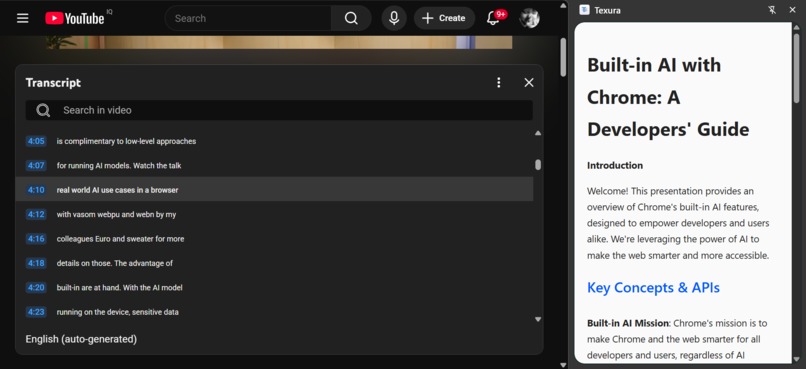
step 3: wait for the model to turn the video transcript to the structured format
-
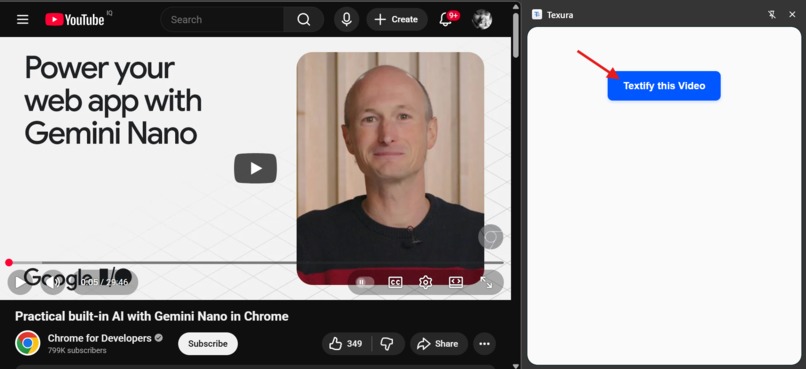
step 2: side panel open click on "Textify this video"
-
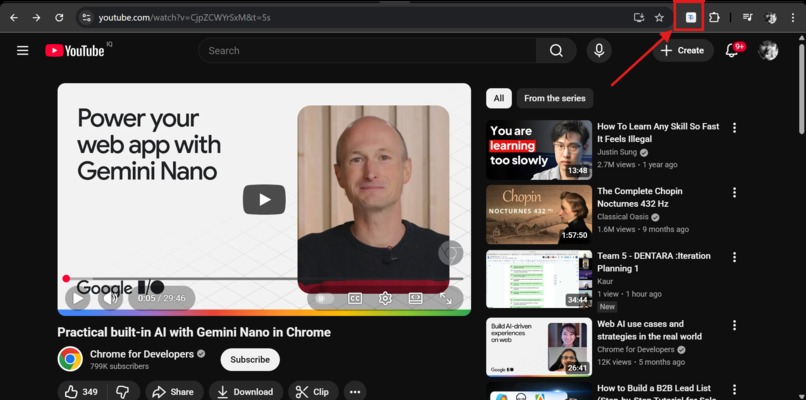
step 1: click on the Texura icon on the toolbar


Inspiration
For the past few years, my primary way of learning anything new was by reading. I'd read articles, documentation, and books. It was how my brain was wired to absorb and retain information.
Recently, I had to take a series of video-based courses, and that's when the friction became obvious. As I watched, I found myself in a constant state of struggle. My eyes would hunt for text on the screen, my focus would drift, and I'd have to rewind the same 30-second segment multiple times. It was inefficient and exhausting.
Out of frustration, I tried a manual workaround: I found the "Show transcript" button, copied the entire raw text, give to an AI model and structured it into key notes. The improvement was immediate. My focus and learning curve shot up.
That's when the idea for Texura was born. I realized many people probably feel this same way—this "information mismatch." I thought, "Wouldn't a tool that does this entire process for me be so much better?" I wanted to build an extension that could automate that entire flow: extract the transcript, analyze it, and structure it, all with a single click.
What it does
Texura is a Chrome extension that acts as a personal information architect. It's for anyone who prefers to learn by reading but finds themselves faced with video-based content.
When you're on a YouTube video, you can open the Texura side panel and click "Textify this Video" Texura then:
- Extracts the full, raw transcript from the video.
- Analyzes the content using the on-device LanguageModel AI to classify the video's type (e.g., Tutorial, Lecture, Recipe) and domain (e.g., Software, Cooking).
- Rewrites the entire transcript, removing filler words and "ums."
- Restructures the content into the most logical format based on its classification. Tutorials become step-by-step guides, lectures become outlines, and recipes become ingredient lists and instructions.
- Streams this new, clean, and structured HTML document to the side panel in real-time, allowing you to read what you watch.
How we built it
The magic of Texura lies in its intelligent and privacy-first architecture. By leveraging Chrome's built-in LanguageModel API, we've created a multi-step pipeline that runs entirely on your device:
- Injects and Extracts: A content script activates on YouTube, finds the transcript, and sends the raw text to the service worker.
- Classifies Content: The
LanguageModelAPI analyzes the transcript to determine the video'stype(like "Tutorial" or "Lecture") anddomain("Software" or "Cooking"). - Refines and Restructures: The AI rewrites the entire transcript, removing filler and dynamically reformatting it into the correct structure (like a step-by-step guide or an outline) based on its classification.
- Streams the Output: The final, clean HTML is streamed in real-time to the side panel for a fast, responsive UI.
Our development focused on two key principles: information accessibility (for text-based learners) and user privacy. Every AI call happens locally, meaning your data never leaves your machine.
Challenges we ran into
Building Texura meant tackling key limitations of the on-device AI to ensure a smooth and reliable user experience. We needed to:
- Solve the Model's Input Quota: The on-device model has a strict input limit, which meant transcripts from longer videos would fail. We developed a "pre-flight" strategy using
session.measureInputUsage()to calculate the prompt's size before sending it. This allows us to gracefully inform the user that the video is too long, preventing an AI crash and providing a clear, understandable error. - Eliminate Long Wait Times: A 20-minute transcript is a large output. Using
session.prompt()created a long, blank-screen wait. We solved this by implementingsession.promptStreaming(). - Develop a Smart Streaming Buffer: To make streaming work, we engineered a custom buffering system in our service worker. This buffer "catches" the AI's token stream and assembles complete HTML tags (like
</p>or</ul>). It then sends these complete elements to the UI, making the notes appear instantly and "live-type" onto the panel. - Ensure Reliable HTML Output: We had to carefully engineer our prompts to instruct the AI to generate only clean, semantic HTML, and then build a robust, regex-based parser for our streaming buffer that could handle this HTML stream without breaking.
Accomplishments that we're proud of
- The Full On-Device Pipeline: From classification to chunking to refinement, the entire AI workflow runs 100% on the user's machine. No data ever leaves the browser, making it completely private.
- The Dynamic Formatting: The extension doesn't just transcribe. It understands and refactors. The classification step allows it to intelligently decide that a "Tutorial" needs numbered steps, but a "Recipe" needs an "Ingredients" list. This is the core magic of Texura.
- The HTML-Aware Streaming: The buffering logic in the service worker is a piece of code I'm particularly proud of. It feels "alive" as it streams complete HTML elements to the UI, rather than just words or tokens.
What's next for Texura
- Support for More Platforms: The first step is to expand beyond YouTube. I plan to add support for other video platforms like Vimeo, Coursera, and university lecture portals.
- Save & Export: Add buttons to allow users to save their generated notes as a local HTML or Markdown file, or export directly to tools like Notion or Obsidian.
- TL;DR Summary: Add an optional "Summary" section at the top of the notes, using a separate session.prompt() call to generate a quick 2-3 sentence overview.
- User-Selectable Formats: Allow the user to override the AI's classification. For example, they could choose "Format this lecture as a blog post" or "Format this talk as a simple Q&A."




Log in or sign up for Devpost to join the conversation.