-
-
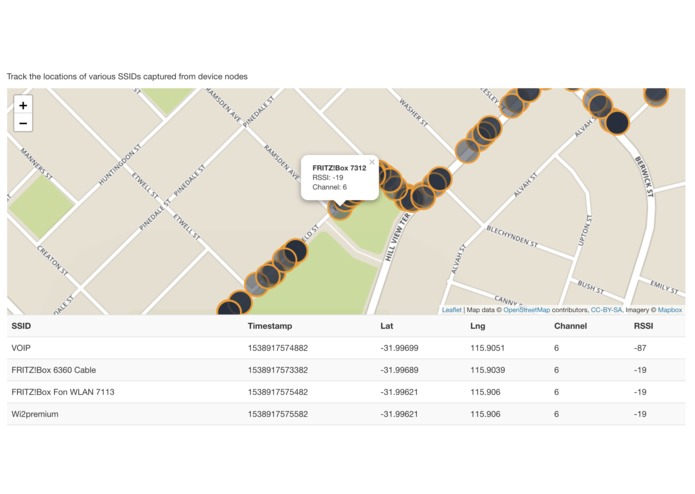
Web Interface demo
-

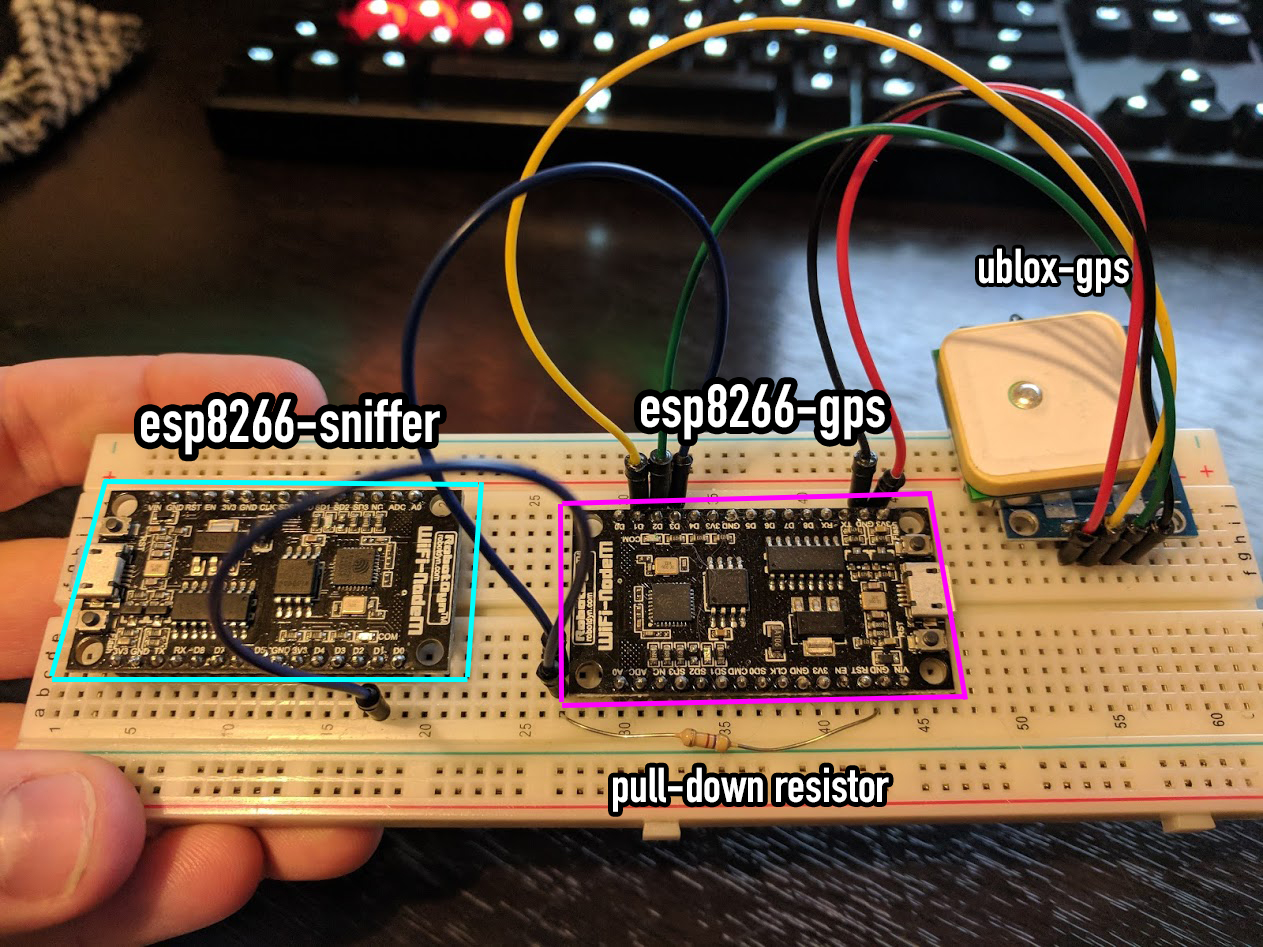
Proof of Concept circuit
-

AWS Architecture


Traffic Cop
http://traffic-cop.s3-website-us-east-1.amazonaws.com/
WiFi Beacon & Client sniffing pipeline for analysing the movements of Human Traffickers.
Authors
- Nathan Glover @nathangloverAUS (Twitter), @t04glovern (Github)
- Stephen Mott @SrzStephen (Github)
Proof of Concept
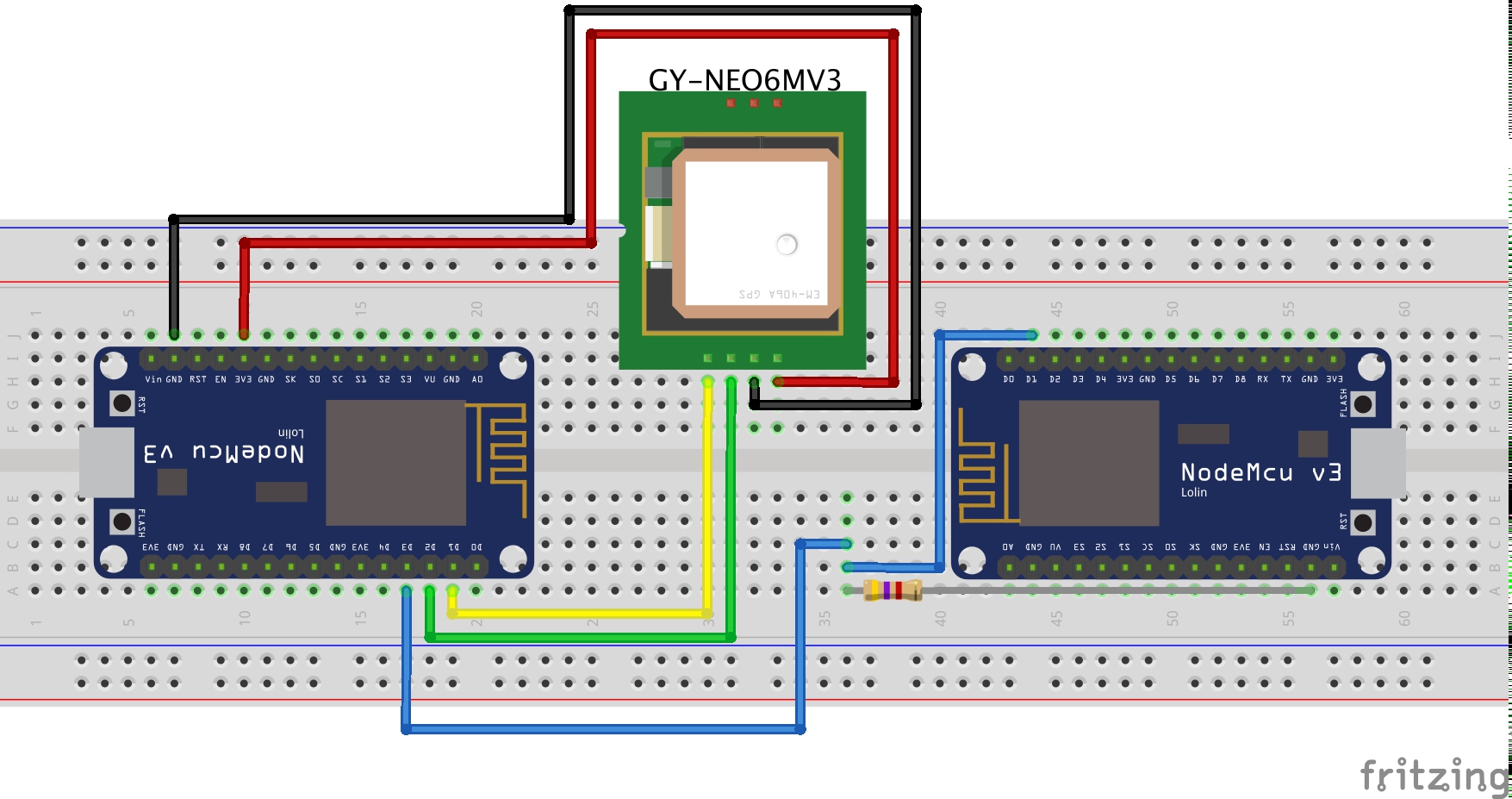
Circuit Diagram
BOM
- 2x NodeMCU 1.0 (ESP 12 E Module)
- 1x U-blox NEO-6M GPS Module
- 1x ~2kΩ+ Resistor
- 5x M2M Jumper Wires
Architecture
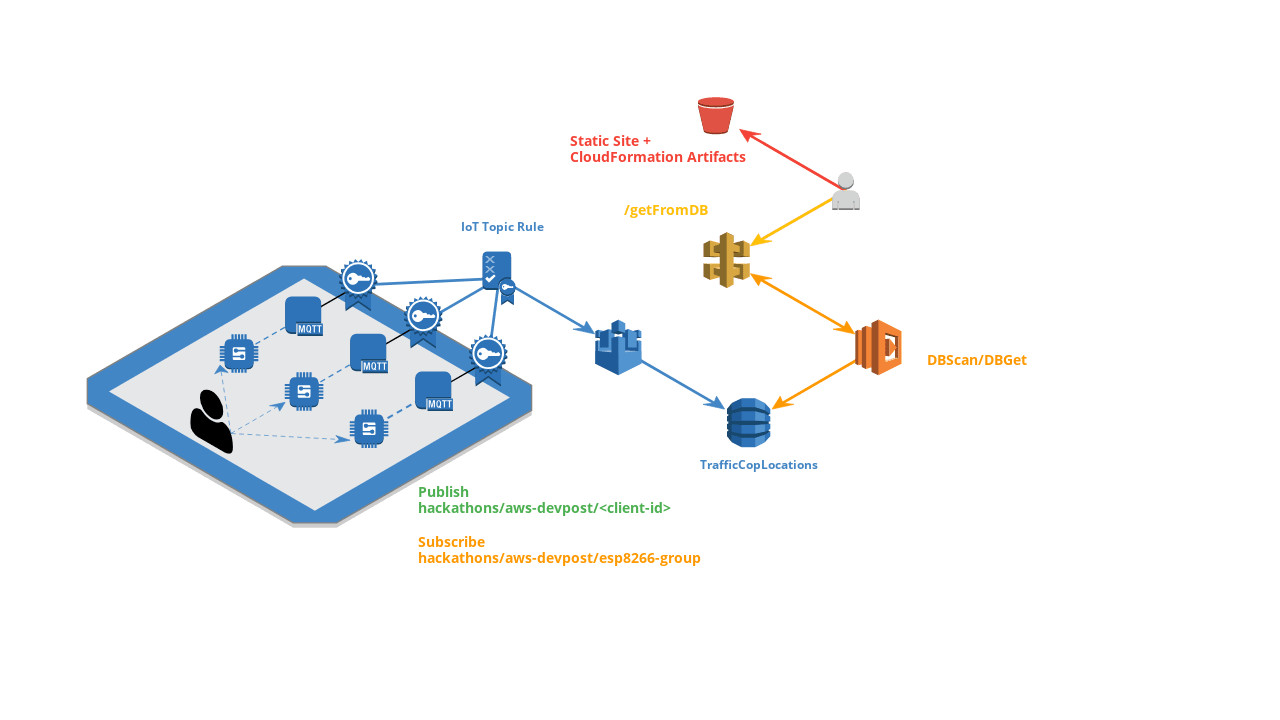
Deploying CF
IoT Vending Machine
Deploys a IoT Vending machine instances that can be used to generate certificates for new devices
aws cloudformation create-stack --stack-name "TrafficCop-IoT-Vending-Machine" \
--template-body file://aws/Iot-Certificate-Vending-Machine.json \
--parameters file://aws/Iot-Certificate-Vending-Machine-Params.json \
--capabilities CAPABILITY_IAM
Create Device
Check the outputs from your cloudformation stack and retrieve the RequestUrlExample, It'll look like the following:
https://<api-gateway-id>.execute-api.us-east-1.amazonaws.com/LATEST/getcert?serialNumber=value1&deviceToken=value2
Create a new item in the DynamoDB instance that was created by the previous CloudFormation script (the DB is called deviceInfo)
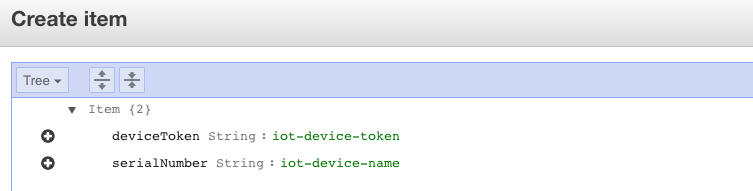
- serialNumber: This should be something unique and will be the identifier for the IoT device you are onboarding (e.g. gps-glover-01)
- deviceToken: This should be a private hash/secret that you will use to generate certificates for your new device securely (e.g. 572589798725)
Substitute these two into your API Gateway query
https://<api-gateway-id>.execute-api.us-east-1.amazonaws.com/LATEST/getcert?serialNumber=gps-glover-01&deviceToken=572589798725
You'll be returned a json response:
{
    "certificateArn": "arn:aws:iot:us-east-1:<account-id>:cert/009ff6ee0.........",
    "certificateId": "009ff6ee092e......",
    "certificatePem": "-----BEGIN CERTIFICATE-----\nMIIDWTCCAkGgAwIBAgIUZiIgLi......-----END CERTIFICATE-----\n",
    "keyPair": {
        "PublicKey": "-----BEGIN PUBLIC KEY-----\nMIIBIjANBgkqhkiG9w0BAQEFAAO.......-----END PUBLIC KEY-----\n",
        "PrivateKey": "-----BEGIN RSA PRIVATE KEY-----\nMIIEpAIBAAKCAQ........-----END RSA PRIVATE KEY-----\n"
    },
    "RootCA": "-----BEGIN CERTIFICATE-----\r\nMIIE0zCCA7ugAwIBAgIQGNrRniZ96Lt........-----END CERTIFICATE-----"
}
Place the outputs for each of the three fields below into new files in esp8266-gps/certs
- esp8266-gps/certs/certificate.pem.crt: certificatePem
- esp8266-gps/certs/private.pem.key: keyPair.PrivateKey
- esp8266-gps/certs/root-CA.pem: RootCA
Follow the instructions in esp8266-gps/README.md on how to convert and upload these certificates to the ESP8266
DynamoDB Instance
Deploys the DynamoDB table + an action rule to push data from a topic into said Dynamo instance
aws cloudformation create-stack --stack-name "TrafficCop-IoT-TopicRule" \
--template-body file://aws/IoT-TopicRule.json \
--parameters file://aws/IoT-TopicRule-Params.json \
--capabilities CAPABILITY_IAM
DynamoDB API
Build the API zip
cd api
./package-lambda.sh
Upload the API to S3 bucket (this same S3 bucket should be used in the Parameters of the aws/DynamoDB-Frontend-Params.json file)
cd api
aws s3 cp dynamodb-api.zip s3://waanimals-deployment-scripts/traffic-cop/dynamodb-api.zip
Deploy the API to CloudFormation
aws cloudformation deploy --template-file aws/DynamoDB-Frontend.json \
--stack-name "TrafficCop-DynamoDB-API" \
--capabilities CAPABILITY_IAM
Retrieve the stacks API endpoint
aws cloudformation describe-stacks --stack-name "TrafficCop-DynamoDB-API" --query Stacks[].Outputs[].OutputValue[] --output text
Place the output from this command into the frontend/index.html file under replacing the api_gateway_url variable.
var api_gateway_url = 'https://<api_gateway_id>.execute-api.us-east-1.amazonaws.com/prod';
Frontend
Deploy the frontend HTML to an S3 bucket with site capability
The bucket policy should be the following for public access
{
    "Version": "2012-10-17",
    "Statement": [
        {
            "Sid": "PublicReadGetObject",
            "Effect": "Allow",
            "Principal": "*",
            "Action": [
                "s3:GetObject"
            ],
            "Resource": [
                "arn:aws:s3:::traffic-cop/*"
            ]
        }
    ]
}
Push the frontend to the bucket.
aws s3 sync frontend/ s3://traffic-cop/
Extras
The db_tools can be used in order to add new entries to the DynamoDB instance manually while testing. To use it simply run npm install then npm run test. You will need to also change the DynamoDB instance name in db_tools/test.js first.
Built With
- amazon-cloudformation
- amazon-dynamodb
- amazon-serverless
- amazon-web-services
- aws-iot
- serverless


Log in or sign up for Devpost to join the conversation.