-
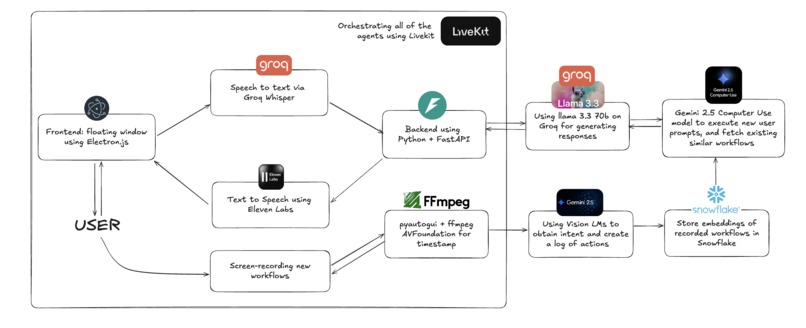
Flowchart
-
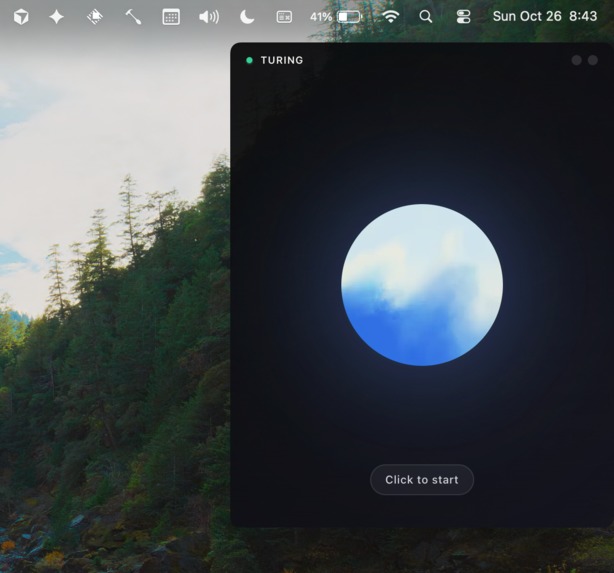
Desktop Overlay


Inspiration
Millions of hours are collectively wasted on computers every single day. Instead of going out to lunch with your friends, you're resolving repetitive support tickets and answering questions that have been asked 50 other times.
Steve Jobs said in the 1980s that computers should be natural extensions of humans, like bicycles for the mind. Moreover, he said that computers would anticipate exactly what the user wants to do next by themselves.
Over 40 years later, computers are still fully reliant on users directly interacting through the mouse and keyboard interface. Turing is built to modernize this with context of how you use your computer and with a faster speed and degree of accuracy than the blind desktop agents that exist today are just by themselves.
What it does
Turing watches how you do tasks, how you reply to messages, how you work, and personalizes workflows to follow your patterns and automate your desktop use while you go out and grab a meal with your friends.
How we built it
We combine context retained from recorded desktop workflows processed and encoded by Vision Language Models (Gemini 2.5 Flash), which analyze screen recordings to extract semantic actions. For instance, it learns "click Submit button" and not just "click at co-ordinates (543, 210)".
These workflows are decoded and executed by personalized desktop agents powered by Gemini Computer Use, which provides vision-based screen understanding and adaptive execution. Workflow storage and retrieval uses Snowflake Cloud, storing semantic actions, parameters, and metadata. Workflow matching uses Snowflake Vector Search for direct semantic similarity analysis, comparing user requests to stored workflow intentions.
We enable speech-to-text via Groq Whisper and TTS human-like responses with ElevenLabs (using Eleven Turbo v2.5) through LiveKit for real-time voice pipelines. The voice agent uses Groq Llama 3.3 70B for conversational intelligence. This enables a truly autonomous agent that learns to automate your workflows with no hands required.
Challenges we ran into
One of the major challenges from the start was to get the desktop agent to convert raw text instructions into actionable steps from the desktop assistant.
Another huge challenge was to encoding the actions using the screen recordings. We ran into a few issues with screen recording alongside tkinter on python, since the process would get locked and Mac OS would throw a SIGTRAP error. So, we switched to using the AVFoundation codex with ffmpeg to record videos on a subprocess and that resolved the screen recording bug with Mac OS. It took us several iterations of trial and error to find the right amount of detail that the VLM would output based on screenshots and action timestamps, such that the executor agent can both generalize and reproduce workflows that the user would have recorded earlier.
What's next for Turing
One of the immediate first things would be to make it come with TONS of pre-recorded workflows for diverse software and use-cases, so that it can be smarter on new workflows but also not need a recording for existing ones.
We would also love to make it easier to chain workflows so you can mix-and-match steps or build on top of other workflows, kinda like Lego.
Another idea we would love to explore is to enable all of this via the cloud. This could let you, theoretically, chain and run complicated workflows on your computer using your phone, even when you are nowhere physically close to it.
Built With
- baseten
- electron
- elevenlabs
- gemini
- groq
- javascript
- livekit
- llama
- ocr
- python
- snowflake


Log in or sign up for Devpost to join the conversation.