-
-
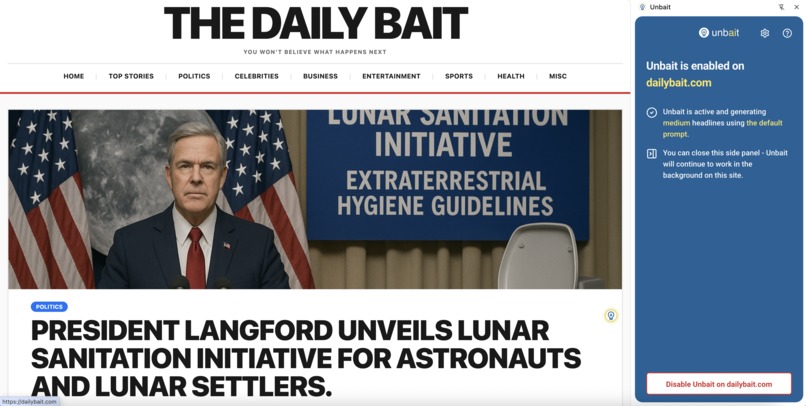
Unbait in action on dailybait.com

Inspiration
Clickbait headlines have become an epidemic in online journalism. Studies suggest that close to one-third of online headlines use clickbait tactics, and research indicates that approximately 80% of users report being annoyed by them. But this is more than just a nuisance. It's a real problem for anyone who wants to make informed decisions about what they read.
Unbait is an attempt to restore clarity and transparency to online news consumption.
What it does
Unbait is a Chrome extension that automatically replaces clickbait headlines with clear, informative alternatives, powered entirely by AI running locally in your browser. It allows users to assess whether reading an article is worth their time before clicking, making news browsing more efficient and less manipulative.
User Flow and Features
When you enable Unbait on a news website, the extension:
- Detects article links as you browse the page
- Fetches full article content in the background (before you even visit the page)
- Generates clear, factual headlines using Chrome's built-in Gemini Nano AI
- Replaces the original headlines seamlessly, preserving styling and layout
- Adds a subtle toggle button that lets you view the original headline anytime
The extension offers customization options including:
- Adjustable headline lengths (short, medium, long, extra-long)
- Custom AI prompts for different tones and styles
- Per-domain settings for fine-tuned control
- Preview mode to see changes before applying
Seamless Integration
Unbait is designed to enhance, not disrupt, the browsing experience. The AI works silently in the background. It doesn't redirect you, open new tabs, or take over your workflow. Headlines are often ready before you even need them, thanks to background processing.
Fair to Users
Unbait respects users through transparency - you know what articles are about before clicking - and saves time by eliminating the need to click through misleading content. It reduces cognitive load by providing clear information instead of emotional manipulation, and protects privacy by running everything locally with no data sent to external servers.
Fair to Publishers
Unlike AI news aggregators that pull traffic away from publishers, Unbait preserves the original user journey - users still visit news sites to read articles. The extension doesn't extract and display article content; it only rewrites headlines. It respects site layouts and branding by preserving original styling. Like nutrition labels on food, it's about transparent information, not bypassing the source.
How it's built
Background: From Server-Side to Client-Side
I built and released an earlier server-based prototype of Unbait a few years ago, but had to abandon it due to problems with cost and scalability. Since then, I've been waiting for small LLMs to become powerful enough to enable a client-side-only solution. Chrome's Built-in AI APIs finally made this possible.
Architecture Overview
Unbait is built as a Chrome Manifest V3 extension with three main components:
- Content Script: Injected into news websites to detect article links, inject AI-generated headlines, and handle user interactions
- Background Service Worker: Manages the processing pipeline, including article extraction, AI headline generation, and cross-tab coordination
- Side Panel UI: React-based interface for enabling/disabling domains and configuring settings
The extension uses a domain management system that:
- Tracks enabled domains with dynamic permission requests
- Maintains per-domain link records in Chrome storage
- Coordinates processing across multiple tabs
- Implements an intelligent priority queue for AI work
Article Processing Pipeline
- Link Detection: Content and background scripts scan pages for article links using heuristics based on URL patterns and page structure. Background script scans ensure that article extraction can run even when the page isn't open. Content script scans ensure that client-side rendered headlines are discovered as well.
- Article Extraction: Mozilla's Readability library extracts clean article text, enhanced with custom preprocessing that identifies and removes common non-article elements
- AI Generation: Chrome's Summarizer API creates factual headlines using the Gemini Nano model running locally
- DOM Injection: Generated headlines are injected while preserving original fonts, colors, and complex styling
Using Chrome's Built-in AI APIs
Summarizer API (Primary use): The Summarizer API is the core of Unbait's headline generation. Unbait creates four separate summarizer sessions configured for different headline lengths (short, medium, long, extra-long). Each session uses custom context prompts that instruct the AI to create informative, non-sensational headlines. The API processes article content along with the original title to generate factual alternatives.
Prompt API: The Prompt API is used for headlines on certain domains to enable intelligent headline highlighting. Some news sites emphasize key phrases in headlines by using a different font color for parts of the headline. Unbait uses the Prompt API to identify which substring of the generated headline should be highlighted, mimicking the tabloid-style formatting common on certain news sites.
Challenges
Universal Site Compatibility
The biggest challenge was making Unbait work on any news site without site-specific code (while the extension handles a wide range of sites effectively, edge cases continue to emerge). This required solving several hard problems:
Distinguishing Relevant Links: Not every link on a news page leads to an article. Navigation menus, ads, author pages, category links - these all needed to be filtered out. Unbait uses a classification system based on URL pattern analysis (looking for article-like structures), DOM context analysis (e.g. excluding links in headers, footers, and nav elements), text density heuristics, and anchor structure analysis.
Robust Article Extraction: While Mozilla's Readability library is excellent, it's not perfect. Unbait enhances it by preprocessing HTML to remove irrelevant parts before extraction, cross-referencing multiple pages from the same domain to identify common non-article elements, detecting article types (text vs. video/gallery/live updates) to avoid processing non-text content, and filtering paywalled content that can't be meaningfully summarized.
Complex Headline Injection: Some tabloid-style news sites use headlines with multiple font sizes and colors to emphasize important phrases. To make Unbait's headlines fit seamlessly, the extension:
- Parses complex headline DOM structures with multiple text nodes
- Preserves original styling including fonts, colors, weights, and sizes
- Employs a binary search-based font sizing algorithm that automatically scales text to fit available space
- Handles varying-font-size headlines that emphasize key phrases (i.e. varying per-line font-sizes for same headline)
Identifying Headline Elements: Many news site anchors wrap complex DOM structures including images, labels, breaking tickers, bylines, subtitles, and headlines. Unbait needs to identify which specific element is the actual headline, replace only that headline while preserving everything else, and handle cases where headlines span multiple DOM nodes.
Toggle Button Placement: The toggle icon (which lets users see original headlines) requires careful placement. It's positioned in the upper-right corner of each headline for clarity, but can't be nested inside the anchor since nested interactive elements violate accessibility guidelines. The extension uses CSS anchor positioning (a relatively new Chrome feature) to solve this, though it still needs to intelligently handle complex cases where headlines consist of multiple DOM elements.
AI Processing at Scale
When enabling Unbait on multiple news sites simultaneously, the extension can face hundreds of headlines to process initially. To make this feel responsive, Unbait employs an intelligent priority queue where headlines higher on the page get processed first, and headlines on the currently active tab receive a significant priority boost. Background tabs still get processed, but at lower priority. This system could be further improved to prioritize links currently visible in the viewport.
Phase-Based Processing: The processing loop runs in two phases:
- Generate headlines (high priority)
- Generate highlighting for headlines (low priority, only after all headlines are done)
This ensures users see headline replacements quickly, even if decorative highlighting comes later.
Language Support
Chrome's Built-in AI APIs officially have limited language support, but they're surprisingly capable in multiple languages. Extensive testing with Danish shows that the AI often creates decent headlines.
However, controlling output language proves challenging. The language seems to be influenced by the language used in the shared context prompt, the language of the source article text, and any language explicitly requested in the context. It's hard to determine which factor is most important, and difficult to control consistently. This remains an area for improvement.
Performance
Despite significant DOM analysis and manipulation, Unbait needs to remain responsive. The extension uses efficient mutation observers for dynamic content, debounced re-injection on window resize events, and async-mutex for thread-safe storage operations. HTTP requests are rate-limited with the Bottleneck library, and careful DOM manipulation minimizes reflows to keep pages snappy.
Key Accomplishments
Universal Compatibility: Unbait works on a wide range of news sites without any site-specific code. While it does a good job at this, there is still room for improvement as edge cases continue to emerge across different site architectures.
Seamless Integration: The extension adapts to each site's unique styling, even preserving complex tabloid-style headlines with multiple font sizes and colors.
Perceived Responsiveness: Even when processing hundreds of headlines, the priority system ensures the most visible content updates first. Users experience fast headline replacement on their active tab while background processing handles the rest.
Page Responsiveness: Despite the significant analysis and DOM manipulation happening in the content script, pages remain snappy and responsive. Careful optimization ensures Unbait doesn't slow down browsing.
Privacy-First Architecture: Everything runs locally using Chrome's Built-in AI. No external API calls, no tracking, no data collection. This was only possible thanks to Chrome's new AI capabilities.
Key Learnings
Building Unbait demonstrates that on-device AI has largely caught up with large cloud-based models for narrow use cases like summarization, at least in English. The quality of headlines generated by Chrome's Gemini Nano model is genuinely impressive and often comparable to what server-based solutions produce.
However, working with on-device AI means operating within different resource constraints. The AI runs on the user's GPU, competing with other browser tabs and system processes for resources. This requires careful consideration of when and how much to use the AI. Processing too many articles simultaneously can cause perceived performance issues or even system slowdowns. Intelligent queuing, prioritization, and rate limiting become essential to ensure Unbait enhances rather than degrades the browsing experience.
What's next for Unbait
Smarter Analysis with Prompt API: Currently, the page understanding is based on DOM/styling analysis and various heuristics. Using the Prompt API could possible improve this. As an example, when an anchor contains multiple distinct text groups, Unbait assumes the largest one is the headline. This heuristic works in most cases, but there are rare exceptions. Using the Prompt API in uncertain cases would enable decisions based on semantic understanding rather than just DOM structure and styling.
Improved Toggle Button Placement: In some cases, the toggle button overlays the headline or is partially hidden due to z-index issues. More robust positioning logic would handle these corner cases better.
Expanded Language Support: As Gemini Nano expands multilingual capabilities, improve control over AI output language to ensure headlines match the source article's language.
Viewport-Based Prioritization: Enhance the priority queue to give even higher priority to headlines currently visible in the user's viewport.
Chrome Web Store Release: Polish the extension for public release, making it available to users beyond developers willing to load unpacked extensions.


Log in or sign up for Devpost to join the conversation.