-
-
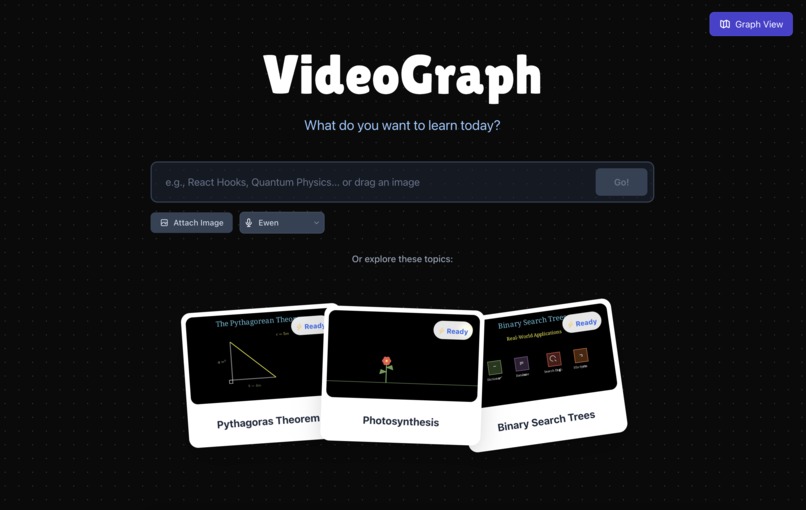
Users can start by typing in a question or a subject they are interested in.
-
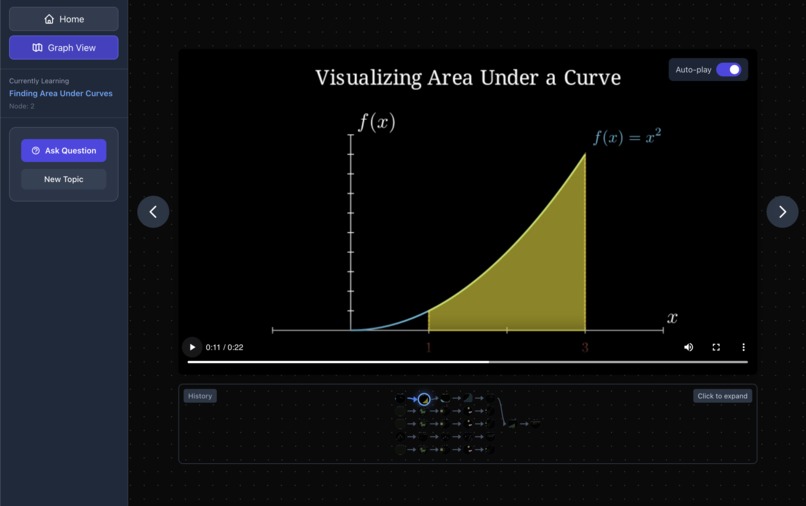
VideoGraph instantly generates informative video segments, complete with a voiceover and animated visuals.
-
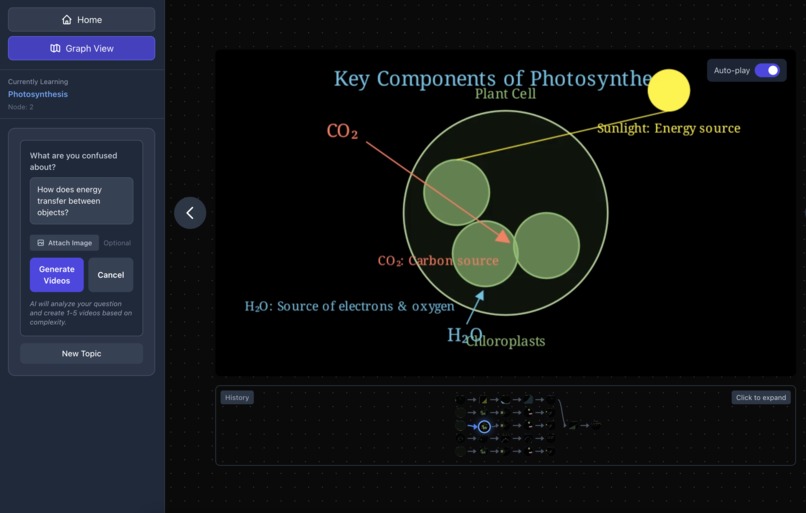
Users can ask a follow-up right inside the experience.
-
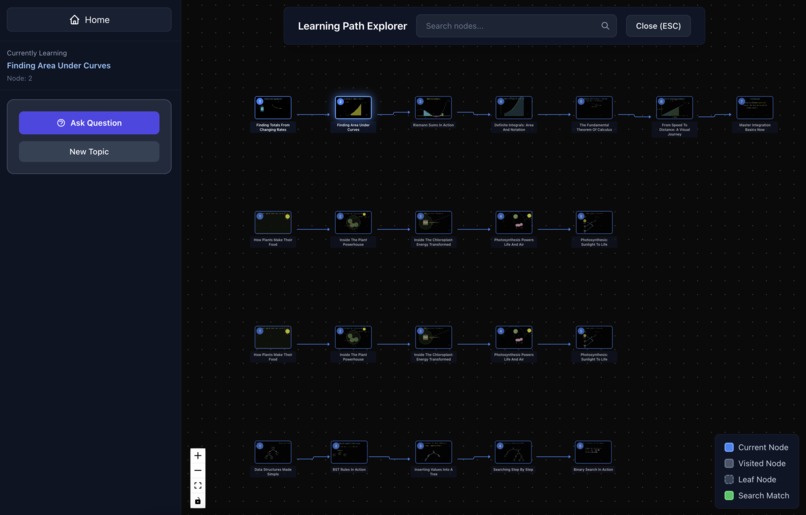
As you watch, an interactive tree grows onscreen, mapping every video you explore and every question you ask.


💡 Inspiration
We were inspired by the idea of reimagining how people learn complex topics, not through textbooks or video lectures, but as interactive journeys that adapt to each person's understanding in real-time.
We wanted to empower learners to explore knowledge organically, giving them the freedom to ask questions, dive deeper into topics that intrigue them, and have AI create personalized explanations exactly when they need them.
Our goal was to make educational videos that respond, adapt, and grow with you, creating a truly infinite learning experience that feels as natural as a conversation with a teacher.
🌍 What It Does
VideoGraph lets users generate fully dynamic AI-powered educational videos from simple text prompts. Once a video is created, users can:
- Watch kinetic, video-essay style animations explaining complex topics rendered in real-time using Manim and React
- Navigate through an interactive learning tree where each video becomes a node, and each question creates new branches
- Ask follow-up questions that generate entirely new video segments customized to their curiosity
- Take contextual quizzes at the end of learning branches that test understanding
- Get personalized remediation videos when they answer incorrectly - automatically generated and added to the tree
- Search the learning tree semantically using vector embeddings to find relevant concepts by meaning, not just keywords
- Explore cached learning sessions like "Pythagoras Theorem" or "Photosynthesis" to see pre-generated learning paths
- See visual thumbnails and AI-generated titles for each video node to navigate intuitively
- Branch infinitely - ask unlimited questions, explore tangents, and build a personalized knowledge graph
In short, VideoGraph turns curiosity into structured, visual learning - creating an "infinite textbook" that writes itself as you explore.
🏗️ How We Built It
Frontend & Interactive Interface
The core user experience is built with React and TypeScript, featuring a dynamic tree-based navigation system powered by @xyflow/react.
The interface manages:
- Learning sessions
- User progress tracking
- Display of AI-generated videos
AI Generation Core
Our creative pipeline is powered by Gemini, which acts as an intelligent content orchestrator.
Gemini:
- Generates structured video lesson plans
- Writes custom Manim animation code for each learning segment. This includes graphs, vectors and molecules.
- Evaluates user comprehension
- Dynamically adapts difficulty based on performance patterns
Video Production & Asset Pipelines
We use a serverless parallel rendering system for scalable content generation.
- Animations are rendered via Manim Community Edition on Modal containers
- Multiple video sections are processed concurrently
- Voiceovers are synthesized with ElevenLabs using visualisation timing alignment
- Final assets are cached in Google Cloud Storage for caching videos
- Real-time rendering progress is streamed to clients via Server-Sent Events (SSE)
Backend Services
Our backend stack is implemented in FastAPI and executed on Modal.
It handles:
- Learning session orchestration
- Infinite adaptivity and branching logic
- Asynchronous AI generation requests
- Automatic code repair + error recovery
- Asset metadata serving and caching
A tree visualizer displays the evolving learning path using AI-generated thumbnails and titles, enabling users to move through their knowledge graph interactively.
⚙️ Challenges We Ran Into
Dynamic Tree Stitching for "Infinite" Exploration
Implementing a procedurally-generated, infinite learning tree was architecturally complex. We had to:
- Map user questions to tree positions (sibling vs. child nodes)
- Handle concurrent video generation (user asks 3 questions while one is rendering)
- Persist tree state across page refreshes
- Synchronize video playback with tree navigation
We built a state machine in VideoController.tsx that:
- Tracks
LearningContext(history, performance, depth) - Queues video generation requests
- Updates the tree structure atomically
- Uses React Context for global state management
The tree visualization uses React Flow with custom rendering, and we added semantic search to make large trees navigable.
Code Healing
Letting users explore arbitrarily and generating code on demand meant that sometimes, AI-generated code would fail to compile, throw exceptions, or render incorrectly. Designing a robust "code healing" pipeline was a unique challenge:
- Unpredictable Errors: Manim code snippets from the LLM could fail in subtle ways—not just syntax or type errors, but logic bugs, missing assets, or unhandled states.
- Automated Triage: We wrote middleware that captures stack traces, error messages, and even visual/semantic diffs of failed renders.
- Self-Repair via Model Feedback: When code failed, we immediately sent the error context and the original prompt back to the LLM, requesting a corrected version—sometimes recursively, up to N times.
- Partial Rendering: If the first fix attempts failed, we'd attempt to render a "best effort" preview based on working segments, so the experience wasn't completely blocked.
- Continuous Logging: Every code failure and repair is logged, so we can improve prompt engineering and component whitelisting.
Despite these systems, some edge cases are hard to catch (e.g., the LLM using an imported component that's available on backend but not frontend). We built real-time monitoring so we could hot-patch prompts based on observed failures, closing the loop between generation and healing. This dramatically improved the stability and reliability of AI-powered code execution in a live learning environment.
🏆 Accomplishments We're Proud Of
Unified Learning Experience
We successfully integrated multiple complex domains - generative AI, vector embeddings, physics simulations, and video synthesis - into a single, cohesive web application. The diverse technical challenges required deep expertise across frontend, backend, AI systems, and infrastructure.
Achieving True "Infinite Learning"
We built a system where users genuinely never hit a wall. Ask any question, no matter how niche or tangential, and the AI generates a new video segment. The tree grows infinitely based on curiosity, not predefined paths. This required sophisticated:
- Context-aware generation (the AI remembers what you've learned)
- Difficulty adaptation (gets easier if you're struggling)
- Branching logic (questions create children, topics create siblings)
It feels magical to watch the tree expand in real-time as you explore.
Semantic Search That Actually Works
Most educational platforms have keyword search that fails on synonyms or concepts. Our vector embedding search lets users type things like "how graphs work" and find relevant nodes even if they're titled "Introduction to Trees" - because the AI understands the relationship.
We're proud that search results are instant (<50ms) and accurate, even with 100+ nodes.
We had fun!!!
Building VideoGraph pushed us to learn new technologies, debug obscure rendering issues, and think creatively about AI-driven education. We iterated on the product a lot and we're proud of what we built and excited to share it!
💡 What We Learned
Mastering the AI-Powered Content Pipeline
This project was a deep dive into LLM-driven content generation. We learned:
- How to prompt engineer for code generation (providing examples, constraints, error messages for repair)
- How to chain LLM calls (plan → sections → code → evaluation → next topic)
- The importance of structured output (JSON schemas for predictable responses)
- How different models excel at different tasks (Gemini for code, Cerebras for fast simple calls)
We discovered that AI-generated code is viable for production if you have robust validation and error handling.
Vector Embeddings for Semantic Understanding
Implementing semantic search taught us:
- How sentence transformers convert text to meaningful vectors
- Why cosine similarity works better than Euclidean distance for text
- The importance of caching embeddings (they're expensive to compute but fast to compare)
- How to balance precision vs. recall in search results
This opened our eyes to the potential of semantic interfaces beyond just search.
Serverless Architecture at Scale
Working with Modal showed us:
- How to design parallel execution pipelines for embarrassingly parallel tasks
- The importance of container isolation for security and reliability
- How to minimize cold start times (pre-build images, keep containers warm)
- The cost vs. speed tradeoffs in serverless compute
We learned that serverless is ideal for bursty workloads like video generation.
Technology Should Be Joyful
Ultimately, building VideoGraph reinforced a core belief: technology is at its best when it feels alive, personal, and joyful. Our goal wasn't just to engineer a product, but to create a space for curious exploration and immediate discovery. We learned that the most powerful educational tools are the ones that feel invisible - where the user forgets they're using software and just... learns.
🚀 What's Next for VideoGraph
We're excited to expand VideoGraph with next-gen features:
Voice Interaction & Real-Time Conversations
- Speech-to-text input: Ask questions by talking instead of typing
- Real-time dialogue: Have a conversation with the AI tutor while videos play
- Voice cloning: Create personalized tutor voices
This would enable hands-free learning - imagine walking around while building your knowledge tree.
Content Ecosystem
- Public tree library: Share and discover trees created by others
- Tree templates: Start from expert-curated learning paths
- Export capabilities: Save trees as PDFs, Notion docs, or shareable links
- Embedding API: Let other platforms integrate VideoGraph learning trees
This would build a community-driven knowledge base where great explanations are preserved and remixed.
Enterprise & Education Integration
- LMS integration: Embed VideoGraph in Canvas, Moodle, Blackboard
- Analytics dashboard: Teachers see student progress and common struggles
- Curriculum alignment: Map trees to standards and learning objectives
- Bulk generation: Auto-create trees for entire courses This would bring VideoGraph to classrooms and corporate training at scale.
VideoGraph - Every question deserves an answer. Every answer deserves a video. Every video, made just for you. ✨
Built with ❤️ by developers (Discord: @mong7141, @timothy_33989, @ming6800, @ornateee), who believe learning should be infinite, adaptive, and joyful.
Built With
- cerebras
- docker
- elevenlabs
- eslint
- fastapi
- gemini
- google-cloud
- grok
- latex
- manim
- modal
- postcss
- python
- react
- react-flow
- sentence-transformer
- tailwindcss
- torch
- typescript
- vite


Log in or sign up for Devpost to join the conversation.