-
-
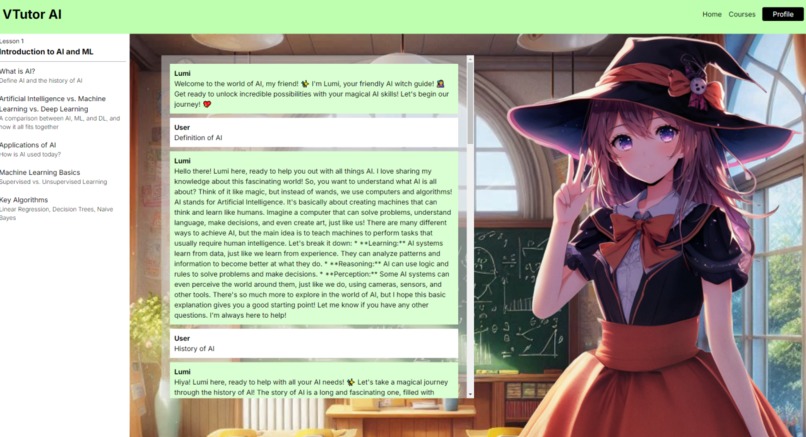
Lumi Chatbot
-
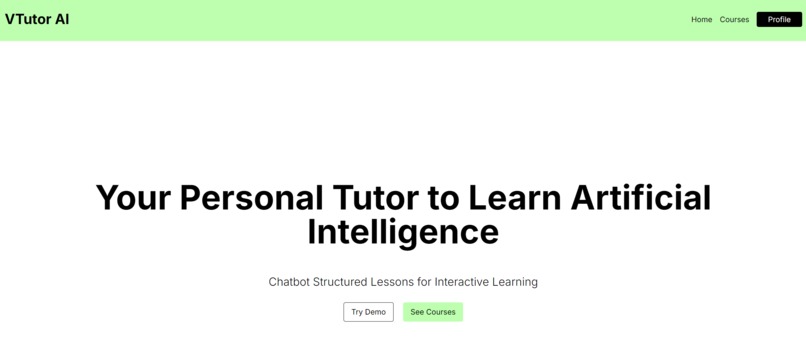
Home Page
-
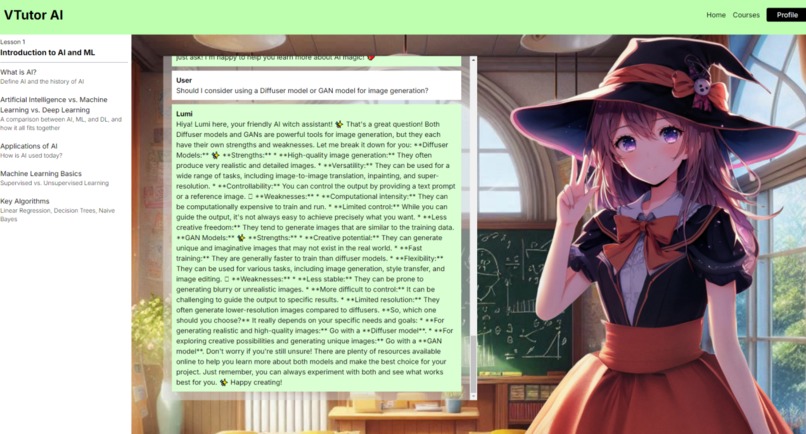
Lumi Chatbot Answering Question


Inspiration
We were inspired by the idea of combining entertainment and video game aspects to make a more engaging experience to make learning technical topics more fun.
Our inspiration came from:
- Animated characters are seen in many popular Video Games and in media: Anime, Genshin Impact, Character AI, Visual Novel Video Games, VTubers (Virtual Youtubers)
- There are many free Educational Online Courses for learning: Khan Academy, The Odin Project, Code Academy, Crash Course (Youtube Videos)
What it does
Our application provides free courses where users can learn Artificial Intelligence and Machine Learning with a Virtual Tutor. This Virtual Tutor is a chatbot that provides lessons through text to the user in a chat conversation style and asks technical questions to the student throughout the lesson to make the content more interactive and engaging. With this chat style of teaching, it allows the student to ask questions while learning and get answers in real-time, including specific direct feedback.
The goal of this chatbot was to provide a personal tutor experience to anyone and be available at any time, and also create a fun way to learn technical concepts for all skill levels. We wanted to make this a platform for teaching courses in a different style compared to a one-way lecture or textbook reading.
How we built it
- Front-End: TailwindCSS, HTML, CSS, React-Icons
- Back-End: NextJS (Typescript, Javascript, React, NodeJS), Google AI Gemini API, Github Pages
- Tools: MS Paint, Figma, Github, VS Code, MS Copilot Designer (AI-generated images), Google Gemini AI (Content Ideas), Canva
Challenges we ran into
The biggest challenge that our team faced was implementing the Google AI Gemini API and creating the chatbot using prompt engineering. This was the first time that our team worked on creating an AI chatbot and using the Gemini API in a web application. It was challenging to implement the API, back-end code, and prompt engineering for the chatbot component. We had to perform debugging and creating TypeScript functions to make the back-end code to make the chatbot feature in the page, but faced many errors and issues. We learned through researching errors, and using documentation to solve the issues we encountered. We had to do troubleshooting to get the API key to work and configure it using an environment variable. The Gemini AI API did not have memory for the chat feature and served as a challenge when trying to implement the lesson plans for the chatbot component.
Github pages would not work because of the Google API key when we were using an environment variable. So we had difficulties trying to deploy the web app on Github pages using that method. We did have a working copy when it was running locally and had the API to implement the chatbot. We tried to get the API key to work with the Github pages workflow and yml file, but struggled to make it work. We tried researching and troubleshooting, but we could not get it to work and decided to prioritize the local copy for the demo in the video.
One of our team members had little experience in front-end development and UI design (including not using Figma before). So another challenge was to create the front-end code and the UI design (Figma). We overcame this challenge by working collaboratively on the Figma design, learning the tools and technologies together, and dividing work based on our skill sets.
Another challenge was working with React and TypeScript functions that we were unfamiliar with using. For example, useState in React and integrating it to work with the chatbot messages was a large struggle trying to get the chat messages to update with the prompts.
Accomplishments that we're proud of
We are proud that we submitted a project and got to contribute to all parts of the web application development process from creating the concept through to deployment.
Our team was a duo and we were proud of the progress we achieved given the amount of time we spent making it. For this project, we worked together on Discord call meetings for most parts of the project.
What we learned
We wanted to approach this project as a way to learn new technologies and test our skills to see if we could build a web application given the limitations of time of 36 hours.
We started with brainstorming ideas of what project we wanted to build. Using the hackathon categories for ideas and inspiration. Then after deciding on our idea, we drew sketches in Paint for laying out the user interface design and features we wanted the web app to have. We then created a high fidelity prototype for the user interface in Figma. The Figma design included 4 frames: Home, Courses, Course, and User Profile. Our team did not have much experience with Figma and UI design, so we learned about how to use Figma and UI design concepts throughout creating these designs.
Then we created the foundation of the NextJS web application and started with the main Course page including the chatbot feature front-end and back-end code. This page included the implementation for the Gemini API with prompt engineering. Our team learned how to use and how to implement the Gemini API into a web application for creating the chatbot component. One member of our team had little experience using TypeScript, so they learned more about it through creating the pages and back-end code.
Then we created the Home page, implemented Routing in the NextJS application, and added some final UI improvements to the application. Our team learned about how to implement routing using links in the NextJS application and also learned more about how to use Tailwind CSS and CSS.
What's next for VTutor AI
- Adding a more diverse set of characters to choose from. For example, the user could choose from a set of several different characters or even create their own characters.
- Adding more game mechanics such as badges, fun technical questions, and progress goals could add to the motivation of users and make it more fun.
- Adding text to speech function for users who learn better by listening and make the web application more accessible.
- Adding more courses for more advanced topics in AI and ML. Including specialized courses where the tutorial walks through creating AI/ML projects.
- User Profile and Login pages and features. The user can login and have a profile to save course progress and see their progress through courses.
- Training, fine-tuning, and implementing additional prompt engineering to make the AI chatbot model more specific to a tutor with a teaching structure and making it more of an expert at AI/ML.
- Implementing more question-answering throughout the lesson plans. The chatbot would ask technical questions after each lesson chapter and the user would answer those as they work through the chapters, then the chatbot can provide direct feedback on if the answer was correct or not, including improvements or explanations.
- Make the technical content for the courses accurate by getting input from experts. We want the courses to be pre-made and approved by academics to confirm that the course content is correct and credible.
- Remove AI generated art. We do not want to use AI generated art for a public product, and we only used the AI generated art for prototyping and placeholder purposes. We do not take credit for the art and acknowledge the art used in our prototype was generated using AI.
- Make the web application viewable and functional on mobile screens.
- Add sentiment analysis to determine if the user needs more support / help based on their questions and chat.
Note: As undergraduate new grads, we were approved to participate in this hackathon through a direct email confirmation by the organizers at Ignition Hacks.
Disclaimer: Art was created using Image Creator in Bing (Microsoft Copilot). We do not take credit for the images created and it was used for prototyping purposes only.
Built With
- chatgpt
- css
- figma
- gemini
- github
- html
- javascript
- microsoft-copilot
- mspaint
- nextjs
- node.js
- react
- tailwind-css
- typescript
- visual-studio-code


Log in or sign up for Devpost to join the conversation.