-
-
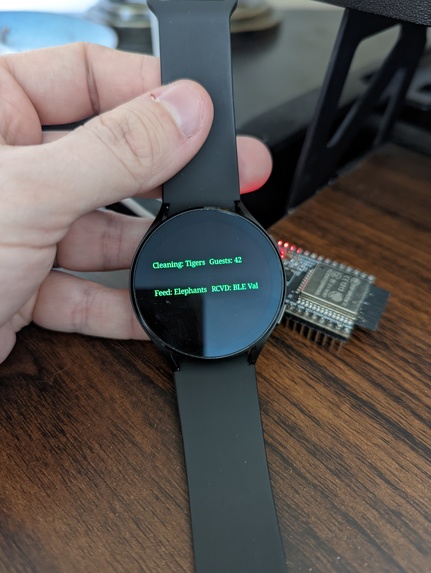
Wearable after receiving BLE data AND showing data from Firebase backend
-
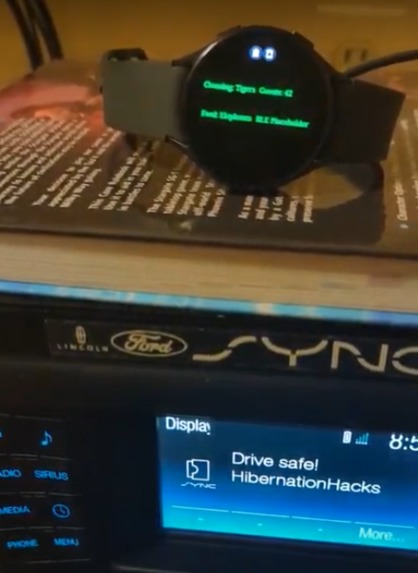
Wearable interacting through Ford Sync app system
-
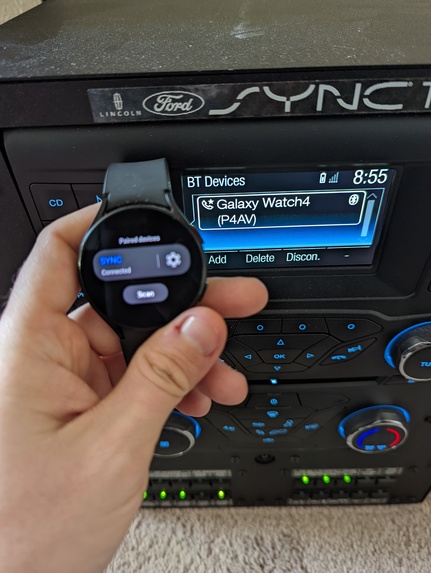
Wearable connected to vehicle system


Problem statement: Utilize wearable devices to solve problems in an enterprise environment.
Inspiration
Through my bachelor's degree I worked as a zookeeper, so I'm pretty familiar with the problem areas that could be improved with technology. These same underlying techniques could also be applied to other areas, including cruise ships and amusement parks (dear Disney: I'd accept an Imagineering job :D)

We're in a weird time for technology where wearables are just starting to be viable for consistent business use, so I wanted to explore how smart watches could be used outside of their normal consumer use-cases for enterprise problems.
Business Use-Case Constraints
I had to get creative to focus on the problem set and how it would actually work in the real world rather than hoping for the best-case scenario. Some of these include:
- Sites should be expected to have full WiFi coverage (very common).
- The wearable device should be provided and provisioned (think Active Directory for wearables) by the company - not brought in by the employee.
- The wearable must operate without a paired phone. This is because wearables can be bought for ~$150, and requiring a phone would be cost prohibitive.
- General data should be driven by a shared backend.
- The app must work using a watch face instead of using stand alone apps. This is required to facilitate always-on functionality.
Everything written here and shown in the videos actually works - no hackathon "fake it 'til you make it" hacks.
What it does
There are three use cases that I addressed with this project:
- Providing situation/user specific glanceable data in real-time
Since we're assuming that every user is provisioned to a specific watch, we can have a backend update their watchface in real time to let them know important work-related information. This includes things like "the tigers are off exhibit to hunt the volunteers", "it's time to feed the elephants their fifth meal", or "there are 356457457345 guests trying to all fit in the rainforest area"
Example is in demo video Glanceable data
- The ability to interact with and control custom industry-specific hardware
The real value for this project comes from the way it allows specific users to interact with customized hardware. Zookeepers can automatically read (and subsequently upload to the backend) data from beacons as they pass by, such as health data for a specific animal (next project: FitBit for giraffes!). This also allows zookeepers to control different devices, such as adjusting the temperature on heaters in the fall/spring when weather fluctuates to maximize animal comfort.
Example is in demo video Hardware interactions
- Connecting and utilizing vehicle data/context awareness.
The final functionality was a stretch goal. I happen to have a Ford console that I got from a company that was going out of business, and I wanted to try using it. This functionality lets the user's watch pair directly to the vehicle and records any time the driver is speeding. It also has a feature where the watch will vibrate at intervals between 8PM and 5AM to keep the driver awake and alert if they are doing a task at night.
Example is in demo video Vehicle Interfacing
How I built it
This project is built using an Android Wear (Samsung Galaxy Watch4) device without a paired phone. The watch connects to a Firebase Realtime Database backend over WiFi, and is able to interact with custom hardware (currently using an ESP32, but BLE is standardized so a Raspberry Pi, Arduino, or completely custom device could be used) to read sensor data or interact with actuators. This project utilizes the wearable's watch face to handle all interactions so that the app is "always on", otherwise consistently opening the app would be cumbersome and not useful for a business environment.
Challenges I ran into
The first challenge I ran into has to do with the watch face only requirement. Watch faces in Android Wear are drawn completely in code on a Canvas, so you need to create paint objects and use math to specify exactly which pixel the item starts on with how it will look. This prevents the use of Jetpack Compose or Views that make UI easy for traditional apps, which is why this prototype isn't as pretty as I would like, but I wanted to focus on function over form. I also wanted the watch to be as automatic as possible so someone who's busy working doesn't need to try and mess with a small touch screen.
The second challenge I ran into involves permissions. Android Wear expects apps to have a companion phone paired where users can approve permissions, but that goes against the business criteria that I wanted to test. I managed to make this work by targeting API 22 instead of 30, but that's a weak point that I would want to address through enterprise provisioning down the line.

The third challenge I ran into involves bluetooth (because of course it does). On top of the required BLE permissions, getting characteristics written and read from the ESP32 and the Android Wear device was a huge pain without really any tools for proper debugging.
Accomplishments that I'm proud of
- BLE works!
- I was able to do a lot more with just a watch face than I expected. While the API for watch faces specifically expects just drawing simple structures to the screen, I was able to push the boundaries through bluetooth, remote data, and dynamic text without requiring a companion app or device.
- I got the watch to a point where it works with vehicles as well as custom hardware. This means there's a lot more flexibility for features in the future.
What I learned
- How to work with the Wear canvas API.
- How to add bluetooth functionality to an ESP32, including reading and writing to custom characteristics.
- How to work with BLE on Android without a third-party library. I tried using Nordic's library originally, but couldn't get it working with the wearable, but I think I could fix it now that I know how the underlying structure works.
What's next for ZooWatch
I'm open to investors to make this a real business focused on customized wearable experiences for businesses (I'm a software engineer that just completed an MBA, so this could actually work :p). I mentioned zoos, cruises, and amusement parks, but the same idea could work for retail, warehouse workers, security guards doing walking patrols, and a variety of other business models.
Currently working on (not fully implemented, but it's trying):
- A walky-talky system since zoo, cruise ship, and amusement park staff use radios constantly, and there's already a microphone on all smart watches and it'd be easy enough to pair a set of ear buds. Dear Twilio DevRel team: currently trying to make this work via Twilio, but voice calls through the Android SDK are rough.
- Using the Twilio API to broadcast text messages triggered by the watch. Currently have a Firebase Function set up that can be hit using the Firebase SDK, which then should send a text message to my phone for emergency alerts.

(Number is blocked out because I don't know the implications of having it public, similar to an API key)
I would like to add the following feature sets for fun later down the line, as mentioned in my demo video:
- Digital vehicle keys so provisioned users can start a truck or car. This would need a second factor for authentication - I would prefer biometric using WebAuthN.
- Use the ID of each provisioned device to mark who can and can't enter an area. Most smart watches support NFC (used for things like Apple Pay and Google Pay), so that hardware could be used to scan someone in.
- A lot of devices support GPS, so they could be used with geofencing to automatically clock an employee in and out through the backend system. This would save employee time while preventing people from accidentally forgetting to clock in and requiring someone to update timesheets.


Log in or sign up for Devpost to join the conversation.