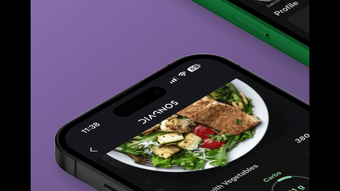

Diagnos: Smart Nutrition Tracking for iPhone
Overview
Diagnos is a free iPhone application designed to support users in managing their nutritional intake with precision and consistency. The software enables individuals to track essential dietary components such as calories, proteins, carbohydrates, and fats, helping them align daily food consumption with personal health and fitness objectives. It is particularly suited for users focused on weight management, dietary improvement, or maintaining long-term healthy eating habits. The app integrates a Healthy Eating Index (HEI) score to assess overall diet quality, offering users a data-driven perspective on their eating patterns. Additionally, the DIAStreak feature promotes habit formation by rewarding continuous days of healthy food logging. Real-world use cases include daily meal monitoring, tracking progress toward wellness goals, and making informed choices when dining out. The meal scanning functionality allows users to photograph their meals, instantly retrieving nutritional data and logging it into a personalized dashboard. This feature enhances convenience and reduces manual input, making dietary tracking more accessible and sustainable over time.
Key Features & Capabilities
- Nutritional Tracking – Monitors calories, proteins, carbohydrates, and fats in real time, supporting users in staying within their daily dietary targets.
- Healthy Eating Index (HEI) Score – Provides a quality assessment of daily food intake, helping users understand how well their diet aligns with nutritional guidelines.
- DIAStreak Feature – Encourages consistent healthy eating by tracking consecutive days of logged meals, promoting long-term behavioral change.
- Meal Scanning Technology – Allows users to take photos of their meals and receive instant nutritional insights, streamlining the logging process.
- Personal Nutrition Dashboard – Centralized view of daily and historical intake, enabling users to visualize trends and progress over time.
- Meal History & Diary – Stores past meals and allows users to review dietary patterns, supporting reflective planning and goal adjustment.
- Restaurant Menu Integration – Offers access to local restaurant menus, helping users make informed choices when eating outside the home.
These capabilities are especially useful for individuals managing weight, following specific diets, or seeking to improve their overall eating habits. The meal scanning feature reduces friction in data entry, making it ideal for users who want a seamless tracking experience. The dashboard and diary support long-term engagement by offering insights into eating behavior, which can inform future decisions. The HEI score adds a layer of objective feedback, transforming raw data into actionable dietary intelligence.
User Interface, Workflow & Performance
The user interface of Diagnos is designed for clarity and ease of navigation, with a clean layout optimized for mobile use. Key functions such as meal logging, scanning, and dashboard access are accessible through intuitive menus and swipe gestures. Navigation is structured around a central dashboard, with quick-access icons for tracking, scanning, and reviewing past entries. The workflow emphasizes efficiency, allowing users to log meals in under a minute using the scan feature. The app maintains responsiveness during typical usage, with no reported delays in image processing or data retrieval. However, exact performance details such as CPU or RAM usage were not specified. The developer did not provide additional system requirements, so users should rely on standard iPhone performance benchmarks. Stability appears consistent with typical iOS applications, though real-world testing under prolonged use was not detailed. Overall, the app appears optimized for smooth operation within the iPhone ecosystem.
Compatibility & System Requirements
Diagnos is designed exclusively for iPhone devices and runs on the latest iOS versions. The application has a file size of 45 MB, indicating a lightweight footprint suitable for most modern iPhones. The developer did not specify exact hardware requirements or minimum iOS versions. Compatibility information was partially provided, with the software confirmed to operate on iPhone platforms. Users should ensure their device meets standard iOS app requirements to support smooth performance. The app does not require external hardware or additional software to function. No information was provided about cloud sync, cross-device access, or offline capabilities. The release date of June 15, 2024, suggests it is a recent addition to the App Store, likely optimized for current iPhone models.
Pros and Cons
Pros
- Free to download and use with no hidden costs
- Intuitive interface tailored for iPhone users
- Meal scanning reduces manual input effort
- HEI score provides meaningful dietary feedback
- Encourages habit formation with DIAStreak
- Comprehensive tracking of key macronutrients
- Integration with local restaurant menus for real-time choices
Cons
- No information provided about cross-device synchronization
- Exact system requirements were not listed
- Performance under heavy usage or long-term use was not detailed
- Only available on iPhone, limiting accessibility to other platforms
- Offline functionality details were not disclosed
FAQ Section
Is Diagnos available for Android devices?
Diagnos is currently available only for iPhone. The developer did not provide information on future Android support.
Does Diagnos require an internet connection to function?
While the app can store data locally, certain features such as meal scanning and menu access require an internet connection for optimal performance.
Is Diagnos secure and private?
Diagnos collects personal dietary data. The developer did not specify data encryption or privacy policies, so users should review the app’s privacy settings and terms of service.
How often does Diagnos receive updates?
The app was released on June 15, 2024. The developer did not provide details on update frequency or future feature roadmap.
Can I use Diagnos without creating an account?
Information about account creation or login requirements was not provided. Users may be able to use basic features without registration, but full functionality may require an account.
Final Thoughts + CTA
Diagnos stands out as a purpose-built nutrition tracking tool for iPhone users seeking a streamlined, data-informed approach to healthy eating. Its integration of meal scanning, a meaningful HEI score, and a habit-focused DIAStreak feature delivers a modern, user-centric experience. While platform exclusivity and limited system details are notable constraints, the app’s free access and thoughtful design make it a compelling choice for individuals serious about dietary improvement. It is especially beneficial for those who value convenience, visual feedback, and long-term tracking. For anyone aiming to refine their eating habits with minimal friction, Diagnos offers a powerful and accessible solution. Download Diagnos now.








