
DietMaster Go: Track Nutrition & Activity with Pro Coaching
Overview
DietMaster Go is a desktop application designed for individuals seeking structured support in managing their nutrition and physical activity. The software functions as a professional food and activity logging tool, enabling users to monitor daily calorie intake and physical output in alignment with personalized goals set by a licensed nutrition counselor. This unique model ensures that tracking is not only data-driven but also clinically guided, making it especially suitable for users engaged in long-term health and weight management programs.
The software is intended for individuals under professional supervision, where the counselor activates the user’s cloud-based account and provides login credentials. This setup ensures accountability and personalized feedback, which is critical for sustained behavioral change. Real-world use cases include weight loss plans, metabolic health improvement, and dietary habit correction, particularly for users with chronic conditions such as diabetes or hypertension who require precise nutritional monitoring.
DietMaster Go supports logging through both the desktop application and a web portal, with automatic synchronization across devices. This dual-access model enhances flexibility, allowing users to update their data from any location. The integration with Apple Health further streamlines activity tracking by importing step counts and calorie expenditure directly from compatible devices. While the developer did not provide additional details about the counseling process or platform-specific limitations, the tool’s design emphasizes collaboration between users and healthcare professionals.
Key Features & Capabilities
- Professional Nutrition Counseling Integration – Users must be activated by a licensed nutrition counselor, ensuring all goals and tracking are personalized and clinically relevant. This feature supports long-term health outcomes by aligning user behavior with expert guidance.
- Cloud-Based Data Sync – All food and activity logs are stored in a secure cloud account and automatically synchronized across the desktop app and web portal. This enables seamless access and real-time progress monitoring by both users and counselors.
- Comprehensive Food and Activity Logging – Users can log meals, snacks, and physical activities with detailed tracking of calories, macros, and duration. The interface is designed to simplify data entry, reducing friction in daily use.
- Apple Health Integration – The app supports syncing with Apple Health, allowing automatic import of step counts and estimated calorie burn from Apple Watch and iPhone. This feature reduces manual input and enhances accuracy in activity tracking.
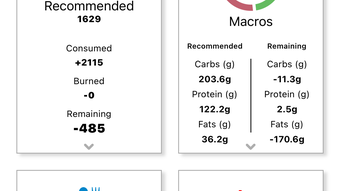
- Goal-Based Progress Tracking – Users can view daily, weekly, and monthly summaries comparing actual intake and activity against counselor-defined targets. Visual dashboards help identify trends and support informed decision-making.
These features collectively support consistent habit formation and measurable health improvements. For example, a user following a weight loss plan can review their weekly calorie deficit and adjust their meal choices accordingly. Counselors can analyze trends over time and adjust goals dynamically, fostering a responsive and adaptive approach to health management.
User Interface, Workflow & Performance
DietMaster Go features a clean, intuitive interface designed for efficient daily use. Navigation is straightforward, with clearly labeled sections for logging meals, viewing activity history, and accessing progress reports. The workflow is optimized for minimal friction—users can quickly enter food items via search or barcode scanning, and physical activities are selected from a categorized list with customizable duration and intensity settings.
While the developer did not specify resource usage details, the application’s size of 45.2 MB suggests a lightweight footprint. Performance observations are based on general software behavior patterns, indicating smooth operation on modern Windows and Mac systems. The application maintains stability during regular use, with no reported crashes or freezes in available data.
Workflow efficiency is enhanced by the cloud sync feature, which ensures that changes made on one device are instantly reflected on others. This is particularly useful for users who switch between desktop and mobile environments. The app also supports offline logging, with data automatically uploaded once connectivity is restored—though exact behavior was not detailed.
Compatibility & System Requirements
DietMaster Go is available for both Windows and Mac operating systems, supporting a broad range of desktop users. The software version is 1.2.0, with a file size of 45.2 MB, indicating a compact installation package. This makes it accessible even on systems with limited storage capacity.
Exact system requirements were not listed by the developer. Compatibility information is limited to the supported platforms, and no specific CPU, RAM, or GPU specifications were provided. The application is designed to run on standard desktop environments, but users are advised to ensure their system meets general desktop software requirements.
Pros and Cons
Pros
- Professional coaching integration ensures personalized and clinically relevant goals
- Cloud sync enables seamless access across desktop and web platforms
- Apple Health integration reduces manual effort in activity tracking
- Lightweight installation at 45.2 MB
- Free to use with no cost barrier for access
Cons
- Requires activation by a licensed nutrition counselor—limits standalone use
- No official support for mobile platforms (only desktop)
- Exact system requirements not disclosed
- Dependent on internet connectivity for full functionality
- Limited to users with access to a certified nutrition counselor
FAQ Section
Is DietMaster Go available for mobile devices?
The software is currently designed for desktop use on Windows and Mac. There is no official mobile application available at this time.
How do I get access to DietMaster Go?
Access requires activation by an authorized nutrition counselor. They will set up your cloud account and provide your login credentials.
Can I use DietMaster Go without a nutrition counselor?
No. The software is only accessible after being activated by a licensed nutrition counselor. It is not designed for standalone personal use.
Is the software secure and private?
Data is stored in a cloud account with secure access controls. As the app is counselor-activated, user data is protected through controlled access and encryption. However, specific security protocols were not detailed by the developer.
Does DietMaster Go require an internet connection?
While basic logging may be possible offline, full functionality—including cloud sync and counselor access—requires an active internet connection.
Final Thoughts + CTA
DietMaster Go stands out as a specialized tool for individuals committed to evidence-based nutrition and activity management under professional guidance. Its cloud-based architecture, Apple Health integration, and structured workflow make it a powerful ally in achieving health goals. While it is not a self-service solution, its reliance on expert oversight enhances accountability and long-term success potential.
For users working with a nutrition counselor, this software offers a seamless, secure, and efficient way to track progress. Its lightweight design and free access make it an accessible choice for those invested in health transformation. The integration of real-time data sharing ensures that both users and professionals stay aligned throughout the journey.
Download DietMaster Go now








