
Screenshots
App details
- Version
- 1.7.4
- Size
- 260.16 MB
- Updated
- July 21, 2023
- Requires
- Mac OS X
- Language
- English
- License
- Free
- Developer
- Divam Gupta
- Category
- Mac OS
About DiffusionBee
Download DiffusionBee – Free AI Art Generator, Offline Stable Diffusion Tool
Overview
DiffusionBee is a free, desktop‑ready artificial‑intelligence program that lets you generate stunning, custom artwork without ever leaving your computer. Powered by the latest stable diffusion model, this open‑source engine translates plain‑text prompts into high‑resolution images in seconds. Unlike cloud‑based services such as DALL‑E or Midjourney, DiffusionBee runs entirely offline, which means you keep full control over your data and can work without an internet connection. Developed by Divam Gupta, the app bundles a suite of creative tools—including text‑to‑image, image‑to‑image, upscaling, in‑painting, and out‑painting— all accessible through an intuitive graphical interface. Whether you’re a graphic designer, a game‑artist, or just someone who enjoys experimenting with AI, DiffusionBee offers a “download‑and‑go” experience that balances power with simplicity. The program is compatible with macOS, Windows, and Linux, and it automatically detects your hardware to deliver the fastest possible rendering speed. With no subscription fees, no hidden costs, and a community‑driven roadmap, DiffusionBee stands out as the most accessible entry point to the world of AI‑generated visual content.
Key Features of DiffusionBee
- Offline Stable Diffusion Engine – Run the powerful stable diffusion model locally, ensuring privacy and zero latency.
- Text‑to‑Image Generation – Create original artwork from natural‑language prompts in under 30 seconds on capable hardware.
- Image‑to‑Image (Img2Img) – Transform an existing picture by guiding the AI with a descriptive prompt.
- Upscaling & Super‑Resolution – Increase image dimensions without sacrificing detail, using built‑in AI upscalers.
- In‑Painting & Out‑Painting – Edit, remove, or extend parts of an image seamlessly with mask‑based tools.
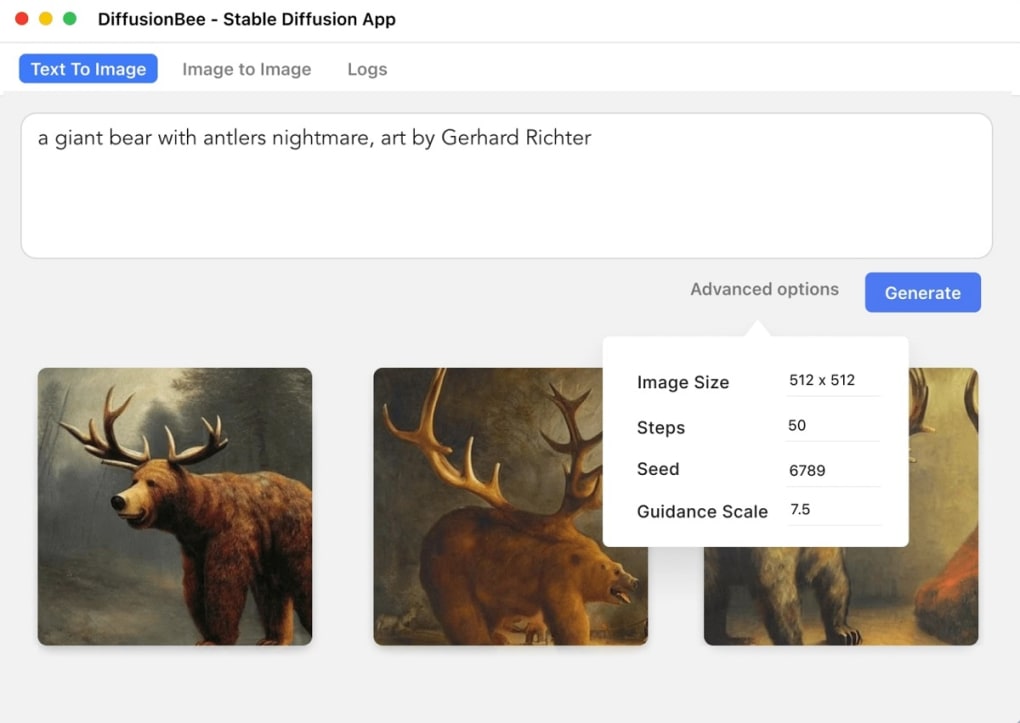
- Negative Prompts & Advanced Settings – Fine‑tune output by specifying what you don’t want, adjusting diffusion steps, guidance scale, and seed values.
- Batch Generation – Produce unlimited images in a single session, perfect for designers needing variations.
- Cross‑Platform Support – Available for macOS (Intel & Apple Silicon), Windows 10/11, and popular Linux distributions.
- Zero‑Cost Licensing – Free to download, use, and distribute, with optional donations to support development.
- Community‑Driven Updates – Regular model upgrades and UI improvements based on user feedback.
Installation & Usage Guide
Step‑by‑Step Installation
1. Download the installer from the official DiffusionBee website. Choose the version that matches
your operating system (macOS, Windows, or Linux).
2. Verify the checksum (SHA‑256) provided on the download page to ensure the file’s integrity.
3. Run the installer. On macOS, drag the app to your Applications folder; on Windows, follow the
wizard prompts; on Linux, extract the tarball and run the provided shell script.
4. Allow permissions for GPU access if you have an NVIDIA or AMD card; the installer will prompt
you to install required drivers or CUDA libraries automatically.
5. Launch DiffusionBee from your desktop or start menu. The first launch may take a minute as
the stable diffusion model files are unpacked.
Generating Your First Image
Once the UI loads, you’ll see a clean workspace with a prompt box at the top. Enter a descriptive phrase, such as “a cyberpunk cityscape at dusk, neon lights reflecting on wet streets”. Select the desired model version (the default is the latest stable diffusion checkpoint), adjust the guidance scale to control how closely the output follows your prompt, and hit Generate. Within seconds, a preview appears in the results pane. You can refine the image by tweaking the prompt, adjusting diffusion steps, or applying a negative prompt like “no text”. To save, click the download icon; images are stored in PNG format with metadata embedded for reproducibility.
Advanced Workflow Tips
• Batch mode: Enable “Multiple Outputs” to generate several variations of the same prompt,
useful for brainstorming.
• Img2Img editing: Drag an existing picture onto the canvas, add a prompt describing the
desired change (e.g., “add rain and a street vendor”), and let the AI reinterpret the scene.
• Upscaling: After generation, click “Upscale” and choose 2× or 4×. The tool uses a
dedicated super‑resolution model to preserve details while enlarging the canvas.
• In‑painting: Paint over an area you want to modify, then describe the new content; DiffusionBee
fills the masked region intelligently.
• Export settings: Use the “Export JSON” button to save prompt, seed, and configuration for
future reproducibility or sharing with teammates.
Pros, Cons & Compatibility
Pros
- Completely free and open‑source – no subscription required.
- Runs offline, guaranteeing privacy and zero internet latency.
- High‑quality, fast image generation with state‑of‑the‑art stable diffusion.
- Rich feature set (text‑to‑image, Img2Img, upscaling, in‑painting, out‑painting).
- Supports macOS (Intel & Apple Silicon), Windows, and Linux platforms.
- Intuitive UI that works for beginners and power users alike.
- Community‑driven updates keep the software current with the latest model checkpoints.
Cons
- Performance heavily depends on GPU; low‑spec machines experience longer render times.
- No native mobile app – only desktop environments are supported.
- Advanced settings can be overwhelming for first‑time AI art creators.
- Occasional model loading delays after updates on slower disks.
- Limited built‑in template library compared with some commercial services.
Compatibility (itemprop="operatingSystem")
DiffusionBee is built with cross‑platform compatibility in mind. The official releases are available for:
- macOS 10.15+ – Fully optimized for both Intel and Apple Silicon (M1/M2) CPUs/GPUs.
- Windows 10/11 (64‑bit) – Requires DirectX 12 compatible graphics; CUDA support for NVIDIA cards is recommended for best performance.
- Linux – Ubuntu 20.04+ and other Debian‑based distributions are supported; users can also compile from source on Fedora or Arch.
The software automatically detects available GPU resources and falls back to CPU mode if no compatible graphics card is found, though CPU rendering can be significantly slower (up to 5‑10×).
Overall Verdict: DiffusionBee delivers a powerful, cost‑free solution for AI‑driven visual creation, especially appealing to creators who value privacy and offline capability. Its comprehensive toolset outweighs the hardware demands, making it a top choice for both hobbyists and professionals.
Frequently Asked Questions
Is DiffusionBee really free to use?
Yes. DiffusionBee is released under an open‑source license and can be downloaded, installed, and used without any subscription or payment. Donations are optional and help fund future development.
Can I run DiffusionBee without an internet connection?
Absolutely. All AI models are stored locally after the initial download, allowing you to generate images offline, which also ensures your prompts and outputs stay private.
What hardware is recommended for fast image generation?
A dedicated GPU with at least 6 GB VRAM (NVIDIA RTX 2060, AMD Radeon 5700 or newer) provides optimal performance. On lower‑spec machines, you can still use DiffusionBee, but expect generation times of 30‑60 seconds per image.
Does DiffusionBee support Apple Silicon Macs?
Yes. The macOS build includes native support for M1 and M2 chips, leveraging the Apple GPU for accelerated diffusion processing.
Can I export the generation settings for reproducibility?
DiffusionBee lets you save a JSON file containing the prompt, seed, guidance scale, steps, and model version. Importing this file reproduces the exact same output on any compatible system.
Conclusion – Should You Download DiffusionBee?
If you’re looking for a powerful, free AI art generator that respects your privacy and works without an internet connection, DiffusionBee is an excellent choice. Its robust feature set—from basic text‑to‑image generation to sophisticated in‑painting and upscaling—covers virtually every creative scenario a designer might encounter. While the software does demand a decent GPU for real‑time performance, the trade‑off is a truly offline, unlimited rendering environment that scales with your hardware. The user‑friendly interface lowers the barrier for newcomers, yet the advanced settings satisfy seasoned artists who want granular control over diffusion steps and negative prompts. With regular community updates and cross‑platform compatibility, DiffusionBee continues to evolve alongside the broader stable diffusion ecosystem.
Ready to unleash your imagination? Click the download button below, install the app, and start creating unique, high‑quality artwork in seconds. Remember, the best way to master any AI tool is by experimenting—so don’t hesitate to play with prompts, tweak settings, and explore the full potential of DiffusionBee today.
Download DiffusionBee nowGuides & Tutorials
How to install DiffusionBee
- Click the Download button above.
- Once redirected, accept the terms and click Install.
- Wait for the DiffusionBee download to finish on your device.
How to use DiffusionBee
This software is primarily used for its core features described above. Open the app after installation to explore its capabilities.
User Reviews
No reviews yet. Be the first to share your experience.
You may also like
more
Excire Foto Light
Organize your snapshots Excire Foto Light is a free-to-download AI -powered phot...

Topaz Photo AI
Photo enhancement tool with AI Topaz Photo AI is a premium AI image editor for P...

anonymoX
Surf anonymously with Firefox anonymoX for Firefox is an add-on that gives you f...

DownThemAll
Download Them All! Downloading anything or everything on a webpage can be a labo...
.webp)
DuckDuckGo Privacy Essentials
A free program for Mac, by DuckDuckGo, Inc.. DuckDuckGo Privacy Essentials is a...

Epic Browser
Free Web Browser for Security Fans People who are looking for a way of browsing...
