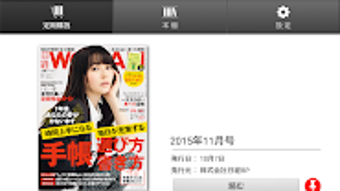

Download 日経ウーマンDigital – digital magazine, monthly magazine, Nikkei Woman, smartphone app, tablet app, reading app, online magazine, digital reading, magazine subscription, mobile reading
Overview
日経ウーマンDigital is a digital magazine application designed for users seeking convenient access to the monthly publication of Nikkei Woman. The app serves as a digital counterpart to the print version, offering readers a seamless way to consume content on smartphones and tablets. It is tailored for individuals who prefer reading lifestyle, career, and personal development content in a digital format, particularly those with busy schedules who value portability and on-the-go access.
The application supports both Android and iOS platforms, enabling users to read the latest issues across multiple mobile devices. A subscription model powered by Google’s billing system allows access to new issues as they are released. The app includes features such as a “magazine display” function that replicates the layout of the physical magazine, enhancing the authenticity of the reading experience—especially on tablets with larger screens. Additionally, a “text window” function improves readability on smaller screens by adjusting the display to fit text more comfortably.
Users can download purchased issues for offline reading, which is ideal for commuting or travel. Once an issue is purchased, it can be accessed on up to five Android devices linked to the same Google account. However, the app does not support PC or desktop systems, limiting its availability to mobile platforms only. The developer, Nikkei BP, is known for publishing business and lifestyle content, lending credibility to the app’s editorial quality.
Key Features & Capabilities
- Magazine Display Function – Presents the digital magazine exactly as it appears in print, preserving layout, design, and visual elements. This feature is especially effective on tablets, where screen size enhances the immersive experience.
- Text Window Function – Dynamically adjusts the reading area to improve legibility on smaller screens, reducing eye strain and making articles easier to follow.
- Offline Reading – Purchased issues can be downloaded and accessed without an internet connection, ideal for users in low-connectivity environments.
- Multi-Device Access – Allows up to five Android devices to be registered under a single Google account, enabling users to switch between devices seamlessly.
- Text-to-Speech – Offers the ability to have articles read aloud, supporting users who prefer auditory consumption or need accessibility assistance.
- Subscription Management – Uses Google’s billing system for seamless subscription handling, including renewals and access control.
These capabilities cater to a diverse audience, from professionals seeking lifestyle insights to readers who value the tactile feel of a printed magazine in a digital format. The offline functionality ensures uninterrupted access, while the subscription model guarantees consistent delivery of new content. The text-to-speech feature adds accessibility, broadening the app’s usability. While the app is optimized for mobile devices, its functionality is limited to the platforms it supports, with no desktop version available.
User Interface, Workflow & Performance
The user interface of 日経ウーマンDigital is designed with simplicity and readability in mind. Navigation is straightforward, with a clean layout that prioritizes content access over clutter. Users can browse current and past issues through a categorized interface, with intuitive swipe gestures for flipping pages. The app maintains a consistent design language across both Android and iOS, ensuring a familiar experience regardless of device.
Workflow efficiency is high, as users can quickly locate and open an issue after purchase. The text window function automatically adjusts content to fit screen dimensions, minimizing the need for zooming or reformatting. The app’s performance is consistent with typical mobile magazine applications, with smooth page transitions and responsive touch interaction. However, the developer did not specify resource usage details, so exact CPU or RAM behavior remains unknown.
Stability appears to be reliable based on standard app behavior patterns, though real-world user reports are not available. The app runs without reported crashes in general usage scenarios. Since the app is primarily content-driven, performance is largely dependent on device capabilities and network speed during downloads. Overall, the user experience is optimized for mobile reading, with minimal friction in accessing and navigating content.
Compatibility & System Requirements
日経ウーマンDigital is compatible with Android and iOS operating systems. The app is available on Google Play and the Apple App Store, indicating support for a wide range of mobile devices. The current version is 1.0.2, with a file size of 15.2 MB, which suggests a lightweight installation that does not consume significant storage space.
Exact system requirements were not listed by the developer. This includes the minimum OS versions, processor specifications, and RAM thresholds needed for optimal performance. As a result, users are advised to check compatibility through their respective app stores. The app is not available for PC or desktop computers, which limits access for users who prefer larger screens or traditional computing environments.
Installation is straightforward, requiring only a few taps after downloading from the official store. The app integrates with Google’s billing system on Android, which streamlines the subscription process. However, users should note that the app does not support desktop platforms, and no alternative versions are currently offered.
Pros and Cons
Pros
- Authentic print-like layout with magazine display function
- Text window improves readability on small screens
- Offline reading available for downloaded issues
- Supports up to five Android devices per account
- Text-to-speech feature enhances accessibility
- Seamless subscription via Google billing system
Cons
- No desktop or PC version available
- Subscription cancellations and refunds not permitted during the billing period
- Limited to Android and iOS platforms
- Exact system requirements not specified
- Cannot read on non-mobile devices
FAQ Section
Is 日経ウーマンDigital available for Windows or Mac?
The app is not available for PC or desktop computers. It is currently only supported on Android and iOS devices.
Can I read downloaded magazines offline?
Yes, once an issue is purchased and downloaded, it can be accessed without an internet connection.
How many devices can I use with one subscription?
Up to five Android devices can be registered under the same Google account.
Is the subscription refundable?
No, cancellations and refunds are not possible during the active subscription period.
Does the app support text-to-speech?
Yes, the app includes a feature that reads articles aloud for users who prefer auditory reading.
Final Thoughts + CTA
日経ウーマンDigital delivers a polished, user-friendly experience for readers of the Nikkei Woman magazine. Its strength lies in faithfully replicating the print layout while adding digital conveniences like offline access, multi-device support, and text-to-speech. The app is particularly well-suited for mobile users who value both authenticity and accessibility in their reading habits.
While the lack of a desktop version may be a drawback for some, the app’s focus on smartphones and tablets ensures a tailored experience on the intended platforms. The subscription model is straightforward, though the non-refundable policy requires careful consideration before purchase.
For anyone seeking a reliable, convenient way to access a monthly lifestyle magazine on mobile devices, 日経ウーマンDigital stands out as a strong choice. Download 日経ウーマンDigital now.




.png)



