
Download Digs – Secure AI‑Powered Collaboration for Homebuilding Projects
Introduction & Overview
Digs is a cloud‑native collaboration platform built specifically for the residential construction market. It brings together builders, subcontractors, suppliers, and homeowners into a single, secure environment where every document, conversation, and decision is stored chronologically and searchable. By automating routine tasks such as plan red‑lining, warranty retrieval, and daily progress reporting, Digs reduces the administrative burden that typically eats up valuable project time. The software is divided into three logical phases—pre‑construction, construction, and handoff—so users only see the tools that are relevant to their current stage. In pre‑construction, design teams can annotate PDFs, DWG, and BIM files in real time, while homeowners can select finishes through an intuitive questionnaire. During construction, field crews capture photos, labor hours, and weather data, which the system aggregates into daily logs and automatically flags schedule variances. The handoff module creates a permanent, encrypted vault of as‑built drawings, warranties, and maintenance manuals that can be queried instantly via an AI‑driven search engine. Digs operates on a subscription model that includes continuous security patches, feature updates, and 24/7 support, ensuring the platform stays compliant with industry regulations. By centralising communication and eliminating email overload, Digs helps teams deliver projects on time, stay within budget, and improve overall client satisfaction.
Core Features that Transform Residential Construction
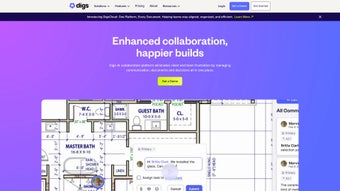
- Real‑time Plan Red‑lining: Annotate PDFs, DWG, and BIM files directly in the browser; changes sync instantly to prevent version conflict.
- AI‑Powered Warranty Search: Upload a photo or type a keyword; the system returns the exact warranty document, coverage dates, and service contacts.
- Finish Selection Workflow: Create selectable items, assign reviewers, and capture digital signatures for final approval.
- Daily Construction Log: Field crews post photos, weather conditions, and labor hours; managers receive automated summaries and alerts.
- Unified Messaging Hub: Integrated email, SMS, and in‑app notifications keep all project communication tied to the correct record.
- Secure Document Vault: AES‑256 encryption at rest and TLS 1.3 in transit, with role‑based access controls.
- Customizable Dashboards: KPI widgets for budget variance, schedule slip, and warranty claims provide instant project health insight.
- Mobile‑Ready Experience: Native iOS and Android apps support offline data capture and automatic sync when connectivity returns.
- Integrated Billing & Change‑Order Engine: Generate cost‑impact reports instantly and push data to accounting systems via API.
- Continuous SaaS Updates: New features and security patches are delivered automatically without user intervention.
Beyond the list, Digs offers a robust set of automation tools that learn from user behavior. For example, the AI engine can suggest the most frequently used subcontractors for a given trade, or automatically flag missing permits based on the project’s location. The platform also supports custom workflow templates, allowing firms to standardise processes across multiple builds while still retaining flexibility for unique client requests. Integration points include popular ERP and accounting solutions such as QuickBooks, Xero, and SAP, ensuring that financial data flows seamlessly between systems. The combination of real‑time collaboration, intelligent automation, and enterprise‑grade security makes Digs a compelling choice for any homebuilding operation seeking to modernise its project management practices.
Installation, Usage, Compatibility, Pros & Cons, and FAQ
Getting Started in Minutes
Digs is a pure SaaS product, so there is no heavy client install required. To begin, visit www.digsapp.com, click “Start Free Trial,” and complete the sign‑up wizard. The wizard captures basic company information, sets up single sign‑on (SSO) options, and prompts you to create a secure password. After email verification, you can invite team members by uploading a CSV file or sending individual invitation links. Each invitee selects a role—Builder, Subcontractor, Vendor, or Homeowner—so Digs automatically applies the correct permission set.
Step‑by‑Step Project Setup
Once your account is active, click “Create New Project” and choose a workflow template (Custom Build, Production Build, or Remodel). Upload architectural drawings, specifications, and permits; the AI engine scans the files, tags key elements, and builds a searchable index. From the dashboard you can launch a finish‑selection questionnaire for homeowners, start a pre‑construction design review, or open the daily log for field crews. The platform’s intuitive drag‑and‑drop interface makes it easy to rearrange dashboard widgets, set up custom alerts, and generate PDF reports for stakeholders.
Cross‑Platform Compatibility
Digs runs on any modern web browser—Chrome, Firefox, Safari, or Edge—on Windows 10/11 and macOS 12+. Native mobile apps are available for iOS 13+ and Android 8+. All devices benefit from end‑to‑end encryption, role‑based access, and automatic sync, ensuring that data is consistent whether you’re on a desktop in the office or a tablet on a construction site.
Pros and Cons
Pros
- All‑in‑one hub eliminates scattered emails and lost PDFs.
- AI‑driven warranty search reduces homeowner response time.
- Real‑time plan red‑lining prevents version control issues.
- Secure, role‑based access protects sensitive construction data.
- Cross‑platform accessibility for every stakeholder.
- Customizable dashboards give instant insight into budget and schedule health.
- Offline mobile capture supports low‑connectivity sites.
- Continuous SaaS updates keep the software current without manual patches.
- Integrated change‑order engine streamlines cost impact analysis.
- 24/7 support and onboarding resources accelerate adoption.
Cons
- Subscription pricing may be a barrier for very small remodelers.
- Initial learning curve for teams accustomed to email‑centric workflows.
- Limited on‑premise deployment for organizations with strict data residency requirements.
- Advanced AI features need a stable internet connection to function optimally.
- Custom API integrations may require developer resources for complex setups.
Frequently Asked Questions
Is Digs a free tool or does it require a subscription?
Digs operates on a subscription‑based model with monthly and annual plans. New users can start with a 14‑day free trial to explore the full feature set before committing.
Can I use Digs on my iPhone while on a construction site?
Yes. Digs provides a native iOS app that works on iPhone and iPad. The app supports offline data capture, so you can upload photos and notes even without cellular coverage; the information syncs automatically once you reconnect.
How does Digs protect my project documents?
All files are encrypted with AES‑256 at rest and transmitted over TLS 1.3. Role‑based permissions ensure that only authorized users can view or edit specific documents, and every action is logged for audit purposes.
Is there an API to connect Digs with my accounting software?
Yes. Digs offers a comprehensive RESTful API that can be used to push change‑order data, invoices, and payment status to popular accounting platforms like QuickBooks, Xero, and Sage.
What kind of support does Digs provide during implementation?
Digs includes onboarding assistance, video tutorials, a searchable knowledge base, and 24/7 live chat. Premium plans also receive a dedicated Customer Success Manager who can help configure workflows and train staff.
Conclusion – Take the Next Step Toward Smarter Homebuilding
In an industry where miscommunication can cost thousands and delay move‑in dates, Digs offers a unified, AI‑enhanced platform that bridges the gap between builders, subcontractors, vendors, and homeowners. Its real‑time red‑lining, secure document vault, and AI‑driven warranty search address the most painful pain points of traditional project management. While the subscription cost requires budgeting, the measurable ROI—faster decision cycles, fewer change‑order disputes, and smoother handoffs—delivers tangible value for both large builders and boutique remodelers.
Ready to experience a more efficient, transparent, and secure way to manage residential construction? Start your free trial today and see how Digs can transform every phase of your project from blueprint to warranty.
- Pros: Real‑time red‑lining, AI warranty search, robust mobile app.
- Cons: Subscription cost for small firms, initial learning curve.



.png)




