
Download DirectDroid – DIRECTV, Android, free, remote control, set top box, recording management, channel search, user profiles, billing info, app for DIRECTV
Overview
DirectDroid is a free Android application developed by Beechwoods Software, designed to serve as a comprehensive remote control and management tool for DIRECTV users. The software enables users to manage multiple DIRECTV set top boxes from a single interface, offering both independent and synchronized control. This functionality is particularly useful for households with multiple viewing areas, allowing users to pause or change channels across devices simultaneously. The app supports recording management, including scheduling new recordings, reviewing past recordings, and organizing content efficiently. Users can also access their favorite channels through a customizable favorites list and perform quick searches across available channels and connected devices. Additional features include the ability to view current programming on favorite channels, manage user profiles, and access account information such as billing details. The in-app help section provides guidance for new users, enhancing accessibility. Designed for both casual viewers and tech-savvy users, DirectDroid streamlines the experience of managing a DIRECTV subscription from a mobile device. It is ideal for individuals who want greater control over their entertainment setup without relying solely on physical remotes.
Key Features & Capabilities
- Multi-Device Control – Manage multiple set top boxes independently or in sync, allowing for coordinated channel changes or pausing across devices.
- Recording Management – Schedule new recordings, view recording history, and manage existing recordings directly from the app.
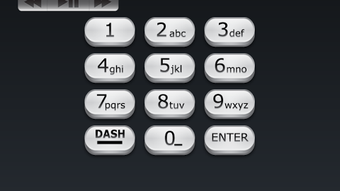
- Customized Keypad – A user-friendly virtual keypad simplifies data entry, such as channel numbers or search terms.
- Favorites & Search – Save preferred channels and search across all available channels and connected set top boxes for quick access.
- User Profiles – Set up and switch between multiple user profiles, each with personalized settings and preferences.
- Account & Billing Access – View account details and billing information without needing to log in to a web portal.
- Live Program Information – See what’s currently airing on favorite channels to make informed viewing choices.
These capabilities enhance user control and convenience, especially in multi-room environments. For example, a family member can pause a show on one set top box while another continues watching, or a user can schedule a recording while changing channels on a different device. The app’s design supports efficient workflow, reducing the need for physical remotes and improving accessibility for users with mobility or vision challenges.
User Interface, Workflow & Performance
DirectDroid features a clean, intuitive interface optimized for touch-based navigation on Android devices. The layout organizes core functions—remote control, recordings, favorites, and account settings—into clearly labeled sections, allowing users to switch between tasks with minimal effort. Navigation is straightforward, with a bottom menu bar providing quick access to primary functions. The app’s workflow supports logical sequences, such as selecting a set top box, searching for a channel, and scheduling a recording—all within a few taps. The developer did not specify resource usage details, so performance metrics like CPU or RAM consumption remain unknown. However, based on the app’s size (15.2 MB), it is likely optimized for efficient operation on modern Android devices. Stability and responsiveness are expected to be consistent with standard mobile app behavior, though real-world performance may vary depending on device capabilities and network conditions. No information was provided regarding crash rates or background behavior. The app appears to function as a lightweight utility focused on usability rather than heavy processing.
Compatibility & System Requirements
DirectDroid is designed for Android devices and is available in version 1.0.0. The installation size is 15.2 MB, indicating a lightweight footprint. The developer did not provide additional system requirements, such as minimum Android version, RAM, or storage space. As such, exact compatibility details are limited. Users should ensure their device runs a current version of Android to support the app’s functionality. The app is intended for use on smartphones and tablets with internet connectivity, as it relies on a network connection to communicate with DIRECTV set top boxes. No information was provided about support for specific Android versions, hardware configurations, or screen sizes. Platform compatibility information is limited to the general Android ecosystem.
Pros and Cons
Pros
- Free to download and use with no hidden costs.
- Supports multiple set top boxes with synchronized or independent control.
- Comprehensive recording management and scheduling tools.
- Custom keypad improves data entry accuracy and speed.
- Multiple user profiles allow personalized experiences.
- Direct access to billing and account information.
- Lightweight size (15.2 MB) reduces storage impact.
Cons
- No information provided on minimum system requirements or Android version support.
- Exact performance and resource usage details were not specified.
- App functionality depends on network connectivity and DIRECTV service availability.
- Limited information on stability, crash handling, or background performance.
- No details on offline mode or data usage optimization.
FAQ Section
Is DirectDroid compatible with all Android devices?
Compatibility information is limited. The app is designed for Android, but specific device or OS version requirements were not provided by the developer.
Is the app safe to use with my DIRECTV account?
DirectDroid is developed by Beechwoods Software and does not appear to require sensitive credentials beyond standard DIRECTV login details. Users should ensure they are downloading the app from official sources to maintain security.
Does DirectDroid require an internet connection?
Yes, the app relies on a stable internet connection to communicate with DIRECTV set top boxes and access account data.
Can I use DirectDroid without a DIRECTV subscription?
No, the app is designed for DIRECTV users and requires an active subscription to access its full range of features.
How often does the app receive updates?
The app’s update frequency is not specified. Users should check the app store for new versions and improvements.
Final Thoughts + CTA
DirectDroid offers a robust, free solution for DIRECTV users seeking greater control over their viewing experience. With features like multi-device management, recording scheduling, user profiles, and account access, it effectively extends the functionality of the DIRECTV service to Android devices. While specific system requirements and performance data are not available, the app’s lightweight design and intuitive interface suggest it is suitable for most modern Android users. It stands out as a practical tool for households with multiple set top boxes or users who prefer managing their entertainment from a smartphone or tablet. For anyone with a DIRECTV subscription looking for a convenient, feature-rich remote control app, DirectDroid delivers strong value. Download DirectDroid now to take full control of your DIRECTV experience.




.png)



