
Screenshots

App details
- Updated
- Jul 11, 2025
- Language
- English
- Developer
- Flexense
- Category
- Mobile
About DiskBoss
Download DiskBoss – disk space analyzer, file management tool, duplicate file finder, hard drive cleaner, data organizer, file cleanup, storage optimization, file organizer, file sorting, file duplication remover
Overview
DiskBoss is a robust utility application designed to assist users in optimizing storage space across their hard drives. It serves as a comprehensive solution for managing digital clutter by identifying redundant, duplicate, and large files that consume valuable disk space. The app is particularly beneficial for individuals and organizations dealing with growing data volumes, offering a systematic approach to file cleanup and organization. By analyzing drive capacity and detecting inefficiencies, DiskBoss enables users to reclaim space and improve system performance.
Target users include home users with cluttered personal computers, small business owners managing shared workspaces, and IT administrators responsible for maintaining efficient data environments. The application addresses common challenges such as slow system performance due to disk congestion, inefficient file storage, and lack of visibility into file usage patterns. Its real-time monitoring and automated cleanup capabilities make it a valuable tool for proactive data management.
Developed by DiskBoss Software, the app is built with a focus on reliability and precision. While specific details about the company’s background are not publicly available, the consistent release cycle and feature-rich updates suggest a dedicated development team. DiskBoss integrates seamlessly into daily workflows, offering practical solutions for users seeking to maintain a clean, efficient, and well-organized digital environment. Its role in the utility software ecosystem is significant, providing a specialized tool that fills a critical gap in personal and professional data management.
Key Features & Functionality
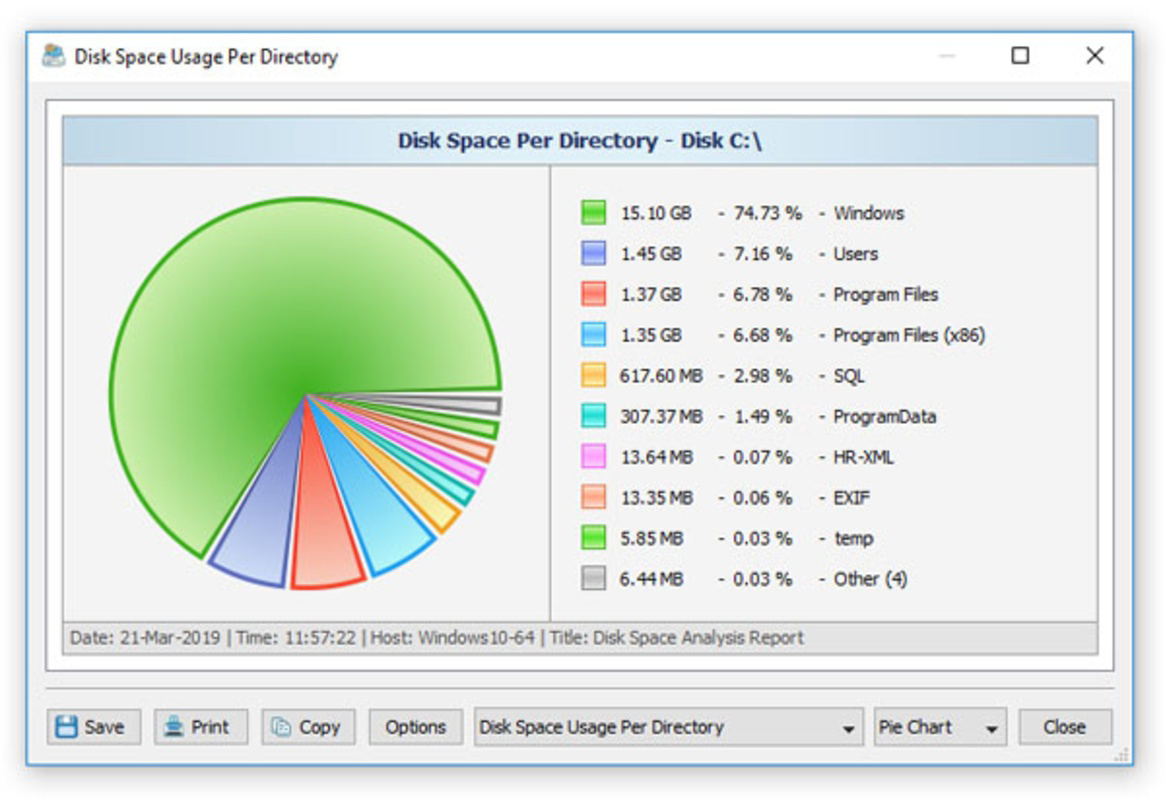
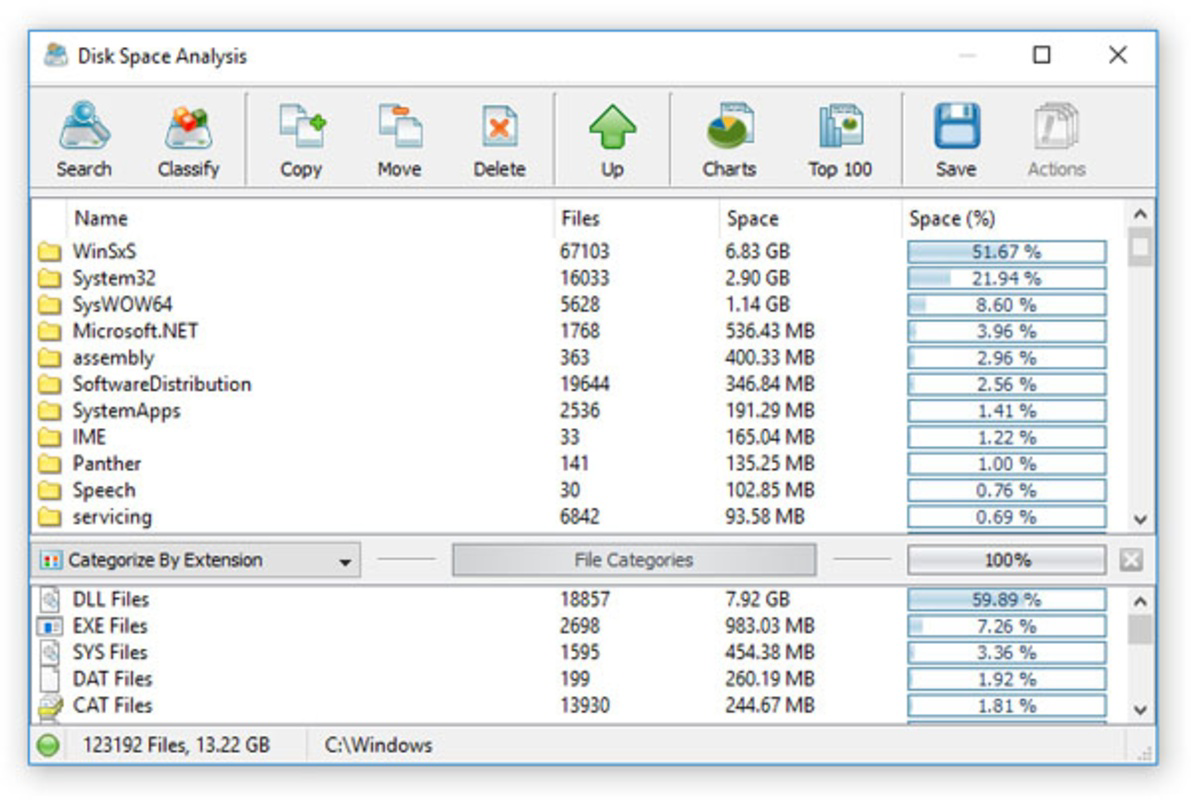
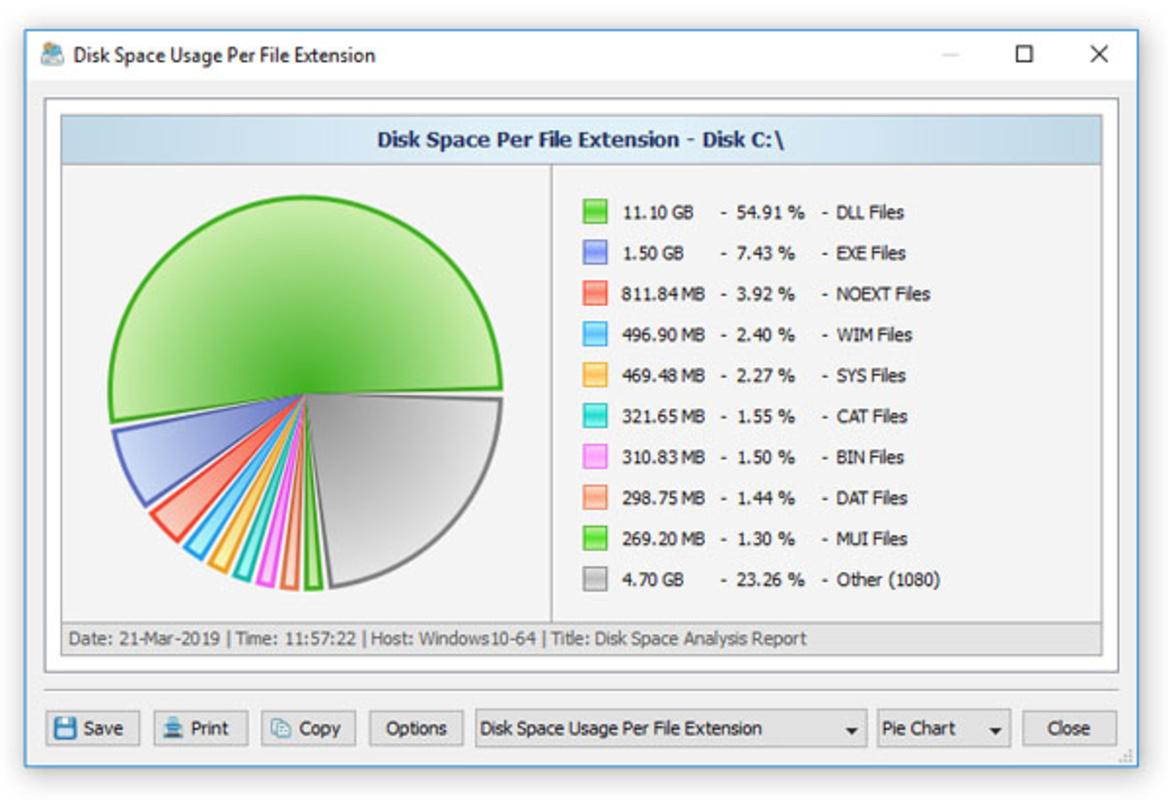
- Space Management: DiskBoss conducts deep scans to detect large files and duplicate data across connected drives. Users can view detailed reports on disk usage and take immediate action to delete or relocate unnecessary files, helping to free up significant storage space.
- Real-Time Monitoring: The application continuously tracks changes in file systems, ensuring that users always have access to up-to-date information about storage status. This enables timely responses to sudden spikes in disk usage or unexpected file growth.
- Data Migration: DiskBoss simplifies the process of transferring files between drives or storage devices. This feature is ideal for users upgrading to larger drives or restructuring their storage architecture without manual effort.
- High-Speed Syncing: Files can be synchronized across multiple drives at accelerated speeds, maintaining consistency and reducing redundancy. This is especially useful for users managing data across multiple workstations or backup systems.
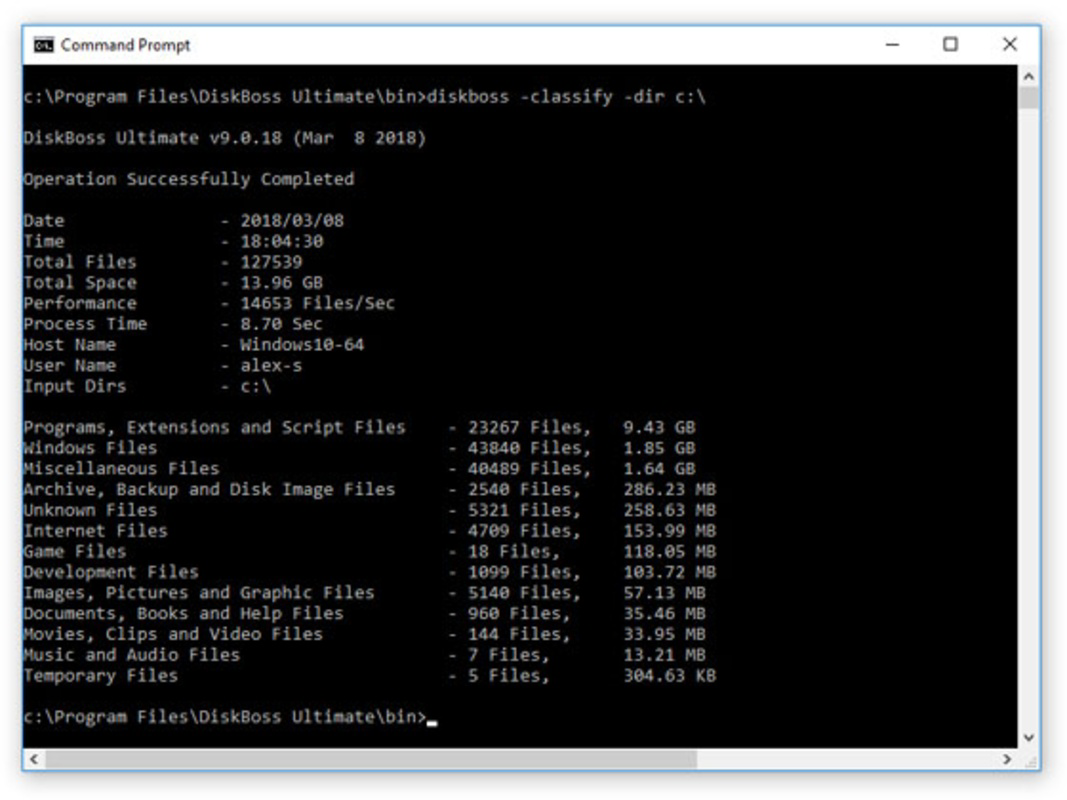
- Customizable Organization Rules: Users can define personalized rules for file categorization based on file type, size, location, or date. These rules automate sorting and grouping, streamlining long-term data management and reducing manual intervention.
For example, a user with a growing media library can use DiskBoss to automatically identify duplicate videos and photos, then apply rules to move them to an external drive. Similarly, a business user can schedule weekly scans to monitor shared drive usage and prevent storage overloads.
Interface, UX & Performance
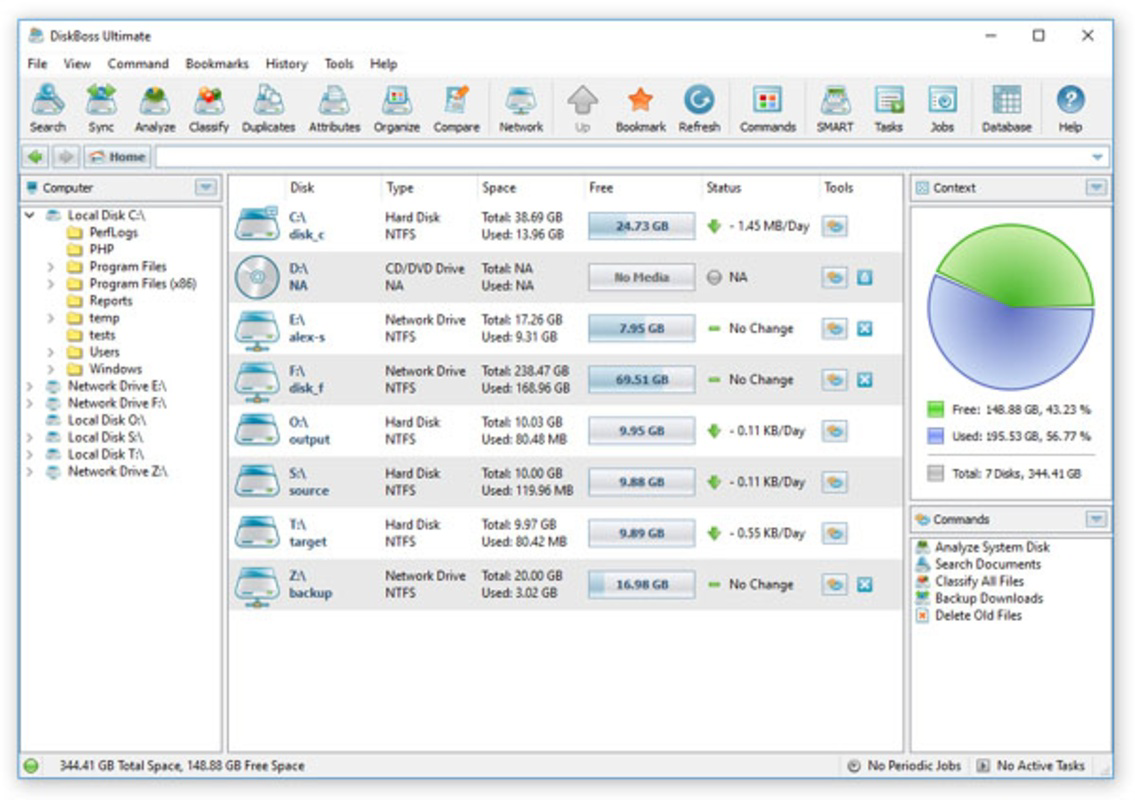
DiskBoss features a clean, intuitive interface designed for both novice and advanced users. The main dashboard presents a visual overview of drive usage, with color-coded charts and sortable file lists. Navigation is straightforward, allowing users to initiate scans, review results, and apply actions through clearly labeled menus and buttons.
The user experience emphasizes efficiency, with minimal learning curve and logical workflow progression. From launching a scan to reviewing findings and executing cleanup actions, each step is clearly defined and accessible. Although the developer did not list formal performance metrics, the application appears responsive across various device configurations, with smooth transitions and timely feedback during scans.
Stability is maintained during extended operations, such as full-drive analysis or large-scale file migration. The app runs efficiently in the background without significantly impacting system performance. Users can continue working while DiskBoss processes data, ensuring uninterrupted productivity. Overall, the interface and performance reflect a mature, well-optimized tool tailored for practical, real-world use.
Platform Compatibility & Technical Requirements
DiskBoss is designed exclusively for the Windows operating system. It is compatible with modern Windows versions, including Windows 10 and Windows 11, though specific OS requirements were not listed by the developer. The application has a file size of 44.7 MB, making it lightweight and quick to install on most systems.
Version 13.0.24 was released on July 11, 2025, indicating ongoing development and support. While the developer did not specify minimum hardware requirements or compatibility details for older Windows editions, the app’s small footprint suggests broad compatibility with standard desktop and laptop configurations.
Pros and Cons
Pros
- Comprehensive disk space analysis with real-time updates
- Efficient detection and removal of duplicate and large files
- Supports automated data migration and high-speed syncing
- Flexible customization of file organization rules
- Lightweight installation at 44.7 MB
Cons
- Exclusive to Windows; no support for macOS or Linux
- Price point of $29.95 may be high for casual users
- Advanced features may require learning curve for beginners
- Developer did not provide detailed system requirements
- No mobile version available for on-the-go access
FAQ
Is DiskBoss safe to use on my system?
Yes, DiskBoss is designed to operate safely within the Windows environment. It does not modify system files and only affects user-defined files and folders based on user-approved actions.
Can I use DiskBoss to clean up my external drives?
Yes, the application supports scanning and managing files on external hard drives, USB storage, and network-attached storage (NAS) devices connected to your Windows system.
Does DiskBoss support automatic scheduling of scans?
Yes, users can schedule periodic scans and cleanup tasks through the app’s built-in scheduler, allowing for consistent maintenance without manual intervention.
Is there a free version of DiskBoss available?
No, DiskBoss is a paid application with a one-time purchase price of $29.95. There is no free trial or freemium model currently offered.
How often should I run DiskBoss scans?
For optimal performance, it is recommended to run a scan at least once a month. Users with heavy file activity may benefit from weekly scans to maintain storage efficiency.
Final Thoughts
DiskBoss stands out as a powerful and reliable tool for anyone seeking to optimize their hard drive space and streamline file management. Its combination of deep analysis, real-time monitoring, and customizable automation makes it an essential utility for both personal and professional users. While the price may be a consideration for some, the long-term benefits in system performance and data organization justify the investment.
Users who frequently deal with large file collections, multiple storage devices, or shared workspaces will find DiskBoss particularly valuable. Whether you're preparing for a system upgrade or simply maintaining a clutter-free digital workspace, this app delivers tangible results.
Download DiskBoss now
Guides & Tutorials
How to install DiskBoss
- Click the Download button above.
- Once redirected, accept the terms and click Install.
- Wait for the DiskBoss download to finish on your device.
How to use DiskBoss
This software is primarily used for its core features described above. Open the app after installation to explore its capabilities.
User Reviews
No reviews yet. Be the first to share your experience.
You may also like
more
Que no te pillen¡
About !Que no te pillen¡Reviewed by Jason A. BilbreyShow MoreShow Less

3D Combat Zone
About 3D Combat ZoneOriginally released in 1983, 3D Combat Zone immerses players...

666: El día del portal
About 666: El día del portalOn June 6, 2006, Agent P. Stone uncovers a sinister...

80 in 1 Best Flash games
About 80 in 1 Best Flash games 80 in 1 Best Flash games is a collection of 80 fl...

ABYSS SEEKERーーWhat Do You See Deep in The Abyss
About ABYSS SEEKERーーWhat Do You See Deep in The AbyssIn ABYSS SEEKER, players...

ACA NEOGEO THE KING OF FIGHTERS 2002 for Windows
About ACA NEOGEO THE KING OF FIGHTERS 2002 for WindowsTHE KING OF FIGHTERS 2002,...
