
Screenshots
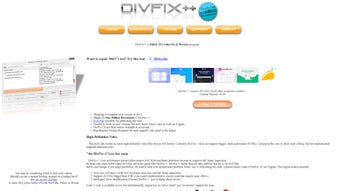
App details
- Version
- 0.34
- Updated
- April 8, 2025
- Requires
- macOS 10.15
- Language
- English
- License
- Free
- Developer
- Erdem U. Altinyurt
- Category
- Mac OS
About DivFix
Download DivFix – Free AVI Repair & Preview Tool for Mac
Overview
DivFix is a free, open‑source utility built specifically for macOS users who work with AVI video files. Whether you regularly download movies, TV episodes, or home‑recorded footage, the chance of encountering a corrupted or partially downloaded AVI file is high. DivFix tackles this problem by scanning the file, rebuilding the missing source index, and restoring playback capability without the need for costly commercial software. In addition to repair, the app offers a handy preview mode that lets you watch an AVI file while it is still downloading, giving you instant feedback on the quality of the source before the transfer completes. Users can point DivFix to a folder that contains temporary download fragments, filter out unwanted data, and view only the relevant video segments. A unique “Strip Index” function also allows you to delete the index of an AVI file, rendering it unreadable to most media players—a useful feature for privacy‑conscious users who want to ensure a file cannot be opened after deletion. All of these capabilities are bundled into a lightweight, easy‑to‑use interface that requires no licensing fees, making DivFix an attractive option for anyone who wants to keep their video library clean, functional, and secure.
Key Features
- Automatic error detection: Scans AVI files for broken headers, missing indexes, and incomplete data structures.
- Source index reconstruction: Rebuilds the internal index so the file can be played by standard media players.
- Live preview of downloading files: Allows you to watch an AVI that is still being downloaded, saving bandwidth and time.
- Directory filtering: Specify a folder containing temporary download fragments and filter out irrelevant files.
- Strip Index function: Permanently removes the index, making the file unreadable to most players – useful for secure disposal.
- Open‑source and free: No hidden fees, no trial periods, and the source code is available for community review.
- Lightweight UI: Simple drag‑and‑drop workflow that requires no technical expertise.
- Regular updates: The developer releases patches to improve compatibility with the latest macOS versions.
Installation & Usage Instructions
Downloading and Installing DivFix
To get started, visit the official DivFix GitHub page or the dedicated download portal. Click the Download for macOS button, which provides a .dmg package. Open the .dmg file and drag the DivFix icon into your Applications folder. macOS may warn you that the app is from an unidentified developer; simply right‑click the icon, choose “Open,” and confirm you want to run the program. The installation process takes less than a minute and requires no additional dependencies.
Repairing an AVI File
Launch DivFix from your Applications folder. In the main window, click the Browse button and locate the corrupted AVI file. Once selected, press Check to let the software scan for errors. After the scan finishes, a summary appears showing missing indexes and potential data loss. Click Repair to start the reconstruction process. The tool creates a backup copy before overwriting the original, ensuring you can revert if needed. Repair times vary depending on file size, but most standard‑definition movies finish within a few seconds.
Previewing a Downloading File
If you are downloading a large AVI via a torrent or direct HTTP stream, open DivFix and select the folder where the temporary files are stored (often a “.temp” directory). Use the Filter option to exclude non‑AVI files, then click Preview. DivFix reads the available data and launches a built‑in player that plays the file from the beginning, updating the stream as more data arrives. This feature is especially handy for verifying video quality before the download completes.
Using the Strip Index Feature
To permanently disable a file, select the repaired AVI and click Strip Index. Confirm the action, and DivFix will erase the index, causing most media players to display an “unsupported format” error. This is useful for securely disposing of sensitive footage or preventing accidental playback.
Compatibility, System Requirements & Pros / Cons
DivFix is native to macOS 10.12 (Sierra) and later. The application runs smoothly on both Intel‑based Macs and Apple Silicon (M1/M2) thanks to universal binaries. While the primary focus is macOS, the underlying source code can be compiled for Linux and Windows, but official builds are currently only offered for macOS.
Pros
- Completely free and open‑source – no hidden costs.
- Fast and reliable index reconstruction.
- Live preview of partially downloaded files.
- Simple drag‑and‑drop interface suitable for beginners.
- Secure “Strip Index” option for privacy.
- Low system resource usage; runs on older Macs.
Cons
- Only official binaries for macOS – Windows users must compile themselves.
- No built‑in video editing tools; solely focused on repair/preview.
- Limited support for formats other than AVI.
- Occasional false‑positive errors on heavily corrupted files.
Frequently Asked Questions
Can DivFix repair completely corrupted AVI files?
DivFix can rebuild missing indexes and recover most playable data, but if the video stream itself is damaged beyond repair, the tool cannot restore the lost frames. In such cases, you may need a dedicated video recovery suite.
Is there a limit to the file size DivFix can handle?
There is no hard‑coded limit; however, extremely large files (over 20 GB) may take longer to scan and repair, especially on older hardware. The application remains stable, but expect longer processing times.
Does DivFix support batch processing?
Yes. You can select an entire folder of AVI files, and DivFix will iterate through each file, performing the check and repair steps automatically. Results are displayed in a summary list.
Can I use DivFix on Windows?
Official builds are only available for macOS. Advanced users can compile the source code for Windows, but this requires familiarity with Xcode, makefiles, and the Qt framework.
Is the “Strip Index” function reversible?
No. Once the index is stripped, the original structure is lost. It is intended for permanent disposal, so be certain before using it.
Final Verdict & Call to Action
DivFix fills a niche that many Mac users overlook: the ability to quickly rescue and preview AVI files without paying for heavyweight video suites. Its open‑source nature, combined with a straightforward UI, makes it an ideal choice for both casual downloaders and power users who need reliable repair capabilities. While the lack of native Windows support may deter some, the focused feature set on macOS delivers excellent value for the price—zero dollars. If you regularly work with AVI content, give DivFix a try; the time saved on corrupted files will quickly outweigh the few minor limitations.
Download DivFix now and experience a smoother, more secure AVI workflow on your Mac.
Guides & Tutorials
How to install DivFix
- Click the Download button above.
- Once redirected, accept the terms and click Install.
- Wait for the DivFix download to finish on your device.
How to use DivFix
This software is primarily used for its core features described above. Open the app after installation to explore its capabilities.
User Reviews
No reviews yet. Be the first to share your experience.
You may also like
more
DiffusionBee
Generate unique art with this app DiffusionBee is a free and accessible artifici...

Excire Foto Light
Organize your snapshots Excire Foto Light is a free-to-download AI -powered phot...

Topaz Photo AI
Photo enhancement tool with AI Topaz Photo AI is a premium AI image editor for P...

anonymoX
Surf anonymously with Firefox anonymoX for Firefox is an add-on that gives you f...

DownThemAll
Download Them All! Downloading anything or everything on a webpage can be a labo...
.webp)
DuckDuckGo Privacy Essentials
A free program for Mac, by DuckDuckGo, Inc.. DuckDuckGo Privacy Essentials is a...
